TGViewer
Channel Public Channel
Best AI Tools | ChatGPT | Perplexity | Deepseek | Artificial Intelligence

Best AI Tools | ChatGPT | Perplexity | Deepseek | Artificial Intelligence

@ai_best_tools

AI will not replace you but person using AI will 🤖

Find the best free AI tools in this channel. Stay updated, unlock the potential of AI, and join our vibrant community 🤠

For promotions: @love_data
Subscribers
59.1K
Photos
632
Videos
16
Links
407
Recent Posts 20 shown
Post #1769 679
Double Tap ❤️ For More Useful Tools
  • ❤ 9
Post #1768 3.66K
How to use ChatGPT to plan your career 🚀🎯

Prompt:

I want you to act as my personal career mentor.

My goal is to build a successful and fulfilling career.

Help me by:

- Asking me thoughtful questions about my interests, strengths, skills, experience, and career goals
- Identifying career paths that could match my profile
- Explaining the skills, qualifications, and experience required for each path
- Helping me understand which skills I should develop first
- Creating a step-by-step career roadmap
- Suggesting practical projects and experiences to build relevant skills
- Recommending useful learning resources and certifications where appropriate
- Helping me identify suitable job roles and career opportunities
- Preparing me for interviews and workplace situations
- Reviewing my progress and updating my roadmap as my goals evolve

Don't make assumptions about my career. Understand my situation first and then guide me step by step.

Start by asking me the first question.

Double Tap ❤️ For More Useful Prompts
  • ❤ 19
  • 👏 1
  • 🤣 1
Post #1767 4.55K
How to use ChatGPT to improve your communication skills 🗣️✨

Prompt:

I want you to act as my personal communication coach.

My goal is to communicate confidently, clearly, and effectively.

Help me improve by:

- First, assess my current skills by asking me questions and having natural conversations with me

- Identify my strengths, weaknesses, and areas that need improvement

- Create a personalized improvement plan based on your assessment

- Teach me one communication skill at a time

- Give me realistic situations to practice

- Correct my mistakes and explain how I can improve

- Show me better ways to express my thoughts naturally and confidently

- Give me practical exercises to improve my communication

- Gradually increase the difficulty as I improve

- Track my progress and regularly reassess my skills

Don't ask me to describe or rate my own communication skills. Assess them through our interaction.

Keep the learning practical, interactive, and focused on steady improvement.

Start by asking me the first question.

❤️ Double Tap For More Useful Prompts
  • ❤ 30
Post #1766 4.72K
🌐 Artificial Intelligence Tools & Their Use Cases 🤖🔮

🔹 TensorFlow ➜ Building scalable deep learning models for computer vision and NLP
🔹 PyTorch ➜ Dynamic neural networks for research and rapid AI prototyping
🔹 LangChain ➜ Creating AI agents with memory, tools, and chaining for complex workflows
🔹 Hugging Face Transformers ➜ Pre-trained models for text generation, translation, and sentiment
🔹 OpenAI GPT Models ➜ Conversational AI, content creation, and code assistance
🔹 Scikit-learn ➜ Classical ML algorithms for classification, regression, and clustering
🔹 Keras ➜ High-level neural network APIs for quick model development
🔹 CrewAI ➜ Multi-agent systems for collaborative AI task orchestration
🔹 AutoGen ➜ Conversational agents for automated programming and problem-solving
🔹 Jupyter Notebook ➜ Interactive AI experimentation, visualization, and sharing
🔹 MLflow ➜ Experiment tracking, model packaging, and deployment pipelines
🔹 Docker ➜ Containerizing AI apps for reproducible environments
🔹 AWS SageMaker ➜ End-to-end ML workflows with cloud training and inference
🔹 Google Cloud AI ➜ Vision, speech, and natural language APIs for app integration
🔹 Rasa ➜ Building customizable chatbots and virtual assistants

💬 Tap ❤️ if this helped!
  • ❤ 16
Post #1765 5.86K
🚀 11 AI Skills That Will Become More Valuable

1️⃣ Asking the right questions 
Knowing what to ask AI and how to frame a problem clearly will become increasingly important.

2️⃣ Critical thinking 
AI can generate convincing answers, but you still need to judge whether the answer actually makes sense.

3️⃣ Problem-solving 
Instead of asking AI to solve everything, learn how to break a complex problem into smaller, manageable steps.

4️⃣ Fact-checking AI outputs 
AI can make mistakes or provide outdated information. Important information should always be verified.

5️⃣ Giving clear instructions 
Better context, requirements, examples, and constraints usually lead to more useful AI responses.

6️⃣ Understanding data 
AI can analyze data quickly, but understanding what the data actually means requires human judgment.

7️⃣ Communicating ideas clearly 
Clear communication helps you explain your goals to AI, teammates, clients, and stakeholders.

8️⃣ Breaking complex problems into steps 
Large tasks become easier when you divide them into smaller problems and solve them systematically.

9️⃣ Combining AI with domain knowledge 
AI becomes much more powerful when you combine it with knowledge of your industry or profession.

🔟 Turning AI outputs into real solutions 
Generating an answer is only the beginning. The real value comes from applying it to real-world problems.

1️⃣1️⃣ Knowing when NOT to use AI 
Not every task needs AI. Sometimes traditional tools, human discussion, or your own judgment are more effective.

💡 AI is the tool. Your ability to think, question, and solve problems is the real skill.

💬 Double Tap ❤️ For More Useful Tips
  • ❤ 22
  • 🔥 1
Post #1764 5.11K
🎓🤖 AI Tools Every Student Should Know — Part 5

91. NotebookLM – Turns your study materials into summaries, explanations, quizzes, and study guides.

92. StudyFetch – Converts notes and course materials into personalized study resources.

93. Knowt – Turns notes, PDFs, and videos into flashcards and quizzes.

94. Quizlet – Creates flashcards, practice tests, and AI-powered study activities.

95. Khanmigo – Provides AI tutoring and guided learning support.

96. Socratic – Helps students understand questions across subjects using explanations and resources.

97. Photomath – Solves math problems from photos and explains the steps.

98. Wolfram|Alpha – Performs advanced mathematical, scientific, and computational calculations.

99. Symbolab – Provides step-by-step solutions for mathematics and equations.

100. Desmos – Creates interactive mathematical graphs and visualizations.

101. GeoGebra – Helps visualize mathematics, geometry, algebra, calculus, and statistics.

102. GitHub Copilot – Assists with coding, debugging, code explanations, and development.

103. Amazon Q Developer – Helps developers write, understand, test, and debug code.

104. Gemini Code Assist – Provides AI-powered coding assistance inside development environments.

105. Claude – Helps with writing, coding, analysis, research, and learning complex concepts.

106. Microsoft Copilot – Assists with research, writing, brainstorming, and productivity tasks.

107. Poe – Provides access to multiple AI models and allows users to create custom bots.

108. You.com – Combines AI assistance with web search and research capabilities.

109. Gamma – Creates presentations, documents, and webpages from simple instructions.

110. Canva AI – Helps create presentations, posters, graphics, and other visual projects.

📌 Double Tap ❤️ For More
  • ❤ 24
  • 🔥 1
Post #1763 4.22K
🤖 GigaChat 3.5 Reasoning

🎯 Thinks before answering: breaks problems into stages, builds plans, and self-corrects

🎯 Explores multiple step-by-step
reasoning paths
for math & coding, using automated verification to
reinforce correct answers

🎯 Autonomously decides when to call external tools or revise earlier steps

🎯 Highly token-efficient: uses 37%
fewer tokens than DeepSeek V4 Flash Preview on math problems, thanks to
proprietary linear attention

📈 Benchmark gains over non-reasoning version:
• IFBench: 44 → 77
• Natural Plan: 64 → 80
• LiveCodeBench v6: 56 → 85

#GigaChat35
#ReasoningAI #OpenSourceLLM #LongContextAI #AICodingAssistant

📦 MIT License. Weights on Hugging Face: fp8 | bf16
  • ❤ 4
Post #1762 4.79K
🤖 AI Tools & Their Use Cases 🧠

🔹 ChatGPT ➜ AI assistant for coding, learning, writing, analysis, and automation
🔹 GitHub Copilot ➜ AI-powered coding assistance and code generation
🔹 Claude ➜ AI assistant for reasoning, coding, and working with documents
🔹 Gemini ➜ AI assistant for research, coding, multimodal tasks, and productivity
🔹 Cursor ➜ AI-powered code editor for building and modifying software
🔹 Perplexity ➜ AI-powered search and research assistant
🔹 Hugging Face ➜ Platform for AI models, datasets, and machine learning tools
🔹 Ollama ➜ Run and experiment with AI models locally
🔹 LangChain ➜ Build applications powered by large language models
🔹 LlamaIndex ➜ Connect AI models with external data and knowledge sources
🔹 OpenAI API ➜ Integrate AI capabilities into applications
🔹 Google AI Studio ➜ Build and experiment with generative AI applications
🔹 Midjourney ➜ Generate creative images using AI
🔹 Runway ➜ Create and edit videos using generative AI
🔹 ElevenLabs ➜ Generate and customize AI voices

💡 AI tools: https://whatsapp.com/channel/0029Vb6xxJGGk1FnoCYE660N

Double Tap ❤️ For More
  • ❤ 10
  • 👏 2
Post #1761 6.44K
Top 21 skills to learn this year 👇

1. Artificial Intelligence and Machine Learning: Understanding AI algorithms and applications.
2. Data Science: Proficiency in tools like Python/ R, Jupyter Notebook, and GitHub, with the ability to apply data science algorithms to solve real-world problems.
3. Cybersecurity: Protecting data and systems from cyber threats.
4. Cloud Computing: Proficiency in platforms like AWS, Azure, and Google Cloud.
5. Blockchain Technology: Understanding blockchain architecture and applications beyond cryptocurrencies.
6. Digital Marketing: Expertise in SEO, social media, and online advertising.
7. Programming: Skills in languages such as Python, JavaScript, and Go.
8. UX/UI Design: Creating intuitive and effective user interfaces and experiences.
9. Consulting: Expertise in providing strategic advice, improving business processes, and implementing solutions to drive business growth.
10. Data Analysis and Visualization: Proficiency in tools like Excel, SQL, Tableau, and Power BI to analyze and present data effectively.
11. Business Analysis & Project Management: Using tools and methodologies like Agile and Scrum.
12. Remote Work Tools: Proficiency in tools for remote collaboration and productivity.
13. Financial Literacy: Understanding personal finance, investment, and cryptocurrencies.
14. Emotional Intelligence: Skills in empathy, communication, and relationship management.
15. Business Acumen: A deep understanding of how businesses operate, including strategic thinking, market analysis, and financial literacy.
16. Investment Banking: Knowledge of financial markets, valuation methods, mergers and acquisitions, and financial modeling.
17. Mobile App Development: Skills in developing apps for iOS and Android using Swift, Kotlin, or React Native.
18. Financial Management: Proficiency in financial planning, analysis, and tools like QuickBooks and SAP.
19. Web Development: Proficiency in front-end and back-end development using HTML, CSS, JavaScript, and frameworks like React, Angular, and Node.js.
20. Data Engineering: Skills in designing, building, and maintaining data pipelines and architectures using tools like Hadoop, Spark, and Kafka.
21. Soft Skills: Improving leadership, teamwork, and adaptability skills.

Join for more: 👇
https://t.me/free4unow_backup

ENJOY LEARNING 👍👍
  • ❤ 19
  • 👍 4
  • 🔥 1
Post #1758 9.13K
🎓🤖 Top AI Tools Every Student Should Know: Part-3

41. Gamma – Creates presentations, documents, and webpages from simple prompts.

42. Napkin AI – Turns text and ideas into diagrams, charts, and visual explanations.

43. Mapify – Converts documents, webpages, videos, and ideas into visual mind maps.

44. NotebookLM – Turns your study materials into summaries, explanations, and interactive study resources.

45. Glasp – Saves, highlights, and summarizes information from webpages and YouTube videos.

46. Readwise Reader – Organizes articles, PDFs, newsletters, and other reading materials in one place.

47. Explainpaper – Simplifies difficult sections of academic research papers.

48. ResearchRabbit – Helps discover related academic papers and explore research connections.

49. Semantic Scholar – AI-powered academic search for finding and understanding research papers.

50. Litmaps – Helps discover relevant research papers and visualize connections between them.

51. SciSpace – Helps understand, summarize, and interact with academic papers.

52. Suno – Generates songs and music from text prompts.

53. Runway – Creates and edits AI-generated videos.

54. Adobe Firefly – Generates and edits images and creative content using AI.

55. Ideogram – Generates images, especially designs containing text.

56. Leonardo AI – Creates AI images, artwork, illustrations, and creative assets.

57. Microsoft Designer – Creates AI-powered graphics, posters, and visual designs.

58. Gamma – Generates polished presentations and documents from a topic or outline.

59. Poe – Provides access to multiple AI models and lets users create custom bots.

60. Hugging Face – Provides access to thousands of AI models, datasets, and development tools.

💡 Double Tap ❤️ For More
  • ❤ 38
  • 👍 4
Post #1757 8.65K
🎓🤖 Top AI Tools Every Student Should Know Part-2

21. Notion AI – Creates, organizes, summarizes, and improves notes and documents.

22. Otter.ai – Records, transcribes, and summarizes lectures and meetings.

23. Humata – Answers questions and summarizes information from PDFs and documents.

24. Gamma – Creates presentations and documents from simple prompts.

25. Tome – Generates AI-powered presentations and visual stories.

26. Beautiful.ai – Creates professional presentations with AI-assisted design.

27. Miro AI – Helps brainstorm ideas, create diagrams, and organize visual projects.

28. Figma AI – Assists with UI design, prototyping, and design workflows.

29. Replit – Helps students build, debug, and deploy applications using AI.

30. Cursor – AI-powered code editor for writing, understanding, and debugging code.

31. Codeium – Provides AI-powered code completion and programming assistance.

32. Phind – AI search and coding assistant for technical questions.

33. Socratic – Helps students understand homework questions across multiple subjects.

34. Brainly – Provides AI-assisted help with school and homework questions.

35. Knowt – Turns notes and study material into flashcards and quizzes.

36. StudyFetch – Converts study materials into personalized learning resources.

37. Scite – Helps students find, evaluate, and understand academic research.

38. Elicit – Helps discover research papers and extract important information.

39. Consensus – Finds research-backed answers from scientific literature.

40. DeepL Write – Improves writing, grammar, clarity, and style.

Double Tap ❤️ For More
  • ❤ 17
  • 🥰 4
Post #1756 6.89K
💼 10 ChatGPT Prompts for Starting & Scaling a Business

1. Find a Profitable Business Niche

I want to start a business in [Industry].

Analyze the market and identify profitable niches with:

• Strong customer pain points

• Existing demand

• Low or manageable competition

• Willingness to pay

• Potential for recurring revenue

Rank the best opportunities and explain why.

2. Turn a Problem Into a Business

Here is a problem I've noticed:

[Describe problem]

Analyze whether this problem could become a viable business.

Identify:

• Who experiences the problem

• How they currently solve it

• Why existing solutions are insufficient

• What they might pay

• Potential business models

3. Minimum Viable Product

I want to build a business around:

[Business idea]

Design the simplest Minimum Viable Product (MVP) I could launch to test demand before investing significant time or money.

Include:

• Core features

• Target users

• What to exclude initially

• Validation method

• Success metrics

4. Customer Interview Questions

I'm validating this business idea:

[Business idea]

Create customer interview questions that help me discover their real problems, current alternatives, willingness to pay, and buying behavior.

Avoid leading questions that make customers agree with my idea.

5. Business Pricing Strategy

My product/service is:

[Describe]

My target customer is:

[Customer]

Create three pricing strategies:

• Budget

• Standard

• Premium

Explain the value proposition, target customer, pricing logic, and risks of each.

6. Sales Script

I sell:

[Product/Service]

My target customer is:

[Customer]

Create a sales conversation that includes:

• Opening

• Discovery questions

• Problem identification

• Value proposition

• Objection handling

• Closing

Make it consultative rather than pushy.

7. Handle Customer Objections

My customers commonly say:

[List objections]

For each objection, explain what the customer may actually be concerned about and create a professional response.

Don't pressure the customer or make claims I cannot support.

8. Business Metrics Dashboard

I run this business:

[Describe business]

Identify the most important metrics I should track.

Separate them into:

• Revenue

• Sales

• Marketing

• Customers

• Operations

• Profitability

Explain what each metric tells me and which metrics deserve the most attention.

9. Scale Without Losing Control

My business is growing:

[Describe current business]

Identify what could break as the business scales.

Analyze:

• Operations

• Hiring

• Technology

• Customer support

• Cash flow

• Quality

• Processes

Create a plan to prepare for each scaling challenge.

10. Business Exit Strategy

I want to build a business that could eventually be sold.

Business:

[Describe business]

Identify what would make the business attractive to a potential buyer.

Create a strategy focused on:

• Recurring revenue

• Profitability

• Customer diversification

• Documented processes

• Brand

• Technology

• Intellectual property

• Reduced founder dependency

Double Tap ❤️ For More Useful Prompts
  • ❤ 24
  • 🥰 1
Post #1755 7.32K
🎥 Useful AI Video Editing & Creation Tools You Should Try 

1. Pictory
– Turns text into engaging videos 
– Great for faceless YouTube content

2. InVideo
– Free plan with templates 
– Ideal for social media clips

3. Synthesia
– Create AI avatar videos 
– Limited free credits monthly

4. FlexClip
– Easy drag & drop editor 
– AI script & voiceover tools

5. Lumen5
– Converts blogs/articles into videos 
– Free version available with watermark

6. Descript
– Edit video by editing text 
– Transcription + AI voice tools

7. Steve AI
– Free plan for explainer & animated videos 
– Fast AI video creation from scripts

💬 Tap ❤️ for more!
  • ❤ 36
Post #1754 8.54K
🚀 Best AI Apps to Know in 2026

AI tools are now transforming how we work, create, code, and automate.

🔹 Assistants : ChatGPT, Claude, Perplexity
🔹 Development : Cursor, Lovable, Replit, Base44
🔹 Content : HeyGen, Synthesia, Descript, Opus Clip
🔹 Productivity : Grammarly, NotebookLM, Gamma, Superhuman
🔹 Creativity : Midjourney, Runway, Kling, Canva, Figma, Veo
🔹 Automation : n8n, Zapier, Lindy AI, Notion AI, Apify

💡 Key takeaway : Don’t try to learn every AI tool. Focus on the tools that directly improve your workflow, productivity, and career.

📌 Save this as your 2026 AI toolkit reference.
  • ❤ 22
  • 👍 2
Post #1753 8.63K
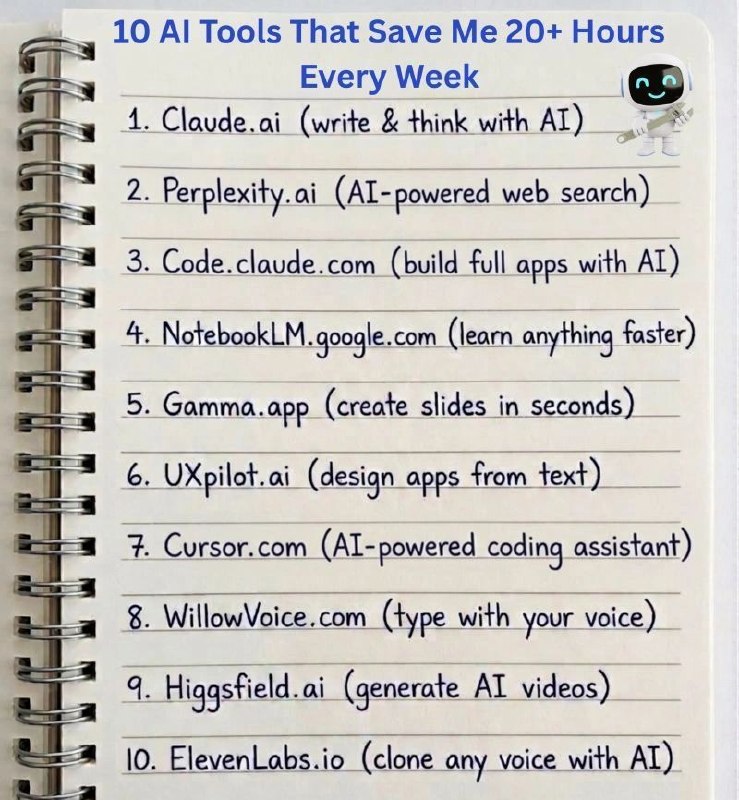
🚀 10 AI Tools to Boost Productivity

AI isn’t just about generating text or images. The real advantage comes from using the right tool for the right task.

1️⃣ *Claude* – Writing, brainstorming & document analysis

2️⃣ *Perplexity AI* – AI-powered research with sources

3️⃣ *Claude Code* – AI-assisted coding & debugging

4️⃣ *NotebookLM* – Understand PDFs, notes & documents faster

5️⃣ *Gamma* – Create professional presentations quickly

6️⃣ *UXPilot* – Generate UI concepts & wireframes

7️⃣ *Cursor* – AI-powered coding & codebase assistance

8️⃣ *WillowVoice* – Speech-to-text & faster documentation

9️⃣ *Higgsfield AI* – AI video creation for content & marketing

🔟 *ElevenLabs* – Realistic AI voices & multilingual audio

💡 *Key takeaway* :
Don’t depend on one AI tool. Build an AI workflow where each tool solves a specific problem.

Double Tap ❤️ For More Useful Tools
  • ❤ 25
Post #1752 9.01K
🎓🤖 Top AI Tools for Students in 2026

1. ChatGPT – Learning, explanations, coding, brainstorming, and study assistance.


2. Google Gemini – Research, learning, writing, and analyzing study materials.


3. Perplexity – AI-powered research with web sources and citations.


4. NotebookLM – Analyzes your PDFs, notes, and study materials and answers questions about them.


5. Claude – Writing, analysis, coding, and understanding complex topics.


6. Microsoft Copilot – AI assistance for research, writing, productivity, and Microsoft tools.


7. Canva AI – Creates presentations, posters, graphics, and visual content.


8. Gamma – Creates presentations, documents, and webpages using AI.


9. Quizlet – Creates flashcards, quizzes, and personalized study materials.


10. Wolfram|Alpha – Solves mathematical, scientific, and computational problems.


11. GitHub Copilot – Helps students write, understand, and debug code.


12. Grammarly – Improves grammar, writing style, clarity, and tone.


13. Otter.ai – Transcribes lectures and conversations into searchable notes.


14. Elicit – Helps research academic papers and extract useful information.


15. Consensus – Finds and summarizes research-based answers from scientific papers.


16. Scite – Helps analyze and evaluate academic research and citations.


17. DeepL – AI-powered translation and writing assistance.


18. Photomath – Solves mathematical problems using your camera and provides explanations.


19. Desmos – Interactive graphing and mathematical visualization.


20. ElevenLabs – Generates realistic AI voices and converts text into speech.

Double Tap ❤️ For More
  • ❤ 34
  • 😍 4
  • 👍 1
  • 🥰 1
Post #1751 9.27K
Post #1750 7.76K
Best AI Tools | ChatGPT | Perplexity | Deepseek | Artificial Intelligence ⚠️ 83% of employers now call AI skills essential - for every role, not just tech. (upGrad, 2026) Reading about AI daily won’t show up in an interview. A certification and deployed projects will. Certification in AI & ML - Vishlesan i-Hub, IIT Patna ✅…
⏳ 83% of employers want AI skills. Tomorrow you can start proving you have them.

Vishlesan i-Hub, IIT Patna - Certification in AI & ML
₹99 qualifier · Sunday, 2nd Aug · one attempt

Reading about AI ends tonight. Building starts tomorrow.

🔗 https://tinyurl.com/DS-29JUL-010
  • ❤ 7
  • 🎄 1
Post #1749 8.91K
🎨 20 Useful AI Image Generation Tools You Should Try 🤖

1. ChatGPT – Generate and edit images from text prompts.
2. Microsoft Designer – Create AI images, social media posts, and graphics.
3. Google Gemini – Generate images using Google's AI models.
4. Adobe Firefly – Create high-quality AI artwork with commercial-friendly features.
5. Canva AI – Generate images directly inside Canva.
6. Leonardo AI – High-quality AI art for games, characters, and illustrations.
7. Ideogram – Excellent for generating images with accurate text.
8. Playground AI – Create and edit AI images with an easy-to-use interface.
9. Mage.space – Free Stable Diffusion image generation.
10. SeaArt AI – Generate anime, realistic, and fantasy artwork.
11. Tensor.Art – AI image generation with thousands of community models.
12. PixAI – Specialized in anime and manga-style artwork.
13. Civitai – Create images using community-trained AI models.
14. Dezgo – Free Stable Diffusion image generator.
15. NightCafe – Generate AI art in multiple artistic styles.
16. Dream by WOMBO – Create digital artwork from simple text prompts.
17. Craiyon – Free and beginner-friendly AI image generator.
18. DeepAI Image Generator – Quick text-to-image generation.
19. Recraft AI – Generate vector graphics, icons, logos, and illustrations.
20. FLUX Playground – Create highly realistic AI-generated images using FLUX models.

💡 Best Picks by Use Case:
🎨 Realistic Images: FLUX Playground, Leonardo AI, Playground AI
✍️ Images with Text: Ideogram
🖌️ Logos & Icons: Recraft AI
🌸 Anime Art: PixAI, SeaArt AI
📱 Social Media Designs: Canva AI, Microsoft Designer
🚀 Beginners: ChatGPT, Adobe Firefly, Craiyon

🔥 Double Tap ❤️ For More
  • ❤ 25
  • 👍 3
  • 🤮 1
  • 😍 1
Post #1748 8K
⚠️ 83% of employers now call AI skills essential - for every role, not just tech. (upGrad, 2026)

Reading about AI daily won’t show up in an interview. A certification and deployed projects will.
Certification in AI & ML - Vishlesan i-Hub, IIT Patna

✅ 9 Months | Online | Open to all backgrounds (12th pass+)
✅ Live learning from IIT faculty & industry mentors
✅ LLMs, RAG, AI Agents, GenAI - the current stack, not 2021’s
✅ Placement support through Masai's network of 5000+ companies

🗓 ₹99 Qualifier Test: This Sunday, 2nd August · One attempt

🔗 https://tinyurl.com/DS-29JUL-010
  • ❤ 8
Older posts →

About this channel

How can I read @ai_best_tools without a Telegram account?
TGViewer shows the public web preview Telegram publishes for Best AI Tools | ChatGPT | Perplexity | Deepseek | Artificial Intelligence: recent posts, photos, videos and the subscriber count, with no app, login or account.
How many subscribers does Best AI Tools | ChatGPT | Perplexity | Deepseek | Artificial Intelligence have?
Best AI Tools | ChatGPT | Perplexity | Deepseek | Artificial Intelligence (@ai_best_tools) has 59.1K subscribers on Telegram, refreshed roughly every 30 minutes.
Does Best AI Tools | ChatGPT | Perplexity | Deepseek | Artificial Intelligence know I viewed it here?
No. Public channel previews carry no viewer identity, and TGViewer has no accounts or tracking of what you look up.
Threads Profile ViewerView any public Threads profile without an account.Open ThreadLook →Writing with AI? Make it sound human.Metric37 rewrites AI drafts so they read naturally. Free AI detector, 1,500 words free.Try Metric37 →