Learn to code and become a Web Developer with HTML, CSS, JavaScript , Reactjs, Wordpress, PHP, Mern & Nodejs knowledge
Managed by: @love_data
Post #3722
1.17K


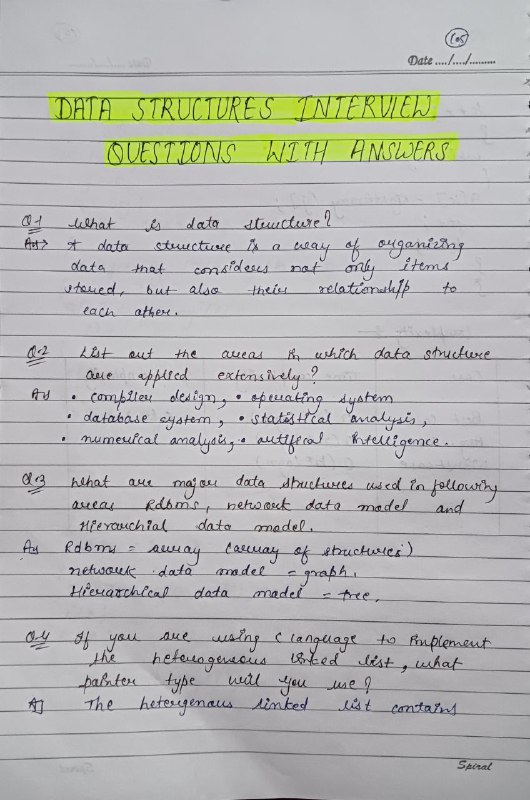


DSA Handwritten Notes
- ❤ 4
- 👍 4
 WE
WE @javascript_courses
\n and \t:const message1 = "Hello\nWorld";
console.log(message1);
// Hello
// World
const message2 = "Name:\tRahul";
console.log(message2); // Name: Rahul (with tab)
console.log("apple" === "apple"); // true
console.log("Apple" === "apple"); // false - case-sensitive

const input = "ADMIN";
if (input.toLowerCase() === "admin") {
    console.log("Access granted");
}const input = " USER@GMAIL.COM ";
const email = input.trim().toLowerCase();
console.log(email); // user@gmail.com
if (email.includes("@")) {
console.log("Email looks valid");
}
trim() ↓ toLowerCase() ↓ includes()const data = "Amit, Priya, Rahul, Neha";
const names = data.split(",");
const cleanedNames = names.map(name => name.trim());
console.log(cleanedNames); // ["Amit", "Priya", "Rahul", "Neha"]
const filteredNames = cleanedNames.filter(
name => name.startsWith("R")
);
console.log(filteredNames); // ["Rahul"]
const word = "Hello";
console.log(word[0]); // H not e
const name = "rahul";
name.toUpperCase();
console.log(name); // still "rahul"

const upperName = name.toUpperCase(); // correct
trim()" Rahul "split() and join()split() → string → arrayjoin() → array → stringconst word = "JavaScript"; Try to produce tpircSavaJ. Hint: split() + reverse() + join()"JavaScript""javascript is powerful" to uppercase."JavaScript" extract Script"I love Python" into "I love JavaScript"const input = " HELLO JAVASCRIPT "; Produce hello javascriptconst email = " USER@EXAMPLE.COM "; @"Valid email format" if it does.const fileName = "report.pdf";
console.log(fileName.endsWith(".pdf")); // true
indexOf()const message = "Hello JavaScript";
console.log(message.indexOf("JavaScript")); // 6
console.log(message.indexOf("Python")); // -1 - not found
lastIndexOf()const text = "JavaScript is powerful. JavaScript is popular.";
console.log(text.lastIndexOf("JavaScript")); // 25
slice()slice() extracts part of a string.const language = "JavaScript";
console.log(language.slice(0, 4)); // Java
slice(0, 4) returns characters from index 0 through 3.slice().const language = "JavaScript";
console.log(language.slice(-6)); // Script
substring()substring()substring() can also extract part of a string.const language = "JavaScript";
console.log(language.substring(0, 4)); // Java
slice() is often more convenient because it supports negative indexes.replace()const message = "I like JavaScript";
const updated = message.replace("JavaScript", "Python");
console.log(updated); // I like Python
replaceAll()const message = "JavaScript is great. JavaScript is popular.";
const updated = message.replaceAll("JavaScript", "JS");
console.log(updated); // JS is great. JS is popular.
split()split() converts a string into an array.const names = "Amit,Priya,Rahul";
const result = names.split(",");
console.log(result); // ["Amit", "Priya", "Rahul"]
const sentence = "Learn JavaScript step by step";
const words = sentence.split(" ");
console.log(words); // ["Learn", "JavaScript", "step", "by", "step"]
join()join() combines array elements into a string.const words = ["Learn", "JavaScript"];
const sentence = words.join(" ");
console.log(sentence); // Learn JavaScript
split() → string → arrayjoin() → array → stringconst message = `Hello`;
const name = "Rahul";
const age = 25;
const message = `My name is ${name} and I am ${age} years old.`;

console.log(message); // My name is Rahul and I am 25 years old.
const price = 1000;
const quantity = 3;
const total = `Total: ${price * quantity}`;
console.log(total); // Total: 3000
const message = `
Hello Rahul,

Welcome to JavaScript.

Keep learning!
`;
console.log(message);
const name = "Rahul";
const city = "Pune";
const message = "Welcome to JavaScript";
const name = "Rahul";
const name = 'Rahul';
const name = `Rahul`;
.length to find the number of characters.const message = "JavaScript";
console.log(message.length); // 10
const message = "Hello World";
console.log(message.length); // 11 - space is included
const language = "JavaScript";
console.log(language[0]); // J
console.log(language[4]); // S
console.log(language[language.length - 1]); // t - last character
const name = "Rahul";
name[0] = "K"; // Does NOT work
const name = "Rahul";
const updatedName = "K" + name.slice(1);
console.log(updatedName); // Kahul
toUpperCase()const name = "rahul";
console.log(name.toUpperCase()); // RAHUL
toLowerCase()const name = "RAHUL";
console.log(name.toLowerCase()); // rahul
const userInput = "ADMIN";
if (userInput.toLowerCase() === "admin") {
    console.log("Admin user");
}
trim()trim() removes whitespace from the beginning and end of a string.const name = " Rahul ";
console.log(name.trim()); // Rahul
trimStart()const text = " Hello";
console.log(text.trimStart()); // "Hello"
trimEnd()const text = "Hello ";
console.log(text.trimEnd()); // "Hello"
includes()const message = "Welcome to JavaScript";
console.log(message.includes("JavaScript")); // true
const email = "user@gmail.com";
console.log(email.includes("@")); // true
startsWith()const url = "https://example.com";
console.log(url.startsWith("https")); // true
endsWith()