
📷 Instagram stickers: how to actually use them well
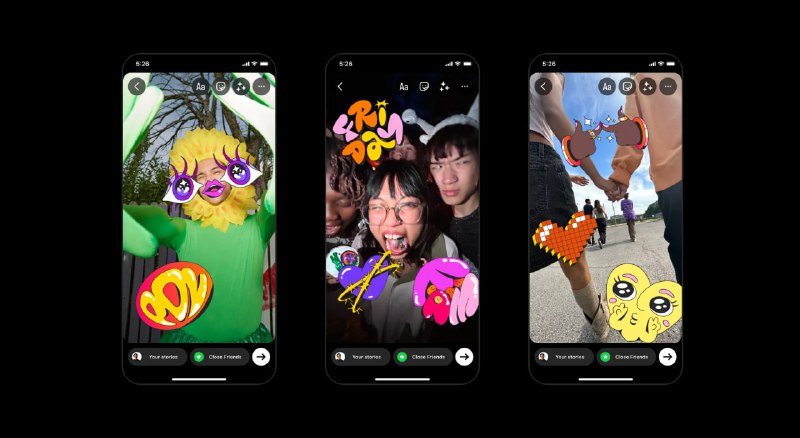
Stickers are no longer just decoration. On Stories and Reels, they drive replies, taps, shares, and even sales. If you use them intentionally, they increase interaction. If you just spam GIFs, they add clutter.
Here’s how to use them properly.
➡️ Interactive stickers
Polls, quizzes, Questions, Add Yours, Magic Ball, Countdown.
These turn passive viewers into participants. Use polls for quick engagement, Questions for collecting audience pain points, Add Yours to start trends inside your niche. Countdown works well before launches or events.
➡️ Expressive stickers
Emojis, avatars, GIFs, music visuals.
These shape mood and tone. Use them to reinforce emotion in Stories. One well-placed GIF near the focal point works better than five random ones.
➡️ Utility stickers
Time, location, weather.
These add context and improve discoverability. Location tags can help surface your Story to local viewers. Use them when place or timing matters.
➡️ Support stickers
Donation and shopping-related tools.
Useful for brands, creators, and community campaigns. They reduce friction by letting users act directly from your Story.
➡️ Music stickers
Song previews with album art or animated visuals.
Good for vibe-setting, behind-the-scenes content, and lifestyle posts. Trending audio can also boost reach.
🔎 How to find better stickers
Use specific keywords in search.
“Basketball training” works better than “sports.”
“Mood sad aesthetic” works better than “sad.”
Search by:
➡️ Holidays
➡️ Trending slang
➡️ Emotions
➡️ Niche keywords
Layer intentionally. Combine one expressive sticker with one interactive element instead of stacking five visuals on top of each other.
💻 Use GIPHY strategically
The GIF tab connects to GIPHY’s library. Browse by categories like Accessories, Word Art, Emoji.
If you’re a brand or creator, you can upload your own sticker pack to GIPHY. That makes your branded stickers searchable inside Instagram. This turns your audience into distributors of your visuals.
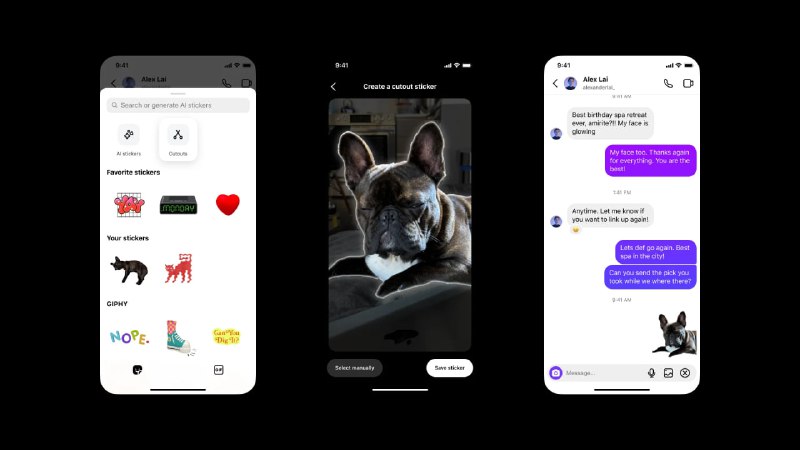
✍️ Create your own custom stickers
Use “Cutouts” or “Your Stickers” to turn photos into reusable stickers.
Good use cases:
➡️ Your face reaction
➡️ Product close-ups
➡️ Inside jokes
➡️ Mascots or pets
Once saved, they’re reusable. This builds visual identity over time.
Stickers are small, but they influence engagement behavior.
✅ Follow @inst
Post #1702
31.3K



- ❤ 24
- 👍 5