TGViewer
Channel Public Channel
👉 Insta | Video - Photo - Reels - Stories

👉 Insta | Video - Photo - Reels - Stories

@inst

➖ Insta News and Announcements
➖ Insta Pages and Stories
➖ Insta Content and Trending
➖ Insta Support and Help
➖ Insta Reels

(Channel is not affiliated with Instagram or Meta)

Buy Ads: @strategy
Subscribers
212K
Photos
1.1K
Videos
33
Links
1.1K
Recent Posts 20 shown
Post #1933 8.72K
💡 How to Build a Reliable Instagram Giveaway
ㅤ
An Instagram giveaway combines two campaigns: a reach campaign that extends beyond current followers and an acquisition campaign that turns some viewers into followers. Treat it as measurable acquisition with a target audience, cost limit, and post-contest retention plan.
ㅤ
➡️ Set the budget first
Cost per acquired follower equals total prize cost divided by net new followers during the promotion. Include prize, labor, and content-slot costs. A $50 prize costs $0.50 per follower at 100 new followers, but more than $3 at 15.
ㅤ
➡️ Match the account
Giveaways fit newer accounts seeking social proof and e-commerce brands launching a specific product. Accounts with 50,000 or more followers should be cautious because prize-driven followers can churn faster. Fix active shadow-reach restrictions or recent policy strikes first.
ㅤ
➡️ Keep entry focused
Follow, tags, Stories, comments, and email or landing-page visits serve different goals. Use no more than two or three requirements. Prioritize shares and sends, avoid tagging more than two or three friends, and remember that Stories expire after 24 hours.
ㅤ
➡️ Set the prize and schedule
A prize must attract strangers without making a weak result expensive. Small-business prizes commonly cost $10 to $50. Larger retailers may spend hundreds if the calculation supports it. Seven days suits small and mid-sized accounts, while larger accounts can often use three to five days.
ㅤ
➡️ Publish rules and verify the winner
Use an accurate prize image and put instructions in the caption. State eligibility, shipping terms, and a deadline with a specific timezone. Include official rules and Instagram’s non-affiliation statement. Log qualifying entrants, add rows for bonus entries, use a random-name picker beyond a few hundred entrants, and disqualify clearly fake accounts if the rules allow it.
ㅤ
A documented example grew an account from about 200 to 340-plus followers, adding about 140 followers from a $12-$14 prize after seven days, or roughly $0.08 per follower. Results vary by audience and scale, so plan strong post-contest content instead of treating the follower spike as the outcome.

📱 Follow @insta
  • ❤ 14
Post #1932 10.9K
🎬 Why Simple Reels Can Win
ㅤ
Reels do not need professional cameras or elaborate editing. Shannon McKinstrie says some of her most successful videos were six seconds long with text overlaid. Relevance and authenticity matter more than production.
Post, collect data, and adjust. Carousels, B-roll with text, photo dumps, and Stories can replace talk-to-camera videos.
ㅤ
➡️ Combine Expertise and Excitement
Discuss what you know and genuinely enjoy. Content made only for consistency repeatedly flopped for McKinstrie. Choose the easiest format to produce. The Nitro Bar uses drink reveals, employee challenges, and founder stories to make its staff, atmosphere, and menu familiar.
ㅤ
➡️ Name the Viewer
Use identity markers in the first few seconds, such as “Raleigh moms,” “new creator,” or “type B.” McKinstrie found that “mom of two” and “type B” felt more familiar than “Instagram coach.” Find audience language in client conversations, testimonials, and TikTok’s Creator Search Insights.
ㅤ
➡️ Make Hooks Specific
Replace broad labels with precise details and a point of view. One client gained 30,000 followers after changing “homeowners” to “women who just bought a home.” A nutritionist’s “smoothie that helped my client lose 10 pounds” beats a generic weight-loss recipe. Story openings such as “one hour ago” or “ten years ago” add context.
ㅤ
➡️ Layer Visual Information
For talk-to-camera Reels, put the topic at the top. Add a credential with Instagram’s typewriter effect and a typing sound under two seconds. Then show a DM, follower-count screenshot, or student result at about two-and-a-half to three seconds. Props and themed cutouts can also signal identity and invite comments.
ㅤ
➡️ Test Trial Reels
Trial Reels go only to non-followers. McKinstrie posts one around noon, then posts the same Reel to her main feed at 3 p.m. Posting to the feed first makes the trial perform poorly. Retention graphs show where viewers leave. A sharp drop in the first few seconds means the hook needs work.
ㅤ
Simple, genuine content can outperform polished production when its hook feels specific and relevant. Choose a sustainable format, add clear visual cues, and use trial retention data to improve the opening.

📱 Follow @insta
  • ❤ 11
Post #1931 15.1K
💡 Instagram Trends This Week
ㅤ
The newest entries in this week’s roundup center on makeup reveals, nostalgic lifestyle edits, confident lip-syncs, and seasonal content. Each format uses a different audio mood to shape the way the Reel unfolds.
ㅤ
➡️ Makeup transformation reveals
Audio: Upside Down by Diana Ross
Creators use the upbeat disco track to transition from a bare-faced or getting-ready moment into a finished makeup look, timing the reveal to the music. A beauty creator could show the makeup process first, then cut to a dramatic final look on the beat.
ㅤ
➡️ Dreamy everyday-life edits
Audio: Cinnamon Girl by Lana Del Rey
This wistful sound is being paired with travel memories, quiet routines, sunsets, relationships, old photos, and beautiful scenery to romanticize ordinary moments. A creator could turn clips from a peaceful morning or recent trip into a sentimental montage.
ㅤ
➡️ Confident lip-sync videos
Audio: Nicole Kidman by ADELA
The track is trending for videos where creators feel themselves rather than follow a complicated format. A creator could film getting dressed, show off a finished look, or simply lip-sync with the song’s confident energy.
ㅤ
➡️ Cinematic lifestyle moments
Audio: Oh La La Amour by Julio Iglesias
Creators pair this romantic, nostalgic song with travel clips, scenery, outfits, cafés, interiors, food, and small everyday moments. A café or lifestyle creator could use it behind footage of a meal, a welcoming interior, or a polished day-in-the-life edit.
ㅤ
➡️ Seasonal September content
Audio: September by Earth, Wind & Fire
Creators are using the upbeat classic for early autumn outfits, seasonal activities, cozy moments, and September photo dumps. Brands can use the format to introduce fall products, menus, events, or campaigns with a fun, nostalgic soundtrack.
ㅤ
➡️ High-energy outfit and transition edits
Audio: Bass Persuades by Miley Cyrus
The track fits dance videos, OOTDs, choreography, transitions, and bold looks that match its attitude. A fashion, beauty, fitness, or lifestyle brand could use quick outfit changes or an energetic product-focused Reel.
ㅤ
This week’s newest formats range from timed transformation reveals to cinematic lifestyle montages, with the audio setting the pace and mood for each type of footage.

📱 Follow @insta
  • ❤ 17
Post #1930 19.2K
📉 How to Grow Instagram Followers in 2026
ㅤ
Growth starts before someone taps Follow. Visitors may find you through a Reel, search, or collaboration, then decide within seconds whether your profile explains what you offer and whom it serves.
The core framework is profile optimization, discovery-focused content, Instagram SEO, consistent posting, and measurement. Avoid buying followers because it can damage account health.
ㅤ
➡️ Make the profile convert
Use a searchable username, recognizable photo, and bio that says what you do, whom it serves, and what followers will get. Add relevant keywords, one clear link destination, and useful Stories to Highlights with customized covers.
ㅤ
➡️ Match formats to goals
Reels reach non-followers most reliably. Use them for discovery, carousels for teaching and saves, single images for announcements, Stories for existing followers, and Live for Q&As or collaborations. On Reels, show the payoff in the first two seconds, keep edits tight, add on-screen text, and design for shares and saves.
ㅤ
➡️ Build search signals
Research the words your audience types into Instagram search and use them naturally in your username, name field, bio, and captions. Add descriptive alt text, relevant location tags, and 3-5 specific hashtags instead of a 30-tag block. Combine broad and niche tags.
ㅤ
➡️ Post consistently for growth
The source recommends 3-5 posts per week without sacrificing quality. Early mornings and early evenings, especially early in the week, often perform well, with Wednesdays around 5 PM standing out in its analysis. Use your engagement, impressions, and traffic data to choose timing.
ㅤ
➡️ Measure real growth
Track follower growth rate, reach to non-followers, profile visits, and engagement rate together. High reach with few profile visits may mean the content does not connect to your account. Many visits with few follows point to the bio and grid. Buying followers can lower engagement, distort analytics, violate Instagram’s terms, and risk restrictions or removal.
ㅤ
Use Reels and relevant SEO to attract new people, then make the bio, grid, and Highlights show why they should stay.

📱 Follow @insta
  • ❤ 13
  • 👍 4
Post #1929 21.6K
🔎 How to Find, Save, and Reuse Instagram Filters
ㅤ
Instagram’s Effects gallery includes filters made by Instagram and other users. Search by name or keyword, browse categories, open effects from a creator’s profile, or reuse one from a friend’s Story.
Preview an effect before using it, then save it to the camera effects tray. Saved effects remain available from the Story camera, although some may be unavailable because of the app version, region, or account.
ㅤ
➡️ Search the Effects gallery
Open Instagram’s Story camera and swipe through the effects beside the shutter button until you reach Browse Effects. Tap the magnifying glass, then browse suggestions or search by name or keyword. Categories include Trending, Aesthetic, and Effects.
ㅤ
➡️ Find effects from a creator
Open the creator’s profile and tap the smiley-face tab to view their effects. Select an effect to preview it, then save it for later. This can be faster than searching the full gallery when you know the creator.
ㅤ
➡️ Reuse an effect from a friend’s Story
Open the friend’s Story and tap the filter name below the username. Choose Try it to use the effect immediately, or choose Save Effect to keep it for later. The panel also includes Download and More options.
ㅤ
➡️ Save an effect to your camera
While previewing an effect, tap the downward-arrow icon to save it. The arrow changes to a check after download, and the effect appears in the camera menu for use without internet access, according to the guide.
ㅤ
➡️ Open your saved effects
Return to the Story page and swipe through the effects beside the shutter button. Previously saved and used effects appear there for taking a photo or recording a video.
ㅤ
Use Browse Effects for a name or keyword, a creator’s smiley-face tab for that creator’s work, or the filter label in a friend’s Story for a direct shortcut. If effects are missing, update Instagram because some may no longer be available or may be limited to certain regions or accounts. Restarting the app or clearing its cache may also refresh the Effects gallery.

📱 Follow @insta
  • ❤ 25
  • 🤝 1
Post #1928 26.8K
✍️ How to Set Up Instagram Automated Replies
ㅤ
Instagram automated replies handle repeated requests in comments, DMs, and Story replies. Metricool Flows organizes these workflows in one dashboard and can deliver links, hours, pricing, event access, or downloads without treating every conversation alike.

Effective flows use clear triggers, current information, and a way to send unusual questions to a person. They can reply publicly to post and Reel comments, send keyword-triggered DMs, or respond to selected Story terms.
ㅤ
➡️ Connect an eligible account
Connect a Business or Creator account to a Metricool brand space. The Flows dashboard shows active workflows, execution totals, and options to build a flow or customize a template.
ㅤ
➡️ Choose a clear trigger
Select a post or Reel comment, a DM containing selected words, or a Story reply containing a designated term. Add variations for typos, plurals, or capitalization, such as LINK, LINKS, and GETLINK.
Use short, easy-to-spell words such as LINK, PLAN, or INFO. Avoid common terms like “the,” “hello,” or “yes,” and tell viewers exactly what to type in the caption, graphic, or Story sticker.
ㅤ
➡️ Build the response
For comment-to-DM flows, write a public confirmation and a private message with the relevant link, file, button, or code. Public replies can use three to five variations. Keep the DM concise, identify it as automated, and provide a clear way to request human help.

Story terms can deliver event access, product previews, or downloads. Terms such as REGISTER, VIP, or GUIDE work when the Story clearly tells viewers which word to send. Stories last twenty-four hours, so check that the destination and message remain current.
ㅤ
➡️ Test and monitor
Use the built-in preview to check message logic and links before activation. After launch, review trigger execution totals and link click-through rates in the dashboard, answer non-trigger DMs manually, and update or pause flows when promotions or links expire.
ㅤ
Effective automated replies are narrow, transparent, and easy to activate. Use a clear keyword, deliver the requested information directly, test every link, and keep human help available for questions outside the trigger.

📱 Follow @insta
  • ❤ 24
Post #1927 26.8K
💡 Instagram Expands What Can Appear on Your Grid
ㅤ
Instagram is rolling out a way to add posts you are tagged in directly to your main profile grid. The original post stays on its creator’s profile, while the tagged post can also appear on yours without creating a duplicate.
Meta also launched Muse, a free personal AI agent that can use content saved across its products for tasks beyond viewing it in a feed.
ㅤ
➡️ Tagged posts can join your main grid
Instagram began rolling out the feature on September 10. You can add a tagged post from the tag notification in DMs, the post itself, or the Tagged tab.
ㅤ
➡️ The original post stays in place
Adding a tagged post does not duplicate it or remove it from the original profile. The content remains connected to the person or account that published it, so the original creator keeps credit.
ㅤ
➡️ You can remove it later
You can remove a tagged post from your main grid without affecting the Tagged tab. This separates what appears on your profile from the full record of posts that include your account.
ㅤ
➡️ Muse connects saved content to tasks
Meta launched Muse on September 8 as a free personal AI agent available through a standalone app and inside Meta’s existing products. One example shows Muse turning a recipe reel saved on Instagram into a grocery list.
ㅤ
➡️ Saved posts can support assistants
Muse points to a broader use for saved posts. The source says it was the second most downloaded app in the United States two days after launch, but does not describe the rollout of every capability.


The grid feature lets profiles surface community content without reposting it, while the original creator keeps attribution. Muse is a separate development, but its recipe example shows how saved Instagram posts may become inputs for tasks beyond scrolling.

📱 Follow @insta
  • ❤ 16
Post #1926 24.1K
💡 Instagram Adds Tagged Grids and Carousel Editing
ㅤ
Instagram added two features for creators and small businesses. You can now add tagged posts to your profile grid and create carousel posts in the Edits app.
These updates support profile recommendations and multi-slide content without requiring several apps.
ㅤ
➡️ Add tagged posts to your grid
When a client or local business tags you, you can add its post to your profile grid. A recommendation or thank-you post can provide free publicity and brand awareness to visitors to your page.
ㅤ
➡️ Use tagged posts for credibility
The grid can include selected posts from clients and community businesses, not only content you publish. For example, an agent could add a local business’s recommendation or thank-you post. Tagging brands you support may also help them notice your post and add it to their grid.
ㅤ
➡️ Create carousels in Edits
Edits now supports carousel posts as well as reels. Tap +, choose Carousel, and upload up to 20 photos and videos. If Carousel is missing, tap your profile picture, open Labs, select Carousel Editor, and turn it on.
ㅤ
➡️ Edit slides before publishing
Edits supports text over images and videos, hundreds of fonts, baby pink and butter yellow colors, photo duplication, slide reordering, audio, and multiple layouts.
ㅤ
Review tagged posts for possible additions to your grid, especially when a client or local business credits your work. For carousel creation, check Edits and enable Carousel Editor in Labs if the option is not visible.

📱 Follow @insta
  • ❤ 19
  • 👍 4
Post #1925 25.1K
💡 Instagram Trends This Week
ㅤ
Here are the newest Reels formats highlighted in this week’s roundup. They range from wordplay and character cuts to fast recaps, announcements, and smooth transitions.
ㅤ
➡️ Some people call me...
Audio: Summer Love - Justin Timberlake
Turn a familiar nickname into the specialty people should associate with you. A creator could start with what people usually call them, then reveal the best specialty in town as the new description.
ㅤ
➡️ Trophy wife
Audio: Mix
Open with “I would love to be a trophy wife, but unfortunately...” and cut to ambitious, take-no-prisoners energy. Entrepreneurs and personal brands can use the switch to show themselves building or working instead.
ㅤ
➡️ Rapid-fire recap
Audio: Milkshake - Kelis
Pack a day, trip, or season into a flash-cut visual diary. A brand could quickly combine product shots, meals, outfits, and interiors into one sped-up highlight reel.
ㅤ
➡️ Plane so low
Audio: Original audio
Build tension with an unexpected setup before landing on the real announcement. Use the detour to reveal an event, launch, or product drop instead of presenting the news directly.
ㅤ
➡️ I'm tired of making content
Audio: Girls Just Want to Have Fun - Cyndi Lauper
Start with “I’m tired of making content. Can you all just...” and pair the line with chaotic b-roll. A creator or brand can turn its actual ask into a joking bit rather than a direct sales pitch.
ㅤ
➡️ Leg swipe transition
Audio: TiK ToK - Kesha
Sweep one leg across the frame, then cut to the next clip at the same point in the motion. Use it for an outfit change, location hop, or before-and-after so the scene changes with the swipe.
ㅤ
This week’s formats favor clear setups followed by a quick reveal, whether the payoff is a specialty, a personality shift, an announcement, or a visual change.

📱 Follow @insta
  • ❤ 24
Post #1924 27K
💡 Instagram Adds Tagged Posts To Your Profile Grid
ㅤ
Instagram is rolling out a new way to control what appears on your main profile grid. You can now add posts you are tagged in directly to your profile, without publishing the same photo or video yourself.

The option addresses a familiar situation: someone else shares a group photo from a party, concert, vacation, or night out, then tags you in it. You can feature that post on your profile while leaving the original publication unchanged.
ㅤ
➡️ Add A Tagged Post From Three Places
You can add a tagged post from the DM notification you receive when you are tagged, directly from the post, or through your Tagged tab. The feature is rolling out, so availability may vary.
ㅤ
➡️ The Original Post Stays Put
Adding a post to your grid does not delete or duplicate the original post. If you change your mind, you can remove it from your profile at any time, and the post will remain in your Tagged tab.
ㅤ
➡️ A New Option For Collaborations
Instagram says the feature could help creators showcase posts from collaborations without republishing the content or using the Invite collaborators option. It may also be useful for brand campaigns involving several creators tagged in the same post.
ㅤ
➡️ More Control Over Profile Layouts
The update follows Instagram’s introduction of Reorder your grid in June, which lets users rearrange content on their main profile. Together, the tools give users more ways to decide how their profiles are presented.
ㅤ
➡️ Other Content Tools Are Also Available
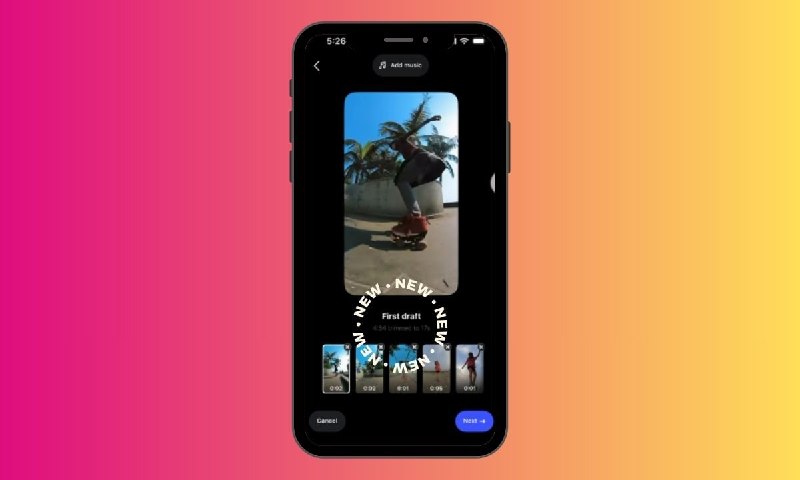
Instagram recently added First Draft, which automatically trims selected video clips, removes pauses, and assembles an initial cut. Its Replace Audio tool lets users change the music on an existing post later.

If you are tagged in a post you want visible on your profile, check the DM notification, the post itself, or your Tagged tab for the option to add it to your grid. You can remove it later without affecting the original post.


For creators and collaborators, the feature offers another way to display shared work while keeping ownership and publication of the original post with the account that uploaded it.

📱 Follow @insta
  • ❤ 23
  • 🔥 3
  • 🤝 2
Post #1923 27.7K
📉 Instagram’s Fastest-Growing U.S. Accounts in August
ㅤ
HypeAuditor data shows that Instagram’s fastest-growing U.S. accounts in August 2026 gained attention through D23 announcements, tributes, film and streaming releases, viral moments, regular uploads, and news coverage.

Sadie Sink gained 2.1 million followers
to reach 34.8 million.
Dolly Parton gained 1.5 million followers after her August 25 death prompted widespread tributes. The ranking shows several distinct paths to growth.
ㅤ
➡️ D23 drove four of the top 10 accounts
Sadie Sink gained 2.1 million followers after debuting as Jean Grey at Disney’s D23 Expo. Inde Navarrette gained 1.2 million after being revealed as Rogue. Robert Downey Jr. gained 1 million after new Avengers: Doomsday footage. Marvel Entertainment gained 696,000 after the weekend’s reveals.
ㅤ
➡️ Tributes drove a major surge
Dolly Parton reached 10.1 million followers after her death prompted tributes from fans, musicians, and officials across social media. Her gain ranked second for August.
ㅤ
➡️ Film and streaming releases lifted accounts
Zendaya gained 963,000 followers as Spider-Man: Brand New Day crossed $1 billion worldwide in six days. Ella Rubin gained 689,500 after Sterling Point premiered on Amazon Prime Video as a No. 1 global hit and was renewed for a second season.
ㅤ
➡️ Viral moments and uploads mattered
Lin Lamar gained 716,900 followers after a clip from her 20 v 1 dating segment on Drake’s Kick livestream spread widely. MrBeast gained 903,700 followers while maintaining his regular YouTube upload schedule.
ㅤ
➡️ News coverage extended beyond entertainment
Mayor Zohran Kwame Mamdani gained 878,500 followers amid national coverage of his administration’s pied-à-terre tax rollout and an ethics complaint filed by a Washington-based watchdog group.
ㅤ
August’s ranking shows no single cause of Instagram growth. The largest gains followed D23 announcements, public tributes, box-office attention, a viral livestream clip, a streaming premiere, regular uploads, and ongoing news coverage. The results show where attention gathered during the month, but do not establish that another account will see the same result.

📱 Follow @insta
  • ❤ 21
Post #1922 32.8K
💡 Instagram Trends This Week
ㅤ
This week's roundup centers on three formats built around surprise, personality, and clean visual changes. Each one can be adapted for a creator, product, service, or everyday Reel.
ㅤ
➡️ Plane so low
Audio: Original audio
Build tension with an unexpected setup, then reveal the real announcement at the end. Creators can use the detour for news, an event, a launch, or a product drop instead of making a direct announcement.
ㅤ
➡️ I'm tired of making content
Audio: Girls Just Want to Have Fun - Cyndi Lauper
Turn the line “I'm tired of making content. Can you all just...” into a joking way to make your actual ask. Pair it with chaotic b-roll so the request feels like part of the bit rather than a sales pitch.
ㅤ
➡️ Leg swipe transition
Audio: TiK ToK - Kesha
Sweep one leg across the frame, then cut to the next clip at the same point in the motion. Use it for an outfit change, a location switch, a before-and-after, or a product transformation.
ㅤ
The newest formats use a clear setup and payoff, but the source notes that original audio is not technically royalty-free. For sponsored content or paid ads, Meta's royalty-free sounds library may be preferable.

📱 Follow @insta
  • ❤ 24
Post #1920 38.6K
💡 Instagram Limits Reach for Undisclosed AI Profiles
ㅤ
Instagram announced Monday that it will limit the reach of accounts featuring AI-generated people without disclosing it.
It is renaming its “AI creator” label to “AI-generated profile.” Instagram says using the label will not penalize creators.
ㅤ
➡️ Clearer disclosure
The new label tells users that the person featured on a profile was generated or substantially created with AI.
ㅤ
➡️ Reach may be reduced
Creators who fail to label an AI-generated profile could see their reach reduced. Instagram has not said how large the reduction will be.
Using the label is not supposed to cause a penalty. The policy targets undisclosed profiles centered on an AI-generated person.
ㅤ
➡️ Editing is excluded
The label is not required for AI-assisted edits, captions, graphics, or other creative tweaks. The focus is the profile subject, not every use of AI.
ㅤ
➡️ User confusion
Instagram says users have found profiles that looked human, then learned that the featured person was completely AI-generated. The company says users want to know when a profile features an AI-generated person.
ㅤ
➡️ Growing examples
A Wired investigation found more than two dozen apparently AI-generated male influencer accounts promoting dating app Goose. Some reportedly contacted potential users by direct message.
The New York Times reported finding hundreds of AI-generated doctors, healers, and wellness personalities promoting supplements or making health claims.
ㅤ
➡️ Likeness backlash
The change follows backlash over a Meta AI tool that generated images using other people’s likenesses. Meta removed it after users objected to their public Instagram content being used without explicit opt-in.
ㅤ
Profiles featuring people generated or substantially created with AI should use Instagram’s new label. AI-assisted edits, captions, graphics, and similar creative changes are not included.

For creators, failing to disclose may reduce reach, while applying the label is not itself supposed to trigger a penalty. For users, the change is intended to make AI profiles clearer.

📱 Follow @insta
  • ❤ 30
  • 👎 1
Post #1919 35.7K
💸 Influencers Are Starting to Take Equity Instead of Only Campaign Fees

The relationship between creators and brands is changing. Some influencers are moving beyond one-off sponsored posts and taking equity stakes in the companies they promote.
Instead of being paid once for a campaign, creators can potentially benefit from the long-term growth of the business.
ㅤ
➡️ From promoter to investor
Traditional influencer deals are straightforward: a brand pays a creator to produce content, the campaign ends, and both sides move on.
With equity deals, creators become financially connected to the company and may continue working with the brand over a much longer period.
ㅤ
➡️ Creators can trade reach for ownership
For creators with valuable audiences, distribution itself has become an asset.
A creator may accept a combination of cash and equity, invest directly in a company, or negotiate ownership as part of a longer-term partnership.
ㅤ
➡️ Brands get more than a sponsored post
A creator with equity has an incentive to help the company grow beyond a single campaign.
That can mean ongoing Instagram content, product feedback, introductions, launch support and a deeper role in shaping how the brand communicates with its audience.
ㅤ
➡️ The upside can be much larger, but so is the risk
A normal sponsorship provides guaranteed payment. Equity only becomes valuable if the company succeeds.
Creators taking these deals therefore have to think more like investors: Is the business good? Can it grow? Is the equity actually worth giving up cash for?
ㅤ
For larger creators, Instagram audiences are increasingly becoming more than advertising inventory. They can be leverage for negotiating actual ownership in the businesses they help build.

📱 Follow @insta
  • ❤ 24
  • 👎 3
  • 👍 2
Post #1918 33.1K
🧠 How Instagram Ranks Feed, Stories, Reels and Explore Differently

Instagram doesn't use one single algorithm for everything you see in the app.
Feed, Stories, Reels and Explore are ranked separately, and each surface pays attention to different signals. That means content that performs well in Stories isn't necessarily optimized for Reels or Explore.
ㅤ
➡️ Feed: relationships and interest
Feed ranking is heavily influenced by how likely Instagram thinks you are to care about a post.
It looks at your previous activity, information about the post and creator, and how often you've interacted with that account before.
Likes, comments, shares, saves and time spent on a post can all provide signals.
ㅤ
➡️ Stories: your existing relationships
Stories are much more relationship-driven.
Instagram looks at how often you view someone's Stories, how frequently you interact with them and how close it thinks your relationship is.
That's why Stories are particularly useful for strengthening an existing audience, rather than reaching completely new people.
ㅤ
➡️ Reels: entertainment and discovery
Reels are designed heavily around discovering content from accounts you don't already follow.
Instagram tries to predict whether you'll watch a Reel, engage with it and find it entertaining enough to keep watching similar content.
Your Reel therefore has to work for someone who may know absolutely nothing about you.
ㅤ
➡️ Explore: discovering new interests
Explore also focuses on content from accounts you don't follow, but ranking is driven strongly by your previous interests and how people are interacting with a particular post.
Instagram uses your activity and engagement patterns to find content similar to things you've already shown interest in.
ㅤ
The practical takeaway is to give each format a job.

Stories can deepen relationships, Feed can serve your existing audience and build engagement, while Reels and Explore can introduce your content to entirely new people.

Instead of using the same strategy everywhere, create with the surface you're trying to win in mind.

📱 Follow @insta
  • ❤ 23
Post #1917 32K
🔎 How to Get Your Instagram Content Into Google Search

Instagram content is becoming more visible outside the app. Google Search can surface public Instagram posts, Reels and profiles, which gives creators another discovery channel beyond Instagram itself.
ㅤ
➡️ Use clear keywords in your profile
Your username, display name and bio help both Instagram and Google understand what your account is about.
If you're a photographer, fitness coach, designer or travel creator, make that obvious in your profile instead of relying on vague branding.
ㅤ
➡️ Write captions around searchable topics
Descriptive captions give search systems more context.
Instead of writing something generic like "Loved this place", explain what the post is actually about: the location, topic, product, tutorial or problem you're covering.
ㅤ
➡️ Create content people actively search for
Tutorials, comparisons, reviews, recommendations, FAQs and evergreen guides have a better chance of staying useful in search than posts that only make sense in the moment.
Think about the phrases someone might type into Google, then build content that directly answers those searches.
ㅤ
➡️ Make your text understandable
Instagram SEO already uses information from captions, bio, alt text and hashtags to understand content. The same clear descriptions also make your posts easier for external search engines to interpret.
ㅤ
➡️ You can now track Google traffic
Google Search Console now supports Platform properties, allowing creators to see which Google searches are leading people to their Instagram content.
The feature can show queries, clicks and impressions for Instagram, TikTok, X and YouTube content, and is now available globally.
ㅤ
For creators, this means Instagram content can now keep working beyond the Instagram feed. A useful Reel or carousel can potentially be discovered months later by someone searching for that exact topic on Google.

📱 Follow @insta
  • ❤ 16
Post #1916 31.5K
🎮 Instagram Launches "First Draft" for Reels

Instagram is rolling out a new Reels feature called First Draft, designed to speed up the most tedious part of editing: turning a pile of raw clips into a usable first version.
ㅤ
➡️ It builds a rough cut automatically
You select several video clips, and Instagram analyzes them, removes unnecessary pauses, and assembles a first draft in under 10 seconds.
The idea is to give creators a starting point instead of making them trim and arrange every clip manually.
ㅤ
➡️ You still control the final edit
First Draft is meant to handle the basic structure. After that, you can adjust the timing, reorder clips, add text, music, captions, effects, and make the Reel fit your own style.
ㅤ
➡️ It could be useful for batch creation
If you regularly shoot multiple clips for tutorials, travel videos, behind-the-scenes content, product videos, or talking-head Reels, this can remove a lot of repetitive editing work.
Instead of building every Reel from scratch, you start with an automatically assembled version and refine it.
ㅤ
➡️ The feature is starting on iPhone
First Draft is initially rolling out to iOS users, with broader availability expected later.
ㅤ
For creators who already shoot a lot of raw footage, this is one of Instagram's more practical recent updates. The feature doesn't replace editing, but it can make getting from raw clips to a workable Reel much faster.

📱 Follow @insta
  • ❤ 21
  • 👍 4
Post #1915 29.3K
✍️ Instagram Says Captions Matter More Than You Think

Instagram has shared new guidance on writing captions, emphasizing that they do more than explain what's happening in a post.
Captions give context to your audience, but they also help Instagram Search understand what your content is about, which can affect discovery.
ㅤ
➡️ Make the first two lines count
Only the beginning of your caption appears before the "more" button.
Instagram recommends opening with something that gives people a reason to continue reading, such as a useful fact, question, or preview of what's coming.
ㅤ
➡️ Tell a story or give people something useful
Instagram says strong captions often tell a personal story or provide information people might want to save, screenshot, or share with a friend.
That's a useful test before publishing: is there anything here worth coming back to?
ㅤ
➡️ Tell people what to do next
A clear CTA can turn someone who simply viewed your post into someone who interacts with it.
You can ask people to save the post, share it, respond in the comments, or visit the link in your bio.
ㅤ
➡️ Use relevant keywords
Instagram specifically recommends using descriptive keywords naturally in captions.
Its search system uses caption text as reference data, so clear wording helps Instagram understand the topic of your content and when it may be relevant in search.
ㅤ
➡️ Use multiple captions in carousels
Instagram now allows creators to add a separate description to individual images in a carousel.
The platform suggests using this to provide additional context instead of relying entirely on one caption for the whole post.
ㅤ
➡️ Make longer captions easy to scan
Use short paragraphs, line breaks, and occasional emojis to break up the text.
Even useful information can lose people if it's presented as one large block.
ㅤ
Сaptions are becoming part of Instagram discovery, not just an optional description under your content.

📱 Follow @insta
  • ❤ 22
  • 😢 2
Post #1913 30.6K
📱 Meta Adds New AI and Workflow Tools to Edits

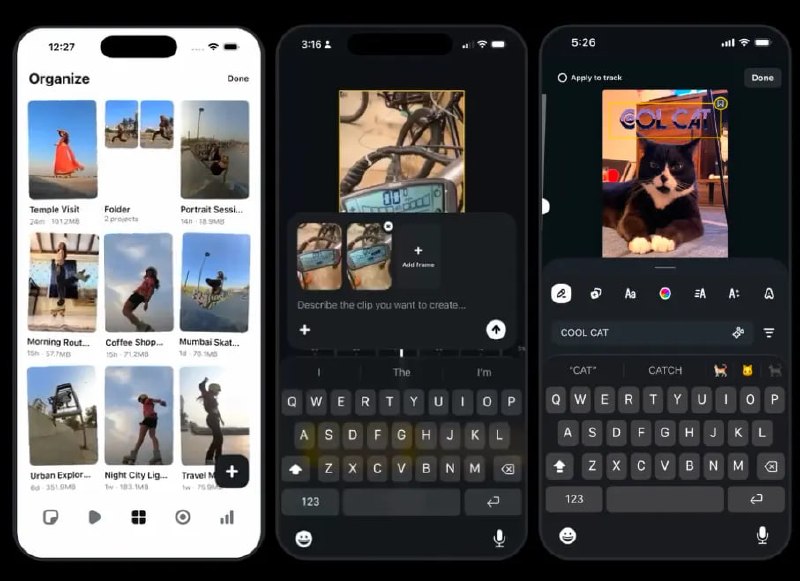
Meta has released another update for its Edits video app, adding several tools aimed at making it easier to organize projects, reuse styles and create new video content.
ㅤ
➡️ Turn a photo into a video with AI
Users in the U.S. can now take a still image and describe what they want to happen using a conversational prompt. Meta's AI will then animate the image into a video clip based on those instructions.
ㅤ
➡️ Better project organization
You can now long-press projects to reorder folders and prioritize videos you're currently working on, which should make larger content pipelines easier to manage.
ㅤ
➡️ Save your text and caption styles
Found a caption or text style you want to use again? Edits now lets you bookmark it directly from the project, making it easier to keep the same visual identity across multiple Reels.
ㅤ
➡️ Multiple versions and better templates
Creators can make several versions of the same project, build richer templates with overlays and lock specific clips in place. This is useful when testing different hooks, cuts or versions of the same Reel without rebuilding everything.
ㅤ
➡️ Search for audio by vibe
Audio search is also becoming more natural. Instead of searching only by track, you can look for sounds based on moods like "chill" or "bossy", or interests such as fashion and travel.
ㅤ
With updates arriving almost weekly, Edits is gradually turning into a more complete production tool for Instagram creators, especially for people who regularly work with templates and recurring Reel formats.

📱 Follow @insta
  • ❤ 23
  • 👍 1
Post #1911 33.4K
🎬 Instagram's Own Tips for Making Better Video Content

Instagram recently shared a set of video creation tips focused on making content easier to watch and more effective in the feed. The advice is surprisingly simple and doesn't require expensive equipment or complicated editing.
ㅤ
➡️ Start with a clear idea
Before filming, decide what the viewer should understand or feel by the end. Trying to fit several unrelated ideas into one video usually makes the message harder to follow.
ㅤ
➡️ Make the opening count
People decide quickly whether to keep watching, so the first few seconds should immediately establish what the video is about. Lead with the interesting moment, question or result instead of a long introduction.
ㅤ
➡️ Think vertically from the beginning
Shoot specifically for the 9:16 vertical format rather than filming horizontally and cropping later. Keep important subjects and text away from areas that can be covered by Instagram's interface.
ㅤ
➡️ Audio still matters
Clear voice and intentional sound can make a simple video feel much better. Music can support the content, but it shouldn't compete with dialogue or distract from the main idea.
ㅤ
➡️ Don't overcomplicate production
Good lighting, a stable shot and a clear subject can be enough. A strong idea and understandable story matter more than adding transitions and effects to every few seconds.
ㅤ
The basic rule is simple: make the video easy to understand immediately, comfortable to watch on a phone, and focused enough that viewers have a reason to stay until the end.

📱 Follow @insta
  • ❤ 27
  • 👍 3
Older posts →

About this channel

How can I read @inst without a Telegram account?
TGViewer shows the public web preview Telegram publishes for 👉 Insta | Video - Photo - Reels - Stories: recent posts, photos, videos and the subscriber count, with no app, login or account.
How many subscribers does 👉 Insta | Video - Photo - Reels - Stories have?
👉 Insta | Video - Photo - Reels - Stories (@inst) has 212K subscribers on Telegram, refreshed roughly every 30 minutes.
Does 👉 Insta | Video - Photo - Reels - Stories know I viewed it here?
No. Public channel previews carry no viewer identity, and TGViewer has no accounts or tracking of what you look up.
Threads Profile ViewerView any public Threads profile without an account.Open ThreadLook →Writing with AI? Make it sound human.Metric37 rewrites AI drafts so they read naturally. Free AI detector, 1,500 words free.Try Metric37 →