
🔎 How to Find, Save, and Reuse Instagram Filters
ㅤ
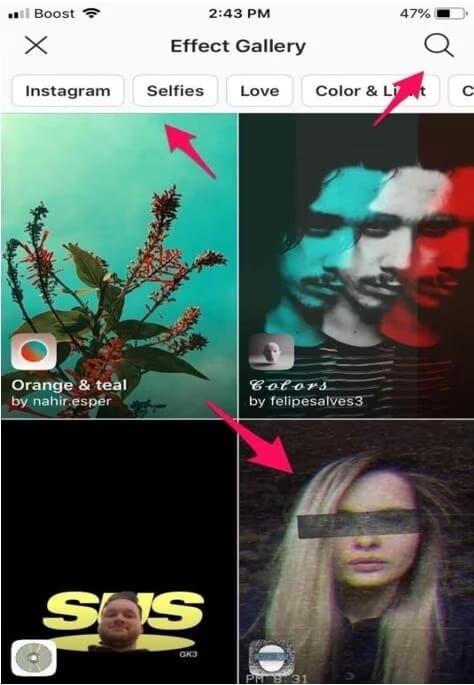
Instagram’s Effects gallery includes filters made by Instagram and other users. Search by name or keyword, browse categories, open effects from a creator’s profile, or reuse one from a friend’s Story.
Preview an effect before using it, then save it to the camera effects tray. Saved effects remain available from the Story camera, although some may be unavailable because of the app version, region, or account.
ㅤ
➡️ Search the Effects gallery
Open Instagram’s Story camera and swipe through the effects beside the shutter button until you reach Browse Effects. Tap the magnifying glass, then browse suggestions or search by name or keyword. Categories include Trending, Aesthetic, and Effects.
ㅤ
➡️ Find effects from a creator
Open the creator’s profile and tap the smiley-face tab to view their effects. Select an effect to preview it, then save it for later. This can be faster than searching the full gallery when you know the creator.
ㅤ
➡️ Reuse an effect from a friend’s Story
Open the friend’s Story and tap the filter name below the username. Choose Try it to use the effect immediately, or choose Save Effect to keep it for later. The panel also includes Download and More options.
ㅤ
➡️ Save an effect to your camera
While previewing an effect, tap the downward-arrow icon to save it. The arrow changes to a check after download, and the effect appears in the camera menu for use without internet access, according to the guide.
ㅤ
➡️ Open your saved effects
Return to the Story page and swipe through the effects beside the shutter button. Previously saved and used effects appear there for taking a photo or recording a video.
ㅤ
Use Browse Effects for a name or keyword, a creator’s smiley-face tab for that creator’s work, or the filter label in a friend’s Story for a direct shortcut. If effects are missing, update Instagram because some may no longer be available or may be limited to certain regions or accounts. Restarting the app or clearing its cache may also refresh the Effects gallery.
📱 Follow @insta
Post #1929
7.53K
- ❤ 16