TGViewer
Channel Public Channel
Web Development

Web Development

@web_dev_bds

Web development learning path

Frontend and backend resources.

HTML, CSS, JavaScript, React, APIs and project ideas.

Join 👉 https://rebrand.ly/bigdatachannels

DMCA: @disclosure_bds
Contact: @mldatascientist
Subscribers
4.44K
Photos
547
Videos
33
Links
115

Showing posts older than #791 · Back to latest

Older Posts 20 shown
Post #790 500
🚀 Client-Side Rendering vs Server-Side Rendering

Both are ways to render web pages. 
But they differ in where the HTML is generated.


1️⃣ Client-Side Rendering (CSR) 🖥️

Browser renders the page using JavaScript.

➤ How: Server sends minimal HTML + JS bundle 
➤ Browser builds UI after loading JS 
➤ Wins: Smooth user experience after first load 
➤ Risk: Slower initial load, SEO challenges 

Flow:
User → Server sends JS → Browser renders page

Used in:
React (SPA), Vue, Angular


2️⃣ Server-Side Rendering (SSR) 🌐

Server generates full HTML before sending it.

➤ How: Server processes request and returns ready HTML 
➤ Wins: Faster first paint, better SEO 
➤ Risk: Higher server load 

Flow:
User → Server renders HTML → Browser displays instantly

Used in:
Next.js, Nuxt.js, traditional backend frameworks


💡 Key Difference

CSR → Rendering happens in the browser 
SSR → Rendering happens on the server 

CSR = Better interactivity after load 
SSR = Better SEO & initial performance
  • ❤ 4
Post #787 615
✅ Set Up Your Code Editor & Browser Dev Tools 🛠️🌐

Before building websites, you need a solid environment. Here's how to set up everything as a beginner:

🔹 1. Code Editor: VS Code (Visual Studio Code) 
VS Code is the most beginner-friendly and powerful editor used by most web developers.

➤ Steps to Set Up: 
1️⃣ Download & install from code.visualstudio.com 
2️⃣ Open VS Code → Go to Extensions tab (left sidebar) 
3️⃣ Install these must-have extensions:
⦁  Live Server – Auto-refresh browser when you save
⦁  Prettier – Format your code neatly
⦁  HTML CSS Support – Boosts suggestions & auto-complete
⦁  Auto Rename Tag – Edits both opening and closing tags
⦁  Path Intellisense – Autocomplete file paths

➤ Settings to Tweak (optional):
⦁  Font size, tab spacing
⦁  Theme: Dark+ (default) or install others like Dracula

🔹 2. Browser: Chrome or Firefox 
Use a modern browser with strong developer tools — Google Chrome is highly recommended.

➤ How to Open DevTools: 
Right-click on any webpage → Inspect 
or press Ctrl+Shift+I (Windows) / Cmd+Opt+I (Mac)

➤ Key DevTools Tabs:
⦁  Elements – Inspect & edit HTML/CSS live
⦁  Console – View JavaScript logs & errors
⦁  Network – Monitor page load and API calls
⦁  Responsive View – Test your site on mobile/tablets 
   (Click the phone+tablet icon on the top-left)

💡 Pro Tip: 
Use Live Server in VS Code + DevTools in Chrome side-by-side for real-time preview & debugging. This workflow saves hours!
  • ❤ 5
Post #785 597
Web Development 🚀 A–Z of Full Stack Development 📣Today we are launching A-Z Full Stack series breaking down different Full Stack concepts in a simple, practical, beginner friendly way. This are the topics we are going to cover👇 A - Authentication 🔐 Verifying user identity…
🔤 Z - Zero Downtime Deployment 🔄

Zero Downtime Deployment means updating an application without stopping it 🚀

In simple words 
Users keep using the app 
even while a new version is being deployed 🧠

Without zero downtime deployment ❌ 
• App goes offline 
• Users face interruptions 
• Business impact increases 

🧠 Why Zero Downtime Matters
• Better user experience 😊 
• No service interruption 
• Safer updates 
• Professional production systems 

🌍 Where It Is Used
• Large scale web applications 
• Banking and finance systems 
• E commerce platforms 
• SaaS products 

🔄 Common Zero Downtime Strategies
• Blue Green deployment 🔵🟢 
• Rolling updates 🔁 
• Canary releases 🐦 
• Load balancer switching ⚖️ 

💻 Example: Rolling Update Concept

Old version running
New version deployed gradually
Traffic shifted step by step
Old version removed


🚨 This Wraps up our long series.
👏 Thank you for following along!
💬 If you have any requests or comments, comment below.
  • ❤ 3
  • 👏 3
Post #784 488
🚀 HTTP vs HTTPS: What’s the Difference?

Both are protocols used to transfer data between 
browser and server.

But the security level is completely different.


1️⃣ HTTP (HyperText Transfer Protocol) 🌐

Data is sent in plain text.

➤ How: Direct communication between client and server 
➤ Wins: Faster, no encryption overhead 
➤ Risk: Data can be intercepted (Man-in-the-Middle attack) 

Example:
http://example.com

2️⃣ HTTPS (HTTP Secure) 🔐

HTTP + SSL/TLS encryption.

➤ How: Encrypts data before transmission 
➤ Wins: Secure login, safe payments, data protection 
➤ Risk: Slight overhead due to encryption 

Example:
https://example.com

💡 Key Difference

HTTP → No encryption 
HTTPS → Encrypted communication 

Use HTTPS for production websites. 
Modern browsers mark HTTP sites as “Not Secure”.
  • ❤ 3
Post #782 556
💻 Back-End Development Basics ⚙️

Back-end development is the part of web development that works behind the scenes. It handles data, business logic, and communication between the front-end (what users see) and the database.

What is Back-End Development?

- It powers websites and apps by processing user requests, storing and retrieving data, and performing operations on the server.
- Unlike front-end (design & interactivity), back-end focuses on the logic, database, and servers.

Core Components of Back-End

1. Server
   A server is a computer that listens to requests (like loading a page or submitting a form) and sends back responses.

2. Database
   Stores all the data your app needs — user info, posts, products, etc. 
   Types of databases: 
   - _SQL (Relational):_ MySQL, PostgreSQL 
   - _NoSQL (Non-relational):_ MongoDB, Firebase

3. APIs (Application Programming Interfaces) 
   Endpoints that let the front-end and back-end communicate. For example, getting a list of users or saving a new post.

4. Back-End Language & Framework 
   Common languages: JavaScript (Node.js), Python, PHP, Ruby, Java

Frameworks make coding easier: Express (Node.js), Django (Python), Laravel (PHP), Rails (Ruby)

How Does Back-End Work?

User → Front-End → Sends Request → Server (Back-End) → Processes Request → Queries Database → Sends Data Back → Front-End → User

Simple Example: Create a Back-End Server Using Node.js & Express

Let’s build a tiny app that sends a list of users when you visit a specific URL.

Step 1: Setup your environment

- Install Node.js from nodejs.org 
- Create a project folder and open terminal there 
- Initialize project & install Express framework: 

npm init -y
npm install express

Step 2: Create a file server.js

const express = require('express');
const app = express();
const port = 3000;

// Sample data - list of users
const users = [
  { id: 1, name: 'Alice' },
  { id: 2, name: 'Bob' }
];

// Create a route to handle GET requests at /users
app.get('/users', (req, res) => {
  res.json(users);  // Send users data as JSON response
});

// Start the server
app.listen(port, () => {
  console.log(Server running on http://localhost:${port});
});

Step 3: Run the server

In terminal, run:

node server.js
Step 4: Test the server

Open your browser and go to: 
http://localhost:3000/users

You should see:
[
  { "id": 1, "name": "Alice" },
  { "id": 2, "name": "Bob" }
]

What Did You Build?

- A simple server that _listens_ on port 3000 
- An _API endpoint_ /users that returns a list of users in JSON format 
- A basic back-end application that can be connected to a front-end

Why Is This Important?

- This is the foundation for building web apps that require user data, logins, content management, and more. 
- Understanding servers, APIs, and databases helps you build full-stack applications.

What’s Next?

- Add routes for other operations like adding (POST), updating (PUT), and deleting (DELETE) data. 
- Connect your server to a real database like MongoDB or MySQL. 
- Handle errors, validations, and security (authentication, authorization). 
- Learn to deploy your back-end app to the cloud (Heroku, AWS).

🎯 Pro Tip: Start simple and gradually add features. Try building a small app like a To-Do list with a back-end database.
  • ❤ 1
Post #780 559
Web Development 🚀 A–Z of Full Stack Development 📣Today we are launching A-Z Full Stack series breaking down different Full Stack concepts in a simple, practical, beginner friendly way. This are the topics we are going to cover👇 A - Authentication 🔐 Verifying user identity…
🔤 Y - YAML 📘

YAML stands for YAML Ain’t Markup Language 
It is used for writing configuration files in a clean and readable way 🧠

In simple words 
YAML helps developers 
configure applications without complex syntax ✨

Without YAML ❌ 
• Config files become hard to read 
• More errors in setup 
• Difficult maintenance 

🧠 Where YAML Is Commonly Used
• Docker Compose files 🐳 
• Kubernetes configuration ⎈ 
• CI CD pipelines 🔄 
• Application settings ⚙️ 

🌍 Why YAML Is Popular
• Easy to read 
• Human friendly 
• Uses indentation instead of symbols 
• Widely supported 

📄 Basic YAML Rules
• Indentation matters 
• No tabs, only spaces 
• Key value pairs 
• Lists using hyphens 

💻 Example: Simple YAML File

server:
  port: 3000
database:
  host: localhost
  name: mydb
  • 👍 4
  • ❤ 1
Post #777 581
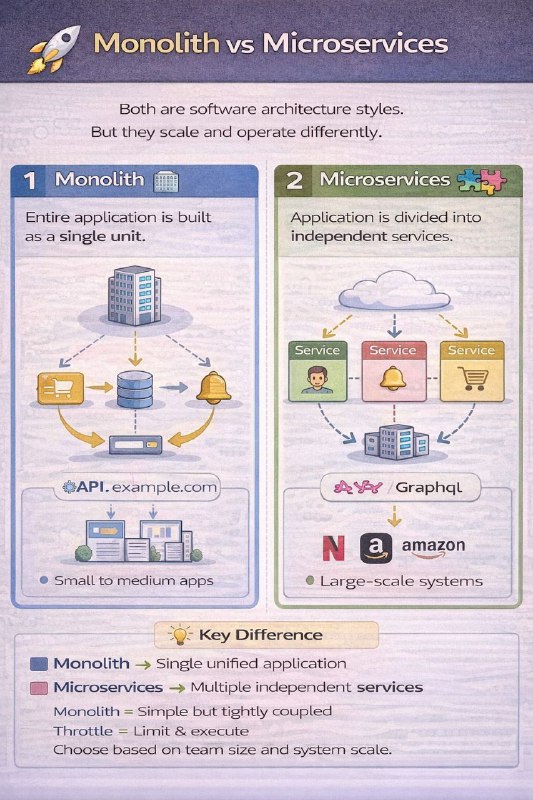
🚀 Monolith vs Microservices

Both are software architecture styles. 
But they scale and operate differently.

1️⃣ Monolith 🏢

Entire application is built as a single unit.

➤ How: One codebase, one deployment 
➤ Wins: Simple to develop & deploy 
➤ Risk: Hard to scale specific components 

If one part fails → entire system can be affected.

Used in:
Small to medium applications


2️⃣ Microservices 🧩

Application is divided into independent services.

➤ How: Each service handles one business function 
➤ Wins: Scalable, flexible, fault isolation 
➤ Risk: Complex communication & management 

If one service fails → others can still run.

Used in:
Large-scale systems (Netflix, Amazon, Uber)

💡 Key Difference

Monolith → Single unified application 
Microservices → Multiple independent services 

Monolith = Simple but tightly coupled 
Microservices = Scalable but complex 

Choose based on team size and system scale.
  • ❤ 3
Post #776 478
Web Development 🚀 A–Z of Full Stack Development 📣Today we are launching A-Z Full Stack series breaking down different Full Stack concepts in a simple, practical, beginner friendly way. This are the topics we are going to cover👇 A - Authentication 🔐 Verifying user identity…
🔤 X - XSS ⚠️

XSS stands for Cross Site Scripting 
It is a security vulnerability found in web applications 🔐

In simple words 
XSS happens when 
malicious scripts are injected into a website 🧠

If XSS is not handled ❌ 
• User data can be stolen 
• Sessions can be hijacked 
• Website trust is lost 

🧠 Types of XSS Attacks
• Stored XSS – malicious script stored in database 
• Reflected XSS – script comes from user input 
• DOM based XSS – client side manipulation 

🌍 Real World Examples
• Fake popups stealing data 
• Session cookie theft 
• Redirecting users to malicious sites 

🔄 How XSS Works
Attacker injects script 💉 
Browser executes it 🧠 
User data gets exposed 🔓 

💻 Example: Vulnerable Code

<div>
  Hello ${userInput}
</div>
  • ❤ 2
Post #775 455
Web Development 🚀 A–Z of Full Stack Development 📣Today we are launching A-Z Full Stack series breaking down different Full Stack concepts in a simple, practical, beginner friendly way. This are the topics we are going to cover👇 A - Authentication 🔐 Verifying user identity…
🔤 W - WebSockets ⚡

WebSockets are used for real time communication between client and server 🌐

In simple words 
WebSockets keep a persistent connection open 
So data can flow instantly both ways 🔁

Without WebSockets ❌ 
• Constant polling 
• Delayed updates 
• Poor real time experience 

🧠 What WebSockets Are Used For
• Chat applications 💬 
• Live notifications 🔔 
• Online gaming 🎮 
• Live dashboards 📊 
• Stock price updates 📈 

🌍 Real World Examples
• WhatsApp live chat 
• Live comments on streams 
• Multiplayer games 
• Real time tracking apps 

🔄 How WebSockets Work
Client opens connection ⚡ 
Server accepts connection 🖥️ 
Both send and receive data anytime 🔄 
Connection stays open 📡 

💻 Example: Simple WebSocket using JavaScript

const socket = new WebSocket("ws://localhost:3000");

socket.onopen = () => {
  socket.send("Hello Server");
};

socket.onmessage = (event) => {
  console.log(event.data);
};
  • ❤ 4
Post #774 449
Web Development 🚀 A–Z of Full Stack Development 📣Today we are launching A-Z Full Stack series breaking down different Full Stack concepts in a simple, practical, beginner friendly way. This are the topics we are going to cover👇 A - Authentication 🔐 Verifying user identity…
🔤 V - Version Control 🗂️

Version Control is used to track and manage changes in code 🧠

In simple words 
Version control helps developers 
save code history and collaborate safely 🤝

Without version control ❌ 
• Code loss 
• No rollback option 
• Team collaboration becomes difficult 

🧠 What Version Control Does
• Tracks code changes 📜 
• Maintains history ⏳ 
• Enables collaboration 👥 
• Helps recover old versions 🔄 

🌍 Popular Version Control Tools
• Git 
• GitHub 
• GitLab 
• Bitbucket 

🔄 How Version Control Works
Developer makes changes ✍️ 
Changes are committed 📌 
Code is pushed to repository ☁️ 
Other developers pull updates 🔁 

💻 Example: Basic Git Commands

git init
git status
git add .
git commit -m "Initial commit"
git push origin main
Post #772 495
Web Development 🚀 A–Z of Full Stack Development 📣Today we are launching A-Z Full Stack series breaking down different Full Stack concepts in a simple, practical, beginner friendly way. This are the topics we are going to cover👇 A - Authentication 🔐 Verifying user identity…
🔤 U - UX 🎨

UX stands for User Experience 
It focuses on how users feel while using an application 🧠

In simple words 
UX is about 
making apps easy, smooth, and enjoyable to use 😊

Without good UX ❌ 
• Users get confused 
• Users leave the app 
• Low engagement and retention 

🧠 What UX Includes
• Easy navigation 🧭 
• Clear layouts 📐 
• Fast loading pages ⚡ 
• Readable text 📖 
• User friendly interactions 🤝 

🌍 Real World Examples
• Simple signup forms 
• Clear buttons and icons 
• Smooth animations 
• Helpful error messages 

🔄 Good UX Flow
User opens app 📱 
Understands interface quickly 👀 
Completes task easily ✅ 
Feels satisfied and returns 🔁 

💻 Example: UX Improvement Idea

Bad UX: Long forms with no hints  
Good UX: Short forms with labels and feedback
  • ❤ 1
Post #771 436
Web Development 🚀 A–Z of Full Stack Development 📣Today we are launching A-Z Full Stack series breaking down different Full Stack concepts in a simple, practical, beginner friendly way. This are the topics we are going to cover👇 A - Authentication 🔐 Verifying user identity…
🔤 T - Testing 🧪

Testing is used to check whether your code works as expected ✅

In simple words 
Testing helps developers 
find bugs before users do 🧠

Without testing ❌ 
• Hidden bugs 
• Unexpected crashes 
• Poor user experience 

🧠 Why Testing Is Important
• Improves code quality ✨ 
• Prevents future bugs 🐛 
• Makes refactoring safe 🔁 
• Builds developer confidence 💪 

🧪 Types of Testing
• Unit testing - tests small parts of code 
• Integration testing - tests modules together 
• End to end testing - tests full user flow 

🌍 Real World Examples
• Checking login functionality 
• Verifying API responses 
• Testing payment flow 
• Ensuring UI buttons work 

🔄 Basic Testing Flow
Write feature ✍️ 
Write test for it 🧪 
Run tests ⚙️ 
Fix bugs if tests fail 🔧 

💻 Example: Simple Test using Jest

function sum(a, b) {
  return a + b;
}

test("adds two numbers", () => {
  expect(sum(2, 3)).toBe(5);
});
  • ❤ 1
Older posts →
Threads Profile ViewerView any public Threads profile without an account.Open ThreadLook →Writing with AI? Make it sound human.Metric37 rewrites AI drafts so they read naturally. Free AI detector, 1,500 words free.Try Metric37 →