- Drag-and-drop installer: Mimics the familiar macOS Applications install flow. - Smart install modes: Can choose between portable (move the AppImage) and extracted (unpack to ~/Applications/.installed/AppRun) while letting you override it. - Desktop integration: Extracts the bundled .desktop file via unsquashfs or dwarfsextract, rewrites Exec and Icon, and stores it in ~/.local/share/applications. - Simple uninstall: Right click in app drawer and choose Move to Trash, can uninstall in AppManager or simply delete from ~/Applications folder. - Install registry + preferences: Main window lists installed apps, default mode, and cleanup behaviors, all stored with GSettings. - Background app updates: Optional automatic update checks with configurable interval (daily, weekly, monthly) and notifications when updates are found.
Features • Notification Blocking - Block notifications in real-time using Android's NotificationListenerService • Flexible Rules - Create denylist (block matching) or allowlist (allow only matching) rules • Pattern Matching - Match notification title/text using simple contains or regex patterns • Time-Based Rules - Schedule rules to activate only during specific time windows • Prebuilt Rules - 40+ pre-configured rules for popular apps (e-commerce promos, social media, etc.) • Auto-Install Rules - Automatically adds relevant prebuilt rules when you install supported apps • Notification History - View all received notifications with configurable retention • Blocked History - Track which notifications were blocked and by which rules • Import/Export - Backup and restore your rules as JSON files • Fully Offline - No network permissions, no data collection
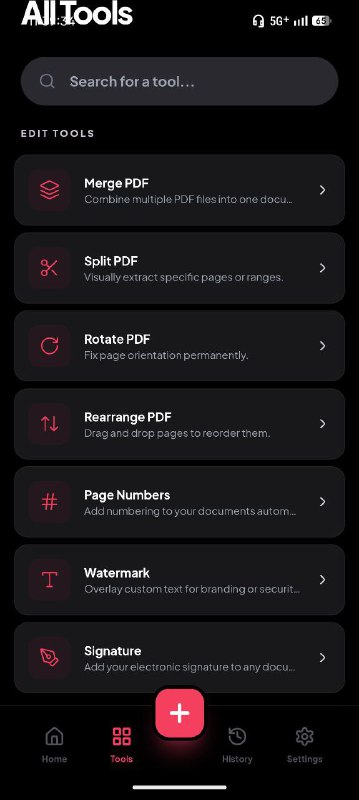
• Modify: Merge multiple files, split pages, rotate, and rearrange. • Optimize: Reduce file size with different quality presets. • Secure: Encrypt files with passwords or remove them locally. • Convert: Convert between PDF and images (JPG/PNG) or plain text. • Sign: Add an electronic signature to your documents safely. • Sanitize: Deep clean metadata (like Author or Producer) to keep your files anonymous.
• Smart Connectivity: Automatically discovers and reconnects to devices even if their IP addresses change, using background network scanning and model verification. • Precision Input: Ultra-low latency input injection (~35-70ms) powered by scrcpy-server, providing smooth navigation and tactile responsiveness. • Long Press Support: Hold buttons (both in UI and keyboard) for secondary actions: • Power: Long-press for Power Menu (Restart/Sleep/Shutdown). • OK/Select: Long-press for Context Menus (options, add to favorites). • Home/Back/Menu/Apps: Long-press for various app-specific shortcuts. • Instant Seeking: Hold any D-pad direction button (mouse or keyboard) for high-speed "Hold-to-Repeat" navigation. • Premium Interface Dashboard: Modern GTK4/Libadwaita design featuring: • Dynamic Dash: A real-time "Now Playing" dashboard with glassmorphism effects and gradients. • Media Control: Play/Pause, Previous/Next track with automatic status synchronization. TV Input Routing: Dedicated dialog for switching HDMI sources, with smart support for multi-device setups (e.g., controlling TV inputs while connected to a streaming box). Desktop Integration: Full MPRIS support for controlling playback from GNOME media widgets, lock screen, and notifications. Customizable Shortcuts: All keyboard shortcuts are fully configurable in Preferences.

 SY
SY