TGViewer
Plus Messenger FAQ Plus Messenger FAQ @plusmsgrfaq · 393K subscribers
Post #54 2.71M
APP INTERFACE TUNING

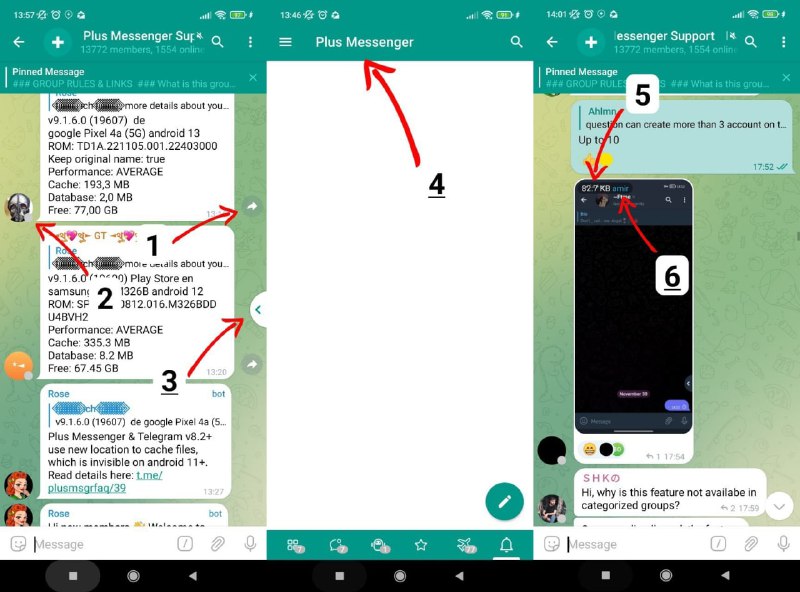
Plus Messenger provides the way to customize its user interface. Here are some settings users often ask about.

1. In order to hide arrow buttons near bottom right corners of message bubbles use P3.3 Show 'direct share' button.
2. In order to hide status circles near users avatars use 1.2.9 Hide user status indicator (in chat list) and 2.2.13 Hide user status indicator (in chats). Use option P1.45 Show user status circle only if online to hide offline-statuses and keep only online.
3. In order to hide quick bar arrow button use P3.12 Show quick bar.
4. In order to change app header use 1.1.5 Header title.
5. In order to hide image size from top left corner of images use P3.26 Hide image size.
6. In order to hide image sender name from the same place use P3.27 Hide pic sender name.

Please note: to turn on mod numbers displaying open any partition of Plus Settings and tap on its title.
  • 👍 4.9K
  • ❤ 1.8K
  • 👎 749
  • 😢 681
More from @plusmsgrfaq
  1. Apr 25, 2026Database clearing Plus Messenger uses local database to store auxillary data which helps a…
  2. Aug 28, 2023Stories in Plus Messenger Telegram now support stories. Here is some information about the…
  3. Jan 17, 2023DOWNLOAD AND UPLOAD BOOST How to get? Download and upload boost features are available onl…
  4. Jan 4, 2023LOGIN BY E-MAIL ADDRESS INSTEAD OF PHONE NUMBER Sometimes Telegram platform switches user…
  5. Oct 5, 2022MUTUAL CONTACTS Plus Messenger provides displaying mark which shows is your contact mutual…
  6. Sep 12, 2022I DO NOT GET VERIFICATION CODE Telegram platform does not send one time password (OTP) by…
Threads Profile ViewerView any public Threads profile without an account.Open ThreadLook →Writing with AI? Make it sound human.Metric37 rewrites AI drafts so they read naturally. Free AI detector, 1,500 words free.Try Metric37 →