Post #252
248

As Safely was released yesterday, let me walk through some of its design features.
Feature 1: Love & respect.
Safely is designed to be loved. We build it for ourselves, our families and friends. Safely does not give investment advice, does not promote earning schemes and other zero-sum trading activities. Instead, Safely provides you with strong security, privacy and peace of mind. Owning your own money with your own cryptographic keys is the prerequisite for your sovereignty and Safely respects that.
Feature 2: Safely Sync as a secure backup.
Wallet recovery phrases are a poor interface for humans handling cryptographic secrets. Keeping copies leaves traces everywhere — your pasteboard, photos, email, paper notes — yet finding one when needed can be hard. Instead of solving the problem of redundant key storage, most wallets leave customers to safeguard those precious secrets.
Safely solves this the hard way: the only creatures capable of handling cryptography are portable computers, so let them do it. Safely Sync automatically synchronizes wallets, address books, settings and whatnot between your personal devices. Lose one, and recover access to your entire crypto account from another.
Sync is end-to-end encrypted: devices securely exchange keys without anyone in the middle. Our servers route updates but cannot see their contents. It is also decentralized: neither the order nor the server matters. The protocol allows syncing over Bluetooth, local WiFi or other servers, including your own. These features aren't supported by the app yet, but may be added in the future.
Safely always keeps backup status clear to the user: a dedicated tab shows all your devices, when they last synced and whether any wallets are missing — so you can easily see whether your wallets are safely stored.
Check out our dedicated article that explains how Sync and accounts work in Safely.
Feature 3: Multiple Wallets.
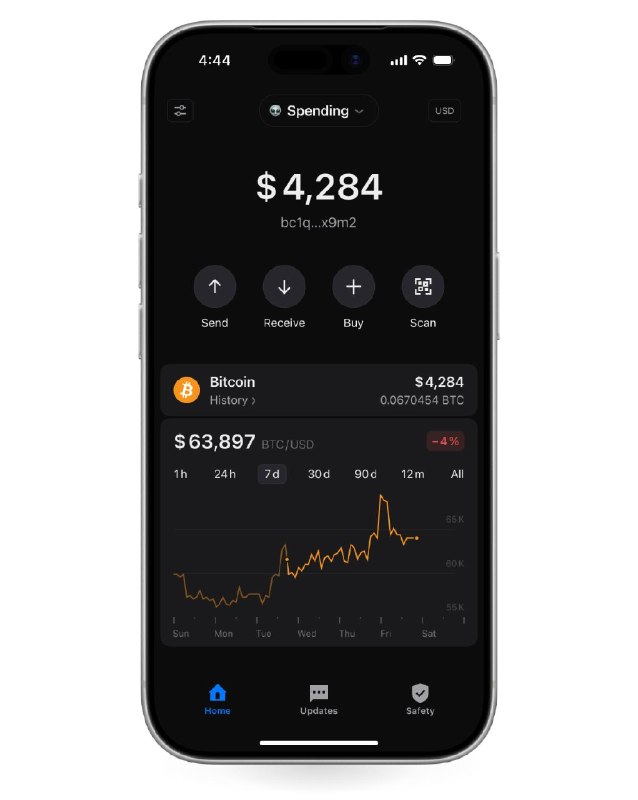
Safely makes it super-easy to keep your money organized. Create separate wallets for spending, for savings, for family and for work. Add watch-only wallets (to avoid keeping keys on your phone) or add a Ledger if you have one.
Switching between wallets takes one click. Drag-and-drop works right there in the list of wallets, so you can arrange them exactly the way you like.
Safely makes sure it is always clear which wallet is currently selected when you send money or view transaction details, so you don't make a mistake. That's why there are also color tags and emojis to choose from: to make them not only personal, but easily recognizable.
Feature 4: Over-engineered price chart.
For some people, the price chart is the most important feature in a wallet. So we made sure the chart gets all the love we could give it.
The horizontal axis is individually crafted for each time interval and aligns on the natural boundaries. So, the 7-day view aligns on the days of the week, the 90-day view — on each month and so on. We also tuned the vertical axis for easy-to-read intervals and less clutter. The 1-month bitcoin price chart will look lovely. The chart is fully interactive. Swipe your finger over the chart to see the historical prices. Use two fingers to see the performance between two points in time.
Aside from the chart, there are many ways to configure how you want to see your balance and transaction amounts, and with what precision. Tap the currency button in the top-left corner to see all the options.
Feature 1: Love & respect.
Safely is designed to be loved. We build it for ourselves, our families and friends. Safely does not give investment advice, does not promote earning schemes and other zero-sum trading activities. Instead, Safely provides you with strong security, privacy and peace of mind. Owning your own money with your own cryptographic keys is the prerequisite for your sovereignty and Safely respects that.
Feature 2: Safely Sync as a secure backup.
Wallet recovery phrases are a poor interface for humans handling cryptographic secrets. Keeping copies leaves traces everywhere — your pasteboard, photos, email, paper notes — yet finding one when needed can be hard. Instead of solving the problem of redundant key storage, most wallets leave customers to safeguard those precious secrets.
Safely solves this the hard way: the only creatures capable of handling cryptography are portable computers, so let them do it. Safely Sync automatically synchronizes wallets, address books, settings and whatnot between your personal devices. Lose one, and recover access to your entire crypto account from another.
Sync is end-to-end encrypted: devices securely exchange keys without anyone in the middle. Our servers route updates but cannot see their contents. It is also decentralized: neither the order nor the server matters. The protocol allows syncing over Bluetooth, local WiFi or other servers, including your own. These features aren't supported by the app yet, but may be added in the future.
Safely always keeps backup status clear to the user: a dedicated tab shows all your devices, when they last synced and whether any wallets are missing — so you can easily see whether your wallets are safely stored.
Check out our dedicated article that explains how Sync and accounts work in Safely.
Feature 3: Multiple Wallets.
Safely makes it super-easy to keep your money organized. Create separate wallets for spending, for savings, for family and for work. Add watch-only wallets (to avoid keeping keys on your phone) or add a Ledger if you have one.
Switching between wallets takes one click. Drag-and-drop works right there in the list of wallets, so you can arrange them exactly the way you like.
Safely makes sure it is always clear which wallet is currently selected when you send money or view transaction details, so you don't make a mistake. That's why there are also color tags and emojis to choose from: to make them not only personal, but easily recognizable.
Feature 4: Over-engineered price chart.
For some people, the price chart is the most important feature in a wallet. So we made sure the chart gets all the love we could give it.
The horizontal axis is individually crafted for each time interval and aligns on the natural boundaries. So, the 7-day view aligns on the days of the week, the 90-day view — on each month and so on. We also tuned the vertical axis for easy-to-read intervals and less clutter. The 1-month bitcoin price chart will look lovely. The chart is fully interactive. Swipe your finger over the chart to see the historical prices. Use two fingers to see the performance between two points in time.
Aside from the chart, there are many ways to configure how you want to see your balance and transaction amounts, and with what precision. Tap the currency button in the top-left corner to see all the options.
- ❤ 14
- 🤡 11
- 👍 3
- 🔥 3
- 🥰 1
- 💩 1
- 🥴 1