TGViewer
Gifted Puma 2026 Gifted Puma 2026 @giftedpuma2026 · 33 subscribers
Post #16 611
AFTER:

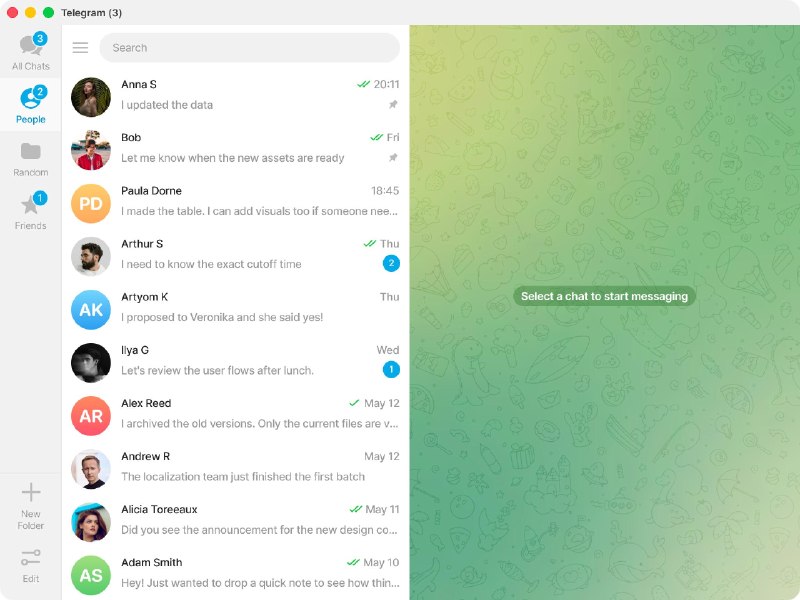
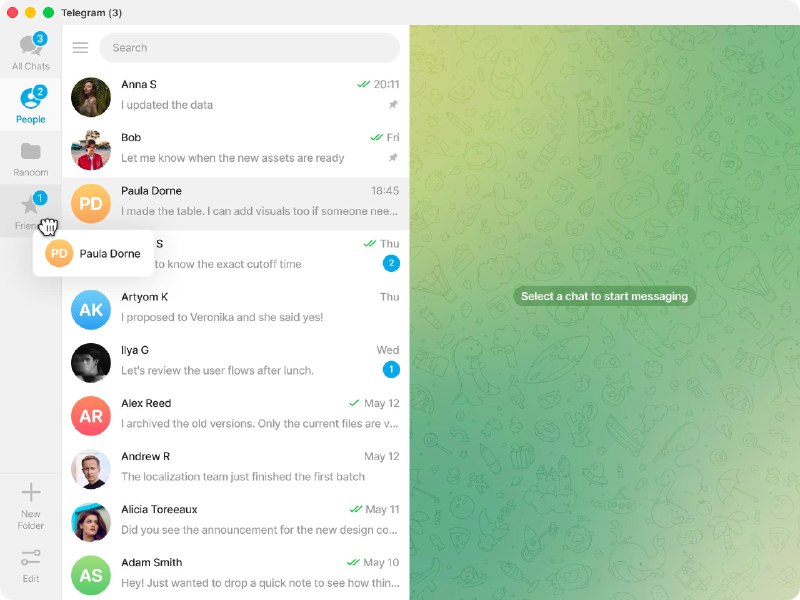
Folders Update — Main Screen

Userflows:
Create Folder - 2 clicks
New Folder → [Name, Chats, etc.] → Create

Add Chats to Folder - 1 click
Just Drag & Drop

View Included Chats - 0 clicks
Just Hover

Design:

1. The folders now have a light background. It gives full focus to the conversations.

2. The Edit button is moved to the bottom of the panel. This separates folders from the actions. It makes the panel cleaner and easier to read.

3. A "New Folder" button is added to the panel. This gives users a direct way to create a folder in a few clicks.

4. The burger menu is moved to the left side of the search bar. This makes it clear that the menu belongs to the whole app and not to the folders panel.
  • ❤ 2
More from @giftedpuma2026
  1. May 17, 2026Gifted Puma 2026 pinned «TABLE OF CONTENTS ——— Folders Update — Telegram Desktop BEFORE: •…
  2. May 17, 2026AFTER: Stars Improvements — Gift Stars & Get Stars Userflow: Gift Stars - 2 taps (Starting…
  3. May 17, 2026BEFORE: Stars Improvements — Gift Stars & Get Stars Userflow: Gift Stars - 5 taps (Startin…
  4. May 17, 2026AFTER: Folders Update — Edit Folder Design: The folder icon was moved to the left side. Th…
  5. May 17, 2026BEFORE: Folders Update — Edit Folder Design: The folder icon on the right is used to chang…
  6. May 17, 2026BEFORE: Folders Update — Main Screen Userflows: 1. Create Folder - 4 clicks Edit → Create…
Threads Profile ViewerView any public Threads profile without an account.Open ThreadLook →Writing with AI? Make it sound human.Metric37 rewrites AI drafts so they read naturally. Free AI detector, 1,500 words free.Try Metric37 →