Here's how you can bypass all detections on UPI and similar appsNote: This guide is for non-root users who use Shizuku (root users have better methods anyway)
First of all, we want to hide Shizuku. For this, install the
beta version of a Shizuku fork that has a "Hide Shizuku from other apps" feature:
https://github.com/thedjchi/ShizukuNow, apps like BHIM, Paytm, DigiLocker etc. detect apps that use Accessibility Services, USB Debugging, etc. To bypass this, we'll be using an app called "Essentials":
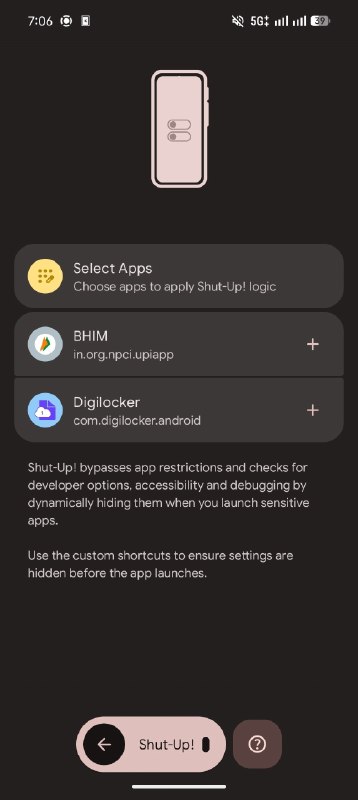
https://github.com/sameerasw/essentialsEssentials has a feature called "Shut-up!" that bypasses all these detections. You'll have to create a shortcut for an app that you want to "Shut Up" and then always launch the app with that shortcut.
The way it works is that when you launch the app, let's say BHIM, with the shortcut created by Essentials, it'll temporarily disable Developer Options, USB Debugging, Wireless Debugging and Accessibility Services (can be configured). Once you close the app, it'll turn everything back on and even attempt to restart Shizuku. You can also enable "App Freeze" to make sure that the app doesn't work in the background once you minimize or close it.
Essentials has a lot of other features as well, but hey, shutting up is sometimes all we need.
Also don't forget to go to settings of Essentials and enable "Use usage access", since the app is bugged rn and developer options don't turn on once you close the app without this being enabled.
It'll still detect LuckyPatcher and Scoop (does for me) since BHIM detects it as "Hooking apps", I don't know about other apps but you would probably have to delete those.
Tl;dr Install
Shizuku Fork, Hide Shizuku, Install
Essentials, Enable Shut Up feature, Add app and create shortcut, Enable "Use usage access" in Essentials settings, Always open the app from shortcut, tada!
🧑💻
@agamtechtricks