Всё самое интересное из мира Python
Сотрудничество, реклама: @devmangx
Работаем с @Spiral_Yuri
РКН: https://clck.ru/3GMMF6
Post #4773
10.9K
 PY
PY @pythonportal
Showing posts older than #4775 · Back to latest

connection_made, data_received, connection_lost. Показывает создание серверов через loop.create_server и create_datagram_endpoint. Сравнивает со Streams и когда их выбирать.pause_writing и resume_writing. Полезно когда важны задержки и много соединений. Для типовых задач чаще хватает Streams.1. http://www.pythonchallenge.com/
2. https://www.hackerrank.com/domains/python
3. https://www.hackerearth.com/practice/python/getting-started/numbers/practice-problems/
4. https://learnpython.org/
5. https://www.w3schools.com/python/python_exercises.asp
6. http://codingbat.com/python
7. https://pythonbasics.org/exercises/
8. https://www.geeksforgeeks.org/python-programming-language/learn-python-tutorial


.exception() вместо .error(), чтобы в лог вместе с исключением попадал tracebackimport logging
LOGGER = logging.getLogger()
try:
{}["not_present"]
except Exception as exc:
LOGGER.error(exc) # только сообщение об ошибке
# -> 'not_present'
try:
{}["not_present"]
except Exception as exc:
LOGGER.exception(exc) # сообщение + traceback
# -> 'not_present'
# Traceback (most recent call last):
# File "my_module.py", line 12, in <module>
# KeyError: 'not_present'

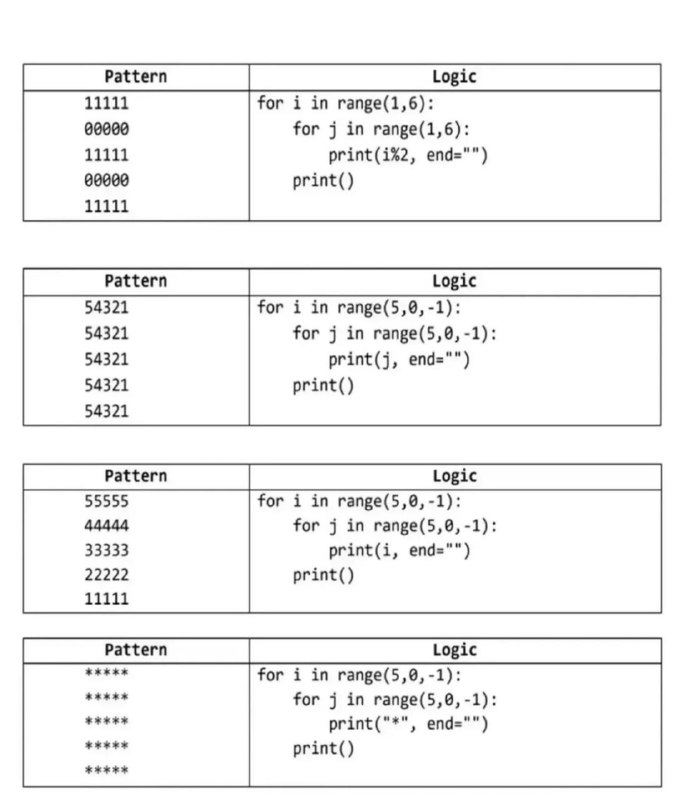

for
pip install matplotlib
import matplotlib.pyplot as plt
categories = ['A', 'B', 'C', 'D', 'E']
values = [10, 15, 7, 12, 20]
colors = ['red', 'blue', 'green', 'orange', 'purple']
plt.figure(figsize=(6,4))
plt.bar(categories, values, color=colors)
plt.xlabel('Categories')
plt.ylabel('Values')
plt.title('Colored Bar Graph')plt.show()
$ git clone https://github.com/NativeSensors/EyeGestures.git
$ cd EyeGestures
$ pip install -r requirements.txt
python3 -m pip install eyeGestures
git config --global user.name "Your Name" git config --global user.email "you@example.com" git config --list git init git clone <repo> git remote add <name> <url> git remote remove <name> git remote rename <old-name> <new-name> git branch git branch <branch-name> git checkout -b <branch-name> git checkout <branch-name> git merge <branch> git rebase <branch> git branch -d <branch-name> git branch -D <branch-name> git add <file> git add . git commit -m "message" git commit --amend git reset <file> git reset HEAD~1 git status git diff git diff --staged git log git log --oneline git show <commit> git blame <file> git stash git stash list git stash apply git stash drop git stash pop git pull git push git push origin <branch> git fetch git fetch --all git tag <tag-name> git tag -a <tag-name> -m "message" git push origin <tag-name> git tag -d <tag-name> git cherry-pick <commit> git rebase -i HEAD~n git reflog git bisect git describe 

umbers = [1, 2, 3]
reversed_numbers = reversed(numbers)

print(list(reversed_numbers))   # [3, 2, 1]
print(list(reversed_numbers))   # [] — итератор уже пуст
reversed_numbers = reversed(numbers)
print(list(reversed_numbers))   # [3, 2, 1] снова работает