TGViewer
Channel Public Channel
Python Projects & Free Books

Python Projects & Free Books

@pythonfreebootcamp

Python Interview Projects & Free Courses

Admin: @Coderfun
Subscribers
40.6K
Photos
655
Videos
1
Links
301

Showing posts older than #425 Β· Back to latest

Older Posts 20 shown
Post #424 5.18K
Scrap Image from google using BeautifulSoup
import requests
from bs4 import BeautifulSoup as BSP

def get_image_urls(search_query):
url = f"https://www.google.com/search?q={search_query}&tbm=isch"
headers = {
"User-Agent": "Mozilla/5.0 (Windows NT 10.0; Win64; x64) AppleWebKit/537.36 (KHTML, like Gecko) Chrome/58.0.3029.110 Safari/537.3"
}
rss = requests.get(url, headers=headers)
soup = BSP(rss.content, "html.parser")

all_img = []
for img in soup.find_all('img'):
src = img['src']
if not src.endswith("gif"):
all_img.append(src)

return all_img

print(get_image_urls("boy"))
  • πŸ‘ 16
Post #420 4.84K
  • πŸ‘ 9
Post #419 5.19K
from turtle import *
import turtle as t

def my_turtle():
# Choices
sides = str(3)
loops = str(450)
pen = 1
for i in range(int(loops)):
forward(i * 2/int(sides) + i)
left(360/int(sides) + .350)
hideturtle()
pensize(pen)
speed(30)

my_turtle()
t.done()
  • πŸ‘ 9
  • πŸ‘Ž 1
Post #418 4.39K
Drawing Beautiful Design Using Python
πŸ‘‡πŸ‘‡
  • πŸ‘ 2
Post #416 4.18K
⌨️ Piechart using matplotlib in Python
  • πŸ‘ 10
Post #413 5.19K
Creating Virtual Environment for Python

Β» Download Python
First you need python installed in your local machine to create virtual environment.
Download Python from Here


Β» Steps to create '.env' folder (virtual environment for python)
1. Navigate to the folder where you want to make your project
Example:

cd D:/code/


2. Open terminal (local terminal, command prompt, or vs code terminal) in that folder

3. Now, use these commands
python --version # Type this and hit enter to verify the python version


# Now use these commands
python -m venv .env


4. Your virtual environment is created in that folder, now activate this virtual environment using this command.

Command for 'Command Prompt':
.\env\Scripts\activate


Command for 'Powershell':
.\env\Scripts\Activate.ps1


Command for Git Bash or WSL:
source \.env\bin\activate


If Powershell gives you error like File cannot be loaded because running scripts is disabled then use this command!
Set-ExecutionPolicy -Scope Process -ExecutionPolicy Bypass


5. Congratulations🎊 Your virtual environment activated now make your project


Happy Coding πŸ‘¨β€πŸ’»
  • πŸ‘ 15
Post #410 5.16K
gui_calender.py1.3 KB
GUI Calender in Python πŸ“…

Do not forget to React ❀️  to this Message for More Content Like this


Thanks For Joining All ❀️
  • πŸ‘ 28
Post #408 6.14K
Exclusion from the queue

The collections.deque() class is a generalization of stacks and queues, and represents a deque. A deque() supports thread-safe, memory-efficient operations for inserting and removing elements of a sequence from either side, with roughly the same O(1) performance in either direction.
  • πŸ‘ 7
Post #407 6.88K
  • πŸ‘ 15
Post #405 7.92K
Top 10 Python Project Ideas πŸ’‘
  • πŸ‘ 18
Post #404 7.16K
Print 2025 Calendar using Python
  • πŸ‘ 22
Post #403 6.71K
⌨️ Learn About Python List Methods
  • πŸ‘ 16
Post #401 6.41K
Python + AI Entrepreneurship Roadmap

Stage 1 – Identify AI Opportunity (Solve Real-World Problems)
Stage 2 – Build Python/AI Skills (ML, Deep Learning)
Stage 3 – Design AI Product (Prototyping with Flask/TensorFlow)
Stage 4 – Validate AI Model (Data Collection & Training)
Stage 5 – Build MVP (Deploy AI App)
Stage 6 – Secure Funding (Pitch to Investors)
Stage 7 – Marketing & Growth (AI-Driven Campaigns)
Stage 8 – Scale Product (Optimize & Automate)

πŸ† – Python AI Entrepreneur
  • πŸ‘ 4
Post #399 5.65K
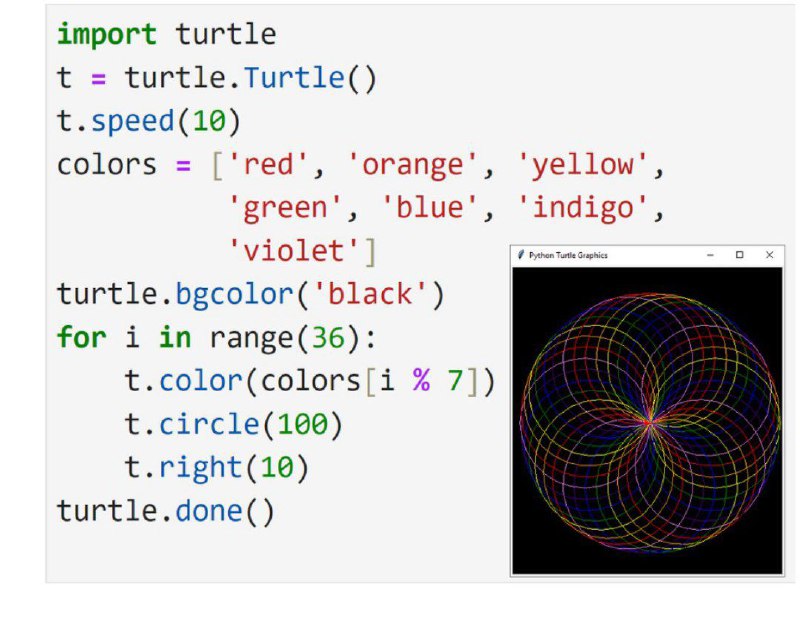
Rainbow circle using Python
  • πŸ‘ 15
Post #395 5.5K
  • πŸ‘ 8
Post #394 6.32K
  • πŸ‘ 15
Post #393 6.33K
  • πŸ‘ 10
Post #392 6.69K
Python for Everything:

Python + Django = Web Development

Python + Matplotlib = Data Visualization

Python + Flask = Web Applications

Python + Pygame = Game Development

Python + PyQt = Desktop Applications

Python + TensorFlow = Machine Learning

Python + FastAPI = API Development

Python + Kivy = Mobile App Development

Python + Pandas = Data Analysis

Python + NumPy = Scientific Computing
  • πŸ‘ 34
Post #389 5.69K
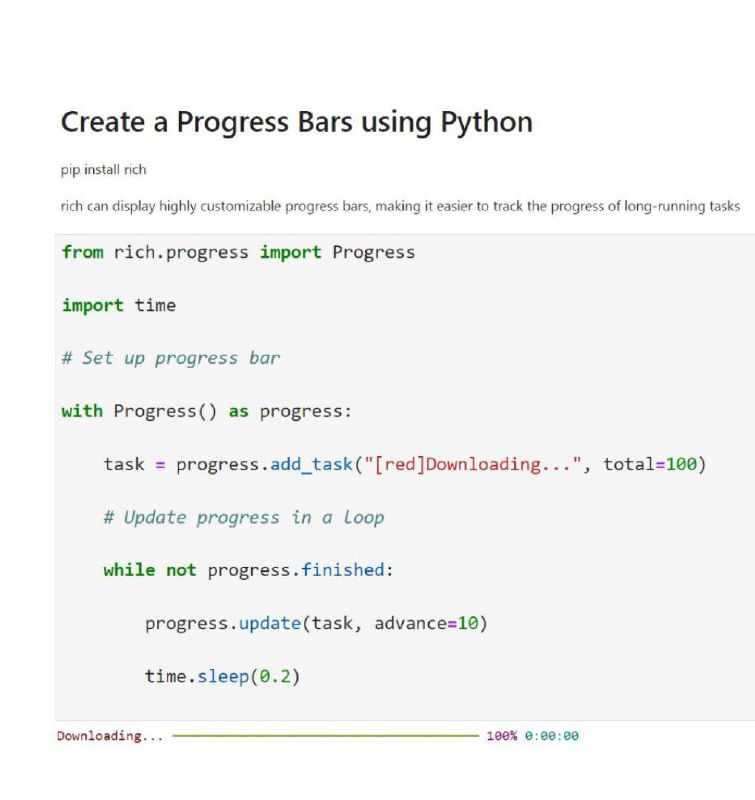
Create a Progress Bars using Python
  • πŸ‘ 17
Older posts β†’
Threads Profile ViewerView any public Threads profile without an account.Open ThreadLook β†’Writing with AI? Make it sound human.Metric37 rewrites AI drafts so they read naturally. Free AI detector, 1,500 words free.Try Metric37 β†’