TGViewer
Channel Public Channel
Python Learning

Python Learning

@python_bds

Python learning resources

Beginner to advanced Python guides, cheatsheets, books and projects.

For data science, backend and automation.
Join ๐Ÿ‘‰ https://rebrand.ly/bigdatachannels

DMCA: @disclosure_bds
Contact: @mldatascientist
Subscribers
5.74K
Photos
587
Videos
2
Links
132

Showing posts older than #354 ยท Back to latest

Older Posts 20 shown
Post #352 1.65K
12 hours of Python course on YouTube

โญ๏ธTime Stampsโญ๏ธ
#1 (00:00:00)โ€‹ Python tutorial for beginners ๐Ÿ
#2 (00:05:57โ€‹) variables โœ˜
#3 (00;17;38โ€‹) multiple assignment ๐Ÿ” 
#4 (00:20:27โ€‹) string methods ใ€ฐ๏ธ
#5 (00:25:13โ€‹) type cast ๐Ÿ’ฑ
#6 (00:30:14โ€‹) user input โŒจ๏ธ
#7 (00:36:50โ€‹) math functions ๐Ÿงฎ
#8 (00:40:58โ€‹) string slicing โœ‚๏ธ
#9 (00:51:52โ€‹) if statements ๐Ÿค”
#10 (00:58:19)โ€‹ logical operators ๐Ÿ”ฃ
#11 (01:04:03โ€‹) while loops ๐Ÿ”„
#12 (01:07:31โ€‹) for loops โžฐ
#13 (01:13:04โ€‹) nested loops โžฟ
#14 (01:17:08) break continue pass โ›”๏ธ
#15 (01:21:06โ€‹) lists ๐Ÿงพ
#16 (01:26:58โ€‹) 2D lists ๐Ÿ“œ
#17 (01:30:47โ€‹) tuples ๐Ÿ“„
#18 (01:33:47โ€‹) sets ๐Ÿด
#19 (01:40:03โ€‹) dictionaries ๐Ÿ“–
#20 (01:47:20โ€‹) indexing ๐Ÿ“‘
#21 (01:53:23โ€‹) functions ๐Ÿ“ž
#22 (02:02:03โ€‹) return statement ๐Ÿ”™
#23 (02:04:51) keyword arguments ๐Ÿ”‘
#24 (02:07:09โ€‹) nested function calls ๐Ÿ–‡
#25 (02:09:40โ€‹) variable scope ๐Ÿ”ฌ
#26 (02:13:23โ€‹) *args ๐Ÿ“ฆ
#27 (02:16:58โ€‹) **kwargs ๐ŸŽ
#28 (02:21:17โ€‹) string format ๐Ÿ’ฌ
#29 (02:33:22โ€‹) random numbers ๐ŸŽฒ
#30 (02:36:43โ€‹) exception handling โš ๏ธ
#31 (02:43:40) file detection ๐Ÿ“
#32 (02:47:28โ€‹) read a file ๐Ÿ”
#33 (02:51:00โ€‹) write a file ๐Ÿ“
#34 (02:53:45โ€‹) copy a file ๐Ÿ–จ
#35 (02:57:05โ€‹) move a file ๐Ÿ—ƒ
#36 (03:01:20โ€‹) delete a file ๐Ÿ—‘
#37 (03:06:15โ€‹) modules ๐Ÿ’Œ
#38 (03:10:26) rock, paper, scissors game ๐Ÿ—ฟ
#39 (03:18:32โ€‹) quiz game ๐Ÿ’ฏ
#40 (03:35:45โ€‹) Object Oriented Programming (OOP) ๐Ÿ
#41 (03:45:06โ€‹) class variables ๐Ÿš—
#42 (03:48:54โ€‹) inheritance ๐Ÿ‘ช
#43 (03:55:30โ€‹) multilevel inheritance ๐Ÿ‘ด
#44 (03:58:32) multiple inheritance ๐Ÿ‘จโ€๐Ÿ‘ฉโ€๐Ÿ‘งโ€๐Ÿ‘ฆ
#45 (04:01:49) method overriding ๐Ÿ™…
#46 (04:04:14โ€‹) method chaining โ›“
#47 (04:08:08) super function ๐Ÿฆธ
#48 (04:12:09โ€‹) abstract classes ๐Ÿ‘ป
#49 (04:19:12) objects as arguments ๐Ÿ
#50 (04:23:20โ€‹) duck typing ๐Ÿฆ†
#51 (04:27:38) walrus operator ๐Ÿฆฆ
#52 (04:31:45โ€‹) functions to variables ๐Ÿ“›
#53 (04:35:21โ€‹) higher order functions ๐Ÿ‘‘
#54 (04:41:06โ€‹) lambda ฮป
#55 (04:45:44โ€‹) sort ๐Ÿ—„
#56 (04:53:22โ€‹) map ๐Ÿ—บ
#57 (04:57:17โ€‹) filter ๐Ÿบ
#58 (05:00:10โ€‹) reduce โ™ป๏ธ
#59 (05:04:54โ€‹) list comprehensions ๐Ÿ“ฐ
#60 (05:10:54) dictionary comprehensions ๐Ÿ•ฎ
#61 (05:18:59โ€‹) zip function ๐Ÿค
#62 (05:23:41โ€‹) if name == 'main' โ“
#63 (05:29:21โ€‹) time module โŒš๏ธ
#64 (05:39:58โ€‹) threading ๐Ÿงต
#65 (05:53:31โ€‹) daemon threads ๐Ÿ˜ˆ
#66 (05:58:19โ€‹) multiprocessing โšก๏ธ
#67 (06:07:15โ€‹) GUI windows ๐Ÿ–ผ
#68 (06:14:38โ€‹) labels ๐Ÿท
#69 (06:24:24โ€‹) buttons ๐Ÿ›Ž
#70 (06:30:44โ€‹) entrybox โŒจ๏ธ
#71 (06:40:15โ€‹) checkbox โœ”๏ธ
#72 (06:49:08โ€‹) radio buttons ๐Ÿ”˜
#73 (07:00:47โ€‹) scale ๐ŸŒก
#74 (07:10:24โ€‹) listbox ๐Ÿ“‹
#75 (07:24:41โ€‹) messagebox ๐Ÿ’ญ
#76 (07:37:17โ€‹) colorchooser ๐ŸŽจ
#77 (07:43:10โ€‹) text area ๐Ÿ“’
#78 (07:48:38โ€‹) open a file (file dialog) ๐Ÿ“
#79 (07:55:33โ€‹) save a file (file dialog) ๐Ÿ’พ
#80 (08:05:17โ€‹) menubar ๐Ÿงพ
#81 (08:15:23โ€‹) frames โšฐ๏ธ
#82 (08:21:30โ€‹) new windows ๐Ÿ—”
#83 (08:25:32โ€‹) window tabs ๐Ÿ“‘
#84 (08:30:52โ€‹) grid ๐Ÿข
#85 (08:39:52โ€‹) progress bar ๐Ÿ“Š
#86 (08:49:48โ€‹) canvas ๐Ÿ–
#87 (09:01:18โ€‹) keyboard events โŒจ๏ธ
#88 (09:05:54โ€‹) mouse events ๐Ÿ–ฑ
#89 (09:11:00โ€‹) drag & drop ๐Ÿ‘ˆ
#90 (09:18:18โ€‹) move images w/ keys ๐ŸŽ
#91 (09:29:13โ€‹) animations ๐Ÿ›ธ
#92 (09:41:31โ€‹) multiple animations ๐ŸŽž
#93 (09:53:04โ€‹) clock program ๐Ÿ•’
#94 (10:01:03โ€‹) send an email ๐Ÿ“ง
#95 (10:07:37โ€‹) run with command prompt ๐Ÿ‘จโ€๐Ÿ’ป
#96 (10:09:53) pip ๐Ÿ—
#97 (10:13:30) py to exe ๐Ÿƒ
#98 (10:17:13โ€‹) calculator program ๐Ÿ–ฉ
#99 (10:31:38โ€‹) text editor program โœ๏ธ
100 (11:05:51) tic tac toe game โญ•๏ธ
101 (11:26:25)โ€‹ snake game ๐Ÿ

๐Ÿ”— Course link
YouTube Python Full Course for free ๐Ÿ #python #tutorial #beginners Python tutorial for beginners full course Python 12 Hour Full Course for free ๐Ÿ (2024): https://www.youtube.com/watch?v=ix9cRaBkVe0 Learn Python in 1 HOUR โฑ: https://www.youtube.com/watch?v=8KCuHHeC_M0 My original Python 12โ€ฆ
  • ๐Ÿ‘ 5
  • โค 2
  • ๐Ÿ‘ 1
Post #350 1.41K
Learn Python
  • ๐Ÿ‘ 11
Post #349 1.45K
  • ๐Ÿ‘ 5
Post #348 1.43K
Machine Learning Tools
  • ๐Ÿ‘ 7
Post #347 1.55K
  • ๐Ÿ‘ 7
Post #346
Python Learning pinned ยซCOMMON TERMINOLOGIES IN PYTHON - PART 1 Have you ever gotten into a discussion with a programmer before? Did you find some of the Terminologies mentioned strange or you didn't fully understand them? In this series, we would be looking at the common Terminologiesโ€ฆยป
Post #345 1.96K
COMMON TERMINOLOGIES IN PYTHON - PART 1

Have you ever gotten into a discussion with a programmer before? Did you find some of the Terminologies mentioned strange or you didn't fully understand them?

In this series, we would be looking at the common Terminologies in python.

It is important to know these Terminologies to be able to professionally/properly explain your codes to people and/or to be able to understand what people say in an instant when these codes are mentioned. Below are a few:

IDLE (Integrated Development and Learning Environment) - this is an environment that allows you to easily write Python code. IDLE can be used to execute a single statements and create, modify, and execute Python scripts.

Python Shell - This is the interactive environment that allows you to type in python code and execute them immediately

System Python - This is the version of python that comes with your operating system

Prompt - usually represented by the symbol ">>>" and it simply means that python is waiting for you to give it some instructions

REPL (Read-Evaluate-Print-Loop) - this refers to the sequence of events in your interactive window in form of a loop (python reads the code inputted>the code is evaluated>output is printed)

Argument - this is a value that is passed to a function when called eg print("Hello World")... "Hello World" is the argument that is being passed.

Function - this is a code that takes some input, known as arguments, processes that input and produces an output called a return value. E.g print("Hello World")... print is the function

Return Value - this is the value that a function returns to the calling script or function when it completes its task (in other words, Output). E.g.
>>> print("Hello World")
Hello World
Where Hello World is your return value.

Note: A return value can be any of these variable types: handle, integer, object, or string

Script - This is a file where you store your python code in a text file and execute all of the code with a single command

Script files - this is a file containing a group of python scripts
  • ๐Ÿ‘ 15
  • ๐Ÿ”ฅ 3
  • โค 1
  • ๐Ÿ‘ 1
Post #344 1.64K
  • ๐Ÿฅฐ 4
  • ๐Ÿ”ฅ 1
Post #341 1.68K
โœ… Install Python IDE [Pycharm IDE]

PyCharm is a cross-platform editor developed by JetBrains. Pycharm provides all the tools you need for productive Python development.
Below are the detailed steps for installing Python and PyCharm

How to Install Python IDE
Below is a step by step process on how to download and install Python on Windows:

Step 1) To download and install Python, visit the official website of Python https://www.python.org/downloads/ and choose your version. We have chosen Python version 3.6.3

Step 2) Once the download is completed, run the .exe file to install Python. Now click on Install Now.

Step 3) You can see Python installing at this point.

Step 4) When it finishes, you can see a screen that says the Setup was successful. Now click on โ€œCloseโ€.

๐Ÿ”— Read Online

#Python #IDE
โž–โž–โž–โž–โž–โž–โž–โž–โž–โž–โž–โž–โž–
Join @python_bds for more cool data science materials.
*This channel belongs to @bigdataspecialist group
Python.org Download Python The official home of the Python Programming Language
Post #339 2.95K
Netflix ML Architecture
  • ๐Ÿ‘ 6
  • ๐Ÿ”ฅ 4
Post #337 1.28K
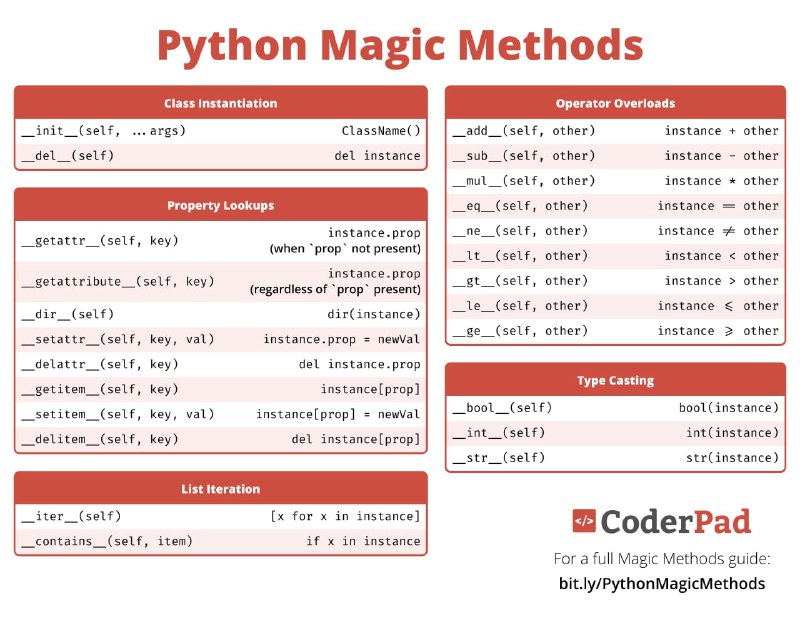
Python Magic Methods Cheat Sheet
  • ๐Ÿ‘ 4
  • ๐Ÿ‘ 2
Post #335 1.67K
Overview of Machine Learning
  • ๐Ÿ‘ 2
Post #334 1.5K
  • ๐Ÿ”ฅ 7
Older posts โ†’
Threads Profile ViewerView any public Threads profile without an account.Open ThreadLook โ†’Writing with AI? Make it sound human.Metric37 rewrites AI drafts so they read naturally. Free AI detector, 1,500 words free.Try Metric37 โ†’