Python learning resources
Beginner to advanced Python guides, cheatsheets, books and projects.
For data science, backend and automation.
Join 👉 https://rebrand.ly/bigdatachannels
DMCA: @disclosure_bds
Contact: @mldatascientist
Post #1292
490
 PY
PY @python_bds
Showing posts older than #1293 · Back to latest

Forwarded from Programming Quiz Channel
Forwarded from Programming Quiz Channel
def outer():
    x = 10
    def inner():
        nonlocal x
        x += 5
        return x
    return inner

f = outer()
print(f())
print(f())
__slots__ ⚡️self.variable = value. But almost none mention what happens under the hood or how it can quietly eat up your RAM.__slots__ fixes that.__dict__. __slots____slots__ tells Python: Do not create a dynamic
__dict__ for this class. Only allow these specific attribute names.
__dict__):class DataPoint:
def __init__(self, x, y, z):
self.x = x
self.y = y
self.z = z
__slots__:class DataPoint:
# Restrict attributes & eliminate __dict__
__slots__ = ("x", "y", "z")
def __init__(self, x, y, z):
self.x = x
self.y = y
self.z = z
__slots__): __slots__ locks down your object structure:point.new_var = 10 will throw an AttributeError). 

user = {
    "name": "Alice",
    "age": 24
}print(user["email"])
KeyError: 'email'
if "email" in user:
    email = user["email"]
else:
    email = None
email = user.get("email")None instead of a crash.email = user.get("email", "Not provided")
👉 get()age = 17
name = "Ted"
skills = ["Python", "AI", "Data Science"]
print(type(age)) # <class 'int'>
print(type(name)) # <class 'str'>
print(type(skills)) # <class 'list'>
isinstance()isinstance() is often more useful when you want to check whether a value belongs to a particular type.age = 17
if isinstance(age, int):
print("Age is an integer")
def calculate_total(price: float, quantity: int) -> float:
    return price * quantity
price: float → expected to be a decimal numberquantity: int → expected to be an integer-> float → expected return typetype(), isinstance(), and type hints can make your Python code more reliable and easier to maintain.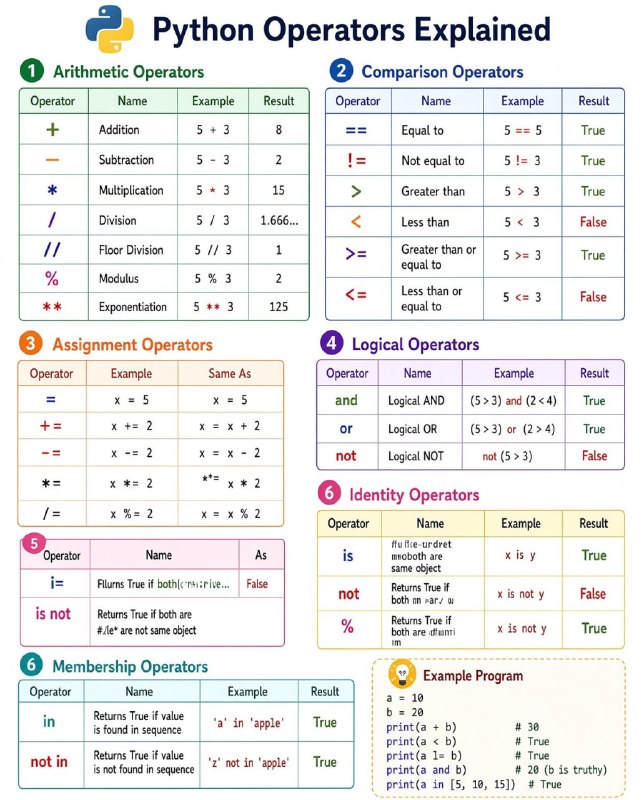
for username in usernames:
    if username in banned_users:
        ...
banned_users is a list, Python checks one element at a time.Alice?
Bob?
Charlie?
David?
...
banned_users is a set. Python doesn't search one by one. It uses a hash table to jump directly to where the value should be.banned_users = [...]
banned_users = {...}TypeError: can only concatenate str (not "int") to str
textwrap - Format long blocks of text.difflib - Compare files or strings.fractions - Work with exact fractions.decimal - High precision decimal arithmetic.calendar - Generate calendars programmatically.uuid - Generate unique IDs.secrets - Create cryptographically secure tokens.pprint - Print nested data structures beautifully.platform - Detect operating system information.getpass - Securely read passwords from the terminal.Forwarded from Programming Quiz Channel
numbers = [1, 2, 3]

numbers.append([4, 5])

print(numbers)
[1, 2, 3, [4, 5]]
numbers = [1, 2, 3]

numbers.extend([4, 5])

print(numbers)
[1, 2, 3, 4, 5]
append() adds one object.extend() adds every element.import subprocess
def get_wifi_passwords():
# To get list of all saved Wi-Fi profiles
profiles_data = subprocess.check_output(['netsh', 'wlan', 'show', 'profiles']).decode('utf-8', errors="ignore").split('\n')
profiles = [line.split(":")[1].strip() for line in profiles_data if "All User Profile" in line]
print("\nSaved Wi-Fi Networks & Passwords:\n" + "-"*40)
for profile in profiles:
try:
# To get password for each profile
profile_info = subprocess.check_output(
['netsh', 'wlan', 'show', 'profile', profile, 'key=clear']
).decode('utf-8', errors="ignore").split('\n')
password = [line.split(":")[1].strip() for line in profile_info if "Key Content" in line]
print(f"Network : {profile}")
print(f"Password: {password[0] if password else 'None / Open Network'}\n")
except:
print(f"Network : {profile}")
print("Password: Unable to retrieve\n")
if __name__ == "__main__":
get_wifi_passwords()
wifi_passwords.pypython wifi_passwords.py