TGViewer
Channel Public Channel
پایتون | Data Science | Machine Learning

پایتون | Data Science | Machine Learning

@python4all_pro

◀️اینجا با تمرین و چالش با هم پایتون رو یاد می گیریم

⏮بانک اطلاعاتی پایتون
پروژه / code/ cheat sheet
+ویدیوهای آموزشی

+کتابهای پایتون
تبلیغات:
@alloadv

🔁ادمین :
@maryam3771
Subscribers
24.2K
Photos
637
Videos
81
Links
503

Showing posts older than #618 · Back to latest

Older Posts 18 shown
Post #611 5.64K
گوگل یک کتابخانه ایجاد رابط کاربری سریع مبتنی بر پایتون( منبع باز ) به نام mesop دارد

که به صورت داخلی در Google برای ایجاد برنامه های داخلی توسط برنامه نویسانی که به خوبی با توسعه front-end آشنا نیستند نیز استفاده می شود

pip3 install mesop

Docs: https://google.github.io/mesop/

GitHub: https://github.com/google/mesop

Checkout the Colab Notebook: https://colab.research.google.com/github/google/mesop/blob/main/notebooks/mesop_colab_getting_started.ipynb

GenAI/LLM support straight out of the box for Chat app in mesop 👉 Demo: https://google.github.io/mesop/demo/


#library
#Python_tricks
#python


🆔 @Python4all_pro
  • 👍 7
Post #609 4.16K
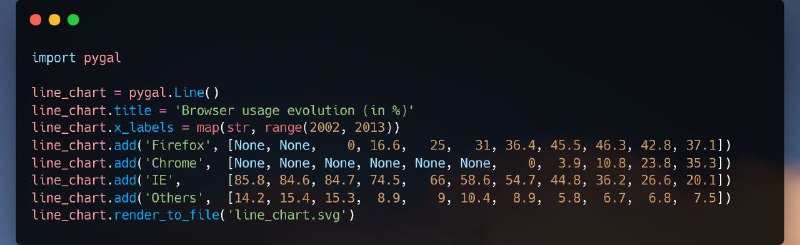
Pygal

؛Pygal یک کتابخانه برای تجسم داده ها با استفاده از SVG است که به شما امکان می دهد انواع نمودارهای تعاملی مانند نمودارهای خطی، ستونی و دایره ای بسازید.

این کتابخانه یک  line_chart ایجاد می کند، چند سری داده به آن اضافه می کند،  عنوان و برچسب های محور x را تنظیم می کند و نتیجه را در یک فایل SVG ذخیره می کند.

#library
#Python_tricks


🆔 @Python4all_pro
  • 👍 7
  • ❤ 2
Post #608 4.29K
افزایش سرعت اجرای Pandas

انویدیا کتابخانه RAPIDS رو معرفی کرده که می‌تونه سرعت اجرای #Pandas رو تا ۱۵۰ برابر افزایش بده. این کتابخانه به‌طور خودکار تشخیص می‌ده که از GPU یا CPU استفاده می‌کنین و نیازی به تغییر کد نیست، فقط کافیه دستورات زیر رو به کدتون اضافه کنین:

%load_ext cudf.pandas
import pandas as pd


GitHub : https://github.com/rapidsai/cudf


#library
#Python_tricks


🆔 @Python4all_pro
  • 👍 7
  • ❤ 1
  • 😍 1
Post #607 3.63K
  تغییر نام خودکار فایل‌ها با پایتون


import os

directory = 'path/to/your/folder'
prefix = 'image_'

# Iterate over files in the directory
for count, filename in enumerate(os.listdir(directory)):
    new_name = f"{prefix}{count}.png"
    src = f"{directory}/{filename}"
    dst = f"{directory}/{new_name}"
   
    # Rename the file
    os.rename(src, dst)


#code


🆔 @Python4all_pro
  • 👍 4
  • ❤ 1
Post #602 4.11K
؛DeepChem - یادگیری عمیق برای کشف دارو، شیمی کوانتومی، علم مواد و زیست شناسی


— pip install deepchem


؛DeepChem مجموعه ای عالی از ابزارهای منبع باز را ارائه می دهد که با استفاده از یادگیری عمیق برای کشف دارو، علم مواد، شیمی کوانتومی و زیست شناسی ساخته دیده است

🖥 GitHub

👉Tutorials
👉 Deep Learning Models from DeepChem


#Python_tricks
#library

🆔 @Python4all_pro
  • 👍 6
  • ❤‍🔥 1
  • ❤ 1
Post #601 4.66K
Python script for PDF audio

# Importing necessary libraries
import PyPDF2
import pyttsx3

# Prompt user for the PDF file name
pdf_filename = input("Enter the PDF file name (including extension): ").strip()                       

# Open the PDF file
try:
    with open(pdf_filename, 'rb') as pdf_file:

        # Create a PdfFileReader object
        pdf_reader = PyPDF2.PdfReader(pdf_file)

        # Get an engine instance for the speech synthesis
        speak = pyttsx3.init()       

        # Iterate through each page and read the text
        for page_num in range(len(pdf_reader.pages)):
            page = pdf_reader.pages[page_num]
            text = page.extract_text()
            if text:
                speak.say(text)
                speak.runAndWait()      

        # Stop the speech engine
        speak.stop()     
        print("Audiobook creation completed.")

except FileNotFoundError:
    print("The specified file was not found.")

except Exception as e:
    print(f"An error occurred: {e}")


#code

🆔 @Python4all_pro
  • ❤ 3
  • ❤‍🔥 1
  • 👍 1
Post #597 6.71K
اگر در حال یادگیری پایتون هستید، یکی از بهترین راه ها تمرین آموخته های خود با حل مسائل مختلف است.

در اینجا لیستی از بیش از 190 پروژه پایتون به همراه کد وجود دارد که به شما در حل مشکلات مختلف و بهبود مهارت های خود در پایتون کمک می کند!

لینک:
https://bit.ly/py-projects-with-code


#پروژه

🆔 @Python4all_pro
  • ❤‍🔥 12
  • 👍 6
  • ❤ 3
Post #594 5.41K
تبدیل تصویر رنگی به خاکستری با پایتون

با استفاده از Python و کتابخانه PIL، تصاویر خود را به خاکستری تبدیل کنید

First, install the necessary module:
pip install pillow


Then, use this script:
from PIL import Image


in_img = 'input.jpg'
out_img = 'grayscale.jpg'

# Open the image
with Image.open(in_img) as img:
# Convert the image to grayscale
grayscale_img = img.convert('L')
# Save the grayscale image
grayscale_img.save(out_img)


#code
#Python_tricks
#library


🆔 @Python4all_pro
  • 🤷‍♂ 7
  • 👍 6
  • 🔥 1
Post #592 4.65K
ChatTTS - generative text2speech model with an emphasis on realism

import ChatTTS
from IPython.display import Audio

chat = ChatTTS.Chat()
chat.load_models()

texts = ["<PUT YOUR TEXT HERE>",]

wavs = chat.infer(texts, use_decoder=True)
Audio(wavs[0], rate=24_000, autoplay=True)


ChatTTS is a text-to-speech model designed specifically for conversational scenarios such as LLM assistant.
ChatTTS supports both English and Chinese (if relevant).


🖥 GitHub
👉 Hugging Face
👉 ChatTTS page

#code
#Python_tricks
#library


🆔 @Python4all_pro
  • 👍 8
Post #590 4.83K
🔖30 Helpful Python Snippets You Should Learn Today


در این مقاله به طور خلاصه 30 قطعه کد کوتاه را مشاهده می کنید که در 30 ثانیه یا کمتر می توانید آنها را درک کرده و یاد بگیرید.
ترفندهای زیر در تمرینات کدنویسی روزانه شما مفید خواهد بود


https://morioh.com/a/271bc88c0100/30-helpful-python-snippets-you-should-learn-today

#code

🆔 @Python4all_pro
  • 🔥 5
  • 👍 2
Post #584 4.44K
حذف بکگراند تصویر با پایتون

# pip install rembg pillow

from rembg import remove
from PIL import Image

input_path = "in.png"
output_path = "out.png"

input = Image.open(input_path)
output = remove(input)
output.save(output_path)


https://github.com/danielgatis/rembg/releases/download/v0.0.0/u2net.onnx

#code


🆔 @Python4all_pro
  • 😍 10
  • 👍 5
Post #578 4.81K
⁉️ تمرین  : به نظر شما گزینه درست کدومه ؟

#code #test

🆔 @Python4all_pro
  • 😍 4
  • ❤ 1
  • 👍 1
Post #569 6.82K
⌨️ Automate File Renaming with Python


import os

# https://t.me/LearnPython3

directory = 'path/to/your/folder'
prefix = 'image_'

# Iterate over files in the directory
for count, filename in enumerate(os.listdir(directory)):
new_name = f"{prefix}{count}.png"
src = f"{directory}/{filename}"
dst = f"{directory}/{new_name}"

# Rename the file
os.rename(src, dst)


#code

🆔 @Python4all_pro
  • 👍 11
  • ❤ 1
  • 🔥 1
Older posts →
Threads Profile ViewerView any public Threads profile without an account.Open ThreadLook →Writing with AI? Make it sound human.Metric37 rewrites AI drafts so they read naturally. Free AI detector, 1,500 words free.Try Metric37 →