◀️اینجا با تمرین و چالش با هم پایتون رو یاد می گیریم
⏮بانک اطلاعاتی پایتون
پروژه / code/ cheat sheet
+ویدیوهای آموزشی
+کتابهای پایتون
تبلیغات:
@alloadv
🔁ادمین :
@maryam3771
Post #352
5.57K
 پا
پا @python4all_pro
Showing posts older than #357 · Back to latest

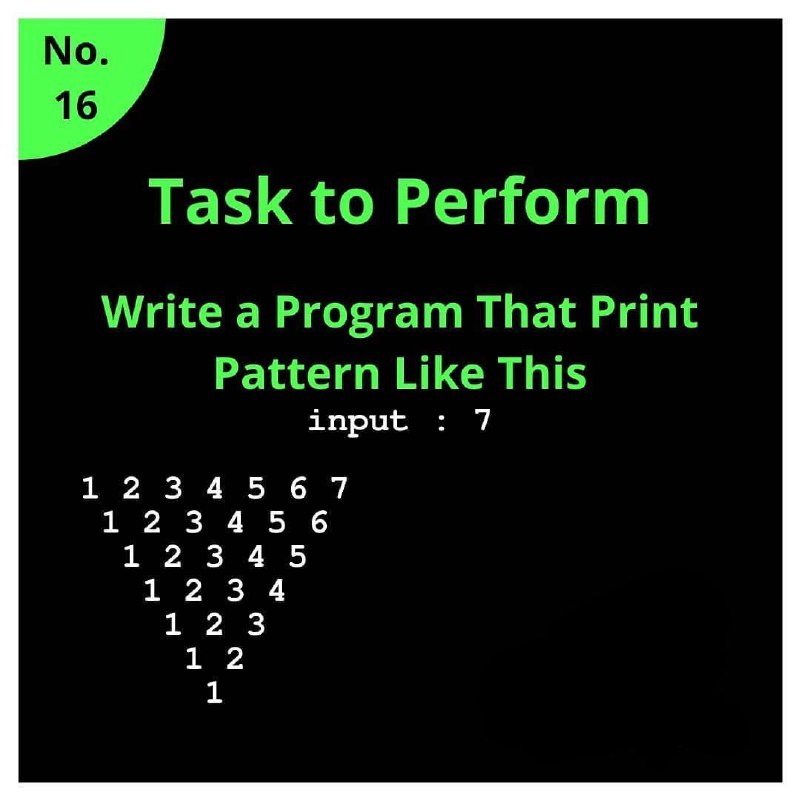
n = 7
for i in range(7):
     print(" " * i, end="")
     for j in range(1, 7-i+1):
         print(j, end=" ")
     print()
pip install psutil
import psutil

battery = psutil.sensors_battery()
plugged = battery.power_plugged
percent = battery.percent

if percent <= 30 and plugged!=True:
    # pip install py-notifier
    # pip install win10toast
    from pynotifier import Notification

    Notification(
        title="Battery Low",
        description=str(percent) + "% Battery remain!!",
        duration=5,  # Duration in seconds
    ).send()
from PIL import Image

im = Image.open("naruto.jpg").convert("RGB")
im.save("naruto.png", "png")
from PIL import Image

im = Image.open("naruto.png").convert("RGB")
im.save("naruto.jpg", "jpeg")
`

n = 7
for i in range(n, 0, -1):
     print(" " * i, end="")
     for j in range(n-i+1):
         print(i, end=" ")
     print()
from PIL import Image
from collections import Counter

# https://t.me/LearnPython3

# Open the image
image = Image.open('input.png')

# Convert the image to a list of RGB tuples
pixels = list(image.getdata())

# Use Counter to count the occurrences of each color
color_counts = Counter(pixels)

# Get the 6 most common colors
top_colors = color_counts.most_common(6)

# Print the extracted colors and their counts
for i, (color, count) in enumerate(top_colors):
    color_block = "\033[48;2;{};{};{}m    \033[0m".format(color[0], color[1], color[2])
    print(f"Color {i + 1}: {color_block} RGB: {color} - Count: {count}")