TGViewer
Channel Public Channel
Phanes Hub

Phanes Hub

@phaneshub

πŸ“š https://docs.phanes.bot
πŸ”— https://phanes.bot/links
πŸ€– @Phanes_bot
Subscribers
47.5K
Photos
68
Videos
1
Links
64

Showing posts older than #116 Β· Back to latest

Older Posts 13 shown
Post #115 15.3K
πŸ•― Charts Update

β€’ Added Support / Resistance levels (with sr)
β€’ Show low / high points
β€’ Show % moves from H/L (with %)
β€’ Added Volatility % index in the header
β€’ Improved MA's/added cross over points (with ma)

β„Ή To access charts, use the /c command. You can also configure your group to display charts by default with /charts on. For a full list of available chart commands, please visit our docs here.
Post #114 16.3K
πŸ’» Phanes Terminal

We have launched the Phanes Terminal which brings real-time call monitoring to your screen through an intuitive terminal-style interface.

Receive instant notifications for new calls, bonding events, and DEX-paid alerts. Easily filter calls by Market Cap, Volume, and more β€” including options to exclude dead coins, losing calls, or non-DEX-paid projects.

β„Ή Access the Terminal within the Phanes DApp by typing /dapp in your group. Currently, only whitelisted groups are authorized, but we'll be rolling out access to all groups soon.


πŸ€“ Learn more in our docs.
Post #108 25K
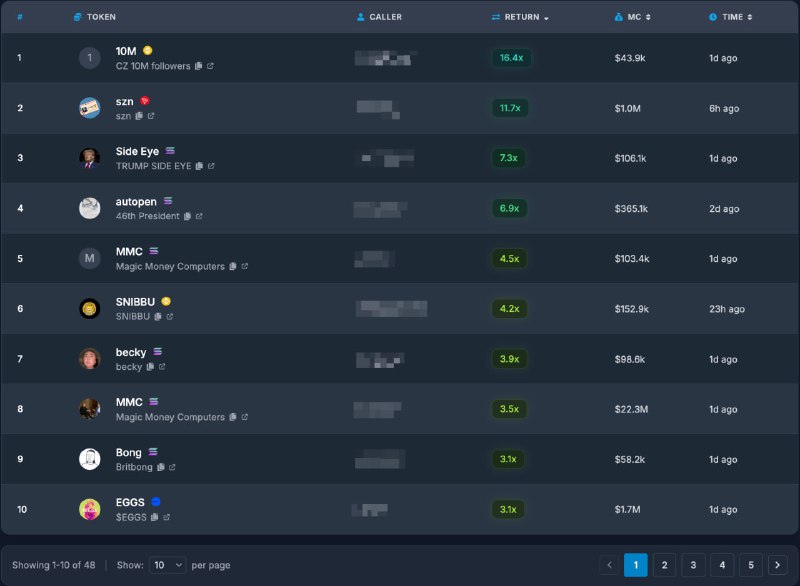
πŸ–₯ Phanes Web Leaderboard (Beta)

We're excited to announce that the web lb has undergone further enhancements.
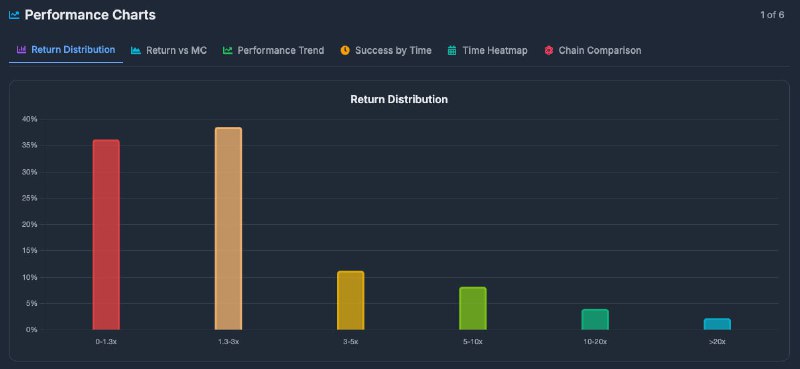
To facilitate more in-depth analysis, we've introduced Performance Charts.
Additionally, several new filter options have been added, including Min/Max ATH, X Return, Called at MC, and more.

To date, over 1,000 groups have been whitelisted. You can check your whitelist status by using the /dapp command. πŸ•Ί
Post #104 23.8K
πŸ–₯ Phanes Web Leaderboard (Beta)

The Phanes Web Interface offers a sleek and intuitive platform for tracking and analyzing calls, seamlessly integrating with your group data to deliver instant updates and in-depth analytics.

You can access it with /dapp.

β„Ή The web leaderboard is currently in beta and only available to whitelisted groups. It will be gradually rolled out to all groups.


Learn more in our docs.
Post #102 23.5K
🚫 Admin Only Mode

Restrict coin queries (make calls) to group admins only.

Use: /admin_only <on/off>

πŸ“ˆ Heatmap (Categories)

Introducing the /hmc command, which generates a category-based heatmap to visualize market distribution across various cryptocurrency sectors.

Learn more in our docs.
Post #101 23K
πŸ“ˆ Market Heatmap

The heatmap provides a visual representation of the cryptocurrency market.

β„Ή Use /hm to access the heatmap. You can also customize the display by specifying the number of top tokens to show, e.g., /hm 50.


Learn more in our docs.
Post #100 21.8K
πŸ•― Charts Update

We've just updated our charts with a new look and added volume functionality & MA's.

β„Ή To access charts, simply use the /c command. You can also configure your group to display charts by default with /charts on. For a full list of available chart commands, please visit our docs here.


🌈 Chart Themes

Customize your charts with a unique theme! Use /ctheme to get started. Learn more about custom themes in our docs.


πŸ’₯ Phanes Stickers

Due to the overwhelming love for Phanes art, we're thrilled to announce the release of an official sticker pack!

Click here to use it ❀️
Post #99 28.5K
πŸ•― Charts by Market Cap

We've added a new feature that allows you to query charts based on market cap. Simply add mc to your query to access this feature.

Command: /c wif mc Β» learn more!


⚑️ AXIOM & NOVA Added

We've added AXIOM and NOVA to the Quick Task section. Set them as your default using /qt Β» learn more!
Post #98 29K
ℹ️ Detailed Queries

Detailed Queries provides additional information for coins listed on Pump.Fun, including the following:

β€’ The total number of coins deployed by the dev.
β€’ The number of coins that bonded.
β€’ The number of coins that hit KOTH.
β€’ Visual indicators


This feature is currently only visible for coins on PF. To enable it by default, you have three options:

a) Append a comma (,) to the end of your query.
b) Use the /detailed on command, which will display detailed queries only for coins less than 1 day old.
c) Use the /pf command.
Post #97 30.8K
新年快乐 | Happy Lunar New Year! 🧧

Our Phanes CNY PNL cards are live, check it out!
Post #96 33.1K
πŸ“† Calendar (Market-Moving Events)

The /cal command has been added. This new feature grants you access to a comprehensive calendar of high-impact economic events.

Commands:
β€’ /cal - Shows this week's USD events.
β€’ /cal d - Shows today's USD events.
β€’ /cal eur - Shows this week's EUR events.
β€’ /cal all - Shows this week's events for all currencies.
β€’ /cal ust+2 or +2 - Shows this week's events in the UST+2 timezone.
β€’ /cal est - Shows this week's events in the EST timezone.

Available currencies:
USD, EUR, GBP, AUD, NZD, CNY, CHF, CAD, JPY

Available timezone codes:
UTC, GMT, EST, PST, CST, MST
Post #95 34.3K
⚠️ Important Notice ⚠️

Beware of fake bots! Only trust the official Phanes bots listed here.

Any other bot claiming to be Phanes is a scam. Stay safe!
Post #94 35.7K
βš™οΈ GitHub Repo Analysis

Analyzes GitHub repositories and provides detailed insights about their health and status.

Provides information about:

β€’ Basic repository stats (stars, watchers, contributors, forks)
β€’ Creation and last update dates
β€’ Repository strengths (pros)
β€’ Potential concerns (cons)


Command: /gh <owner/repo>, e.g. /gh solana-labs/solana
Older posts β†’
Threads Profile ViewerView any public Threads profile without an account.Open ThreadLook β†’Writing with AI? Make it sound human.Metric37 rewrites AI drafts so they read naturally. Free AI detector, 1,500 words free.Try Metric37 β†’