TGViewer
Channel Public Channel
Office Tool Plus 📰

Office Tool Plus 📰

@otp_channel

Office Tool Plus 的官方频道。

Official channel of Office Tool Plus.

频道默认使用静默模式发布消息,只有紧急事情才会发布通知。

群组 (Group):
https://t.me/+h2TKTqoaoAE4MmU1

English group:
https://t.me/joinchat/-YmyEwHZTFJiMTI1

官方网站 (Website):
https://otp.landian.vip
Subscribers
7.16K
Photos
138
Videos
4
Links
211
Recent Posts 20 shown
Post #1329 1.7K
近期我们发现各大视频平台上充斥着各种以 Office Tool Plus 为内容的 Office 安装教学视频。

这本来是一件好事,但经过我们查看后发现,某些视频创作者以圈钱,引流为目的,制作了一些粗制滥造的、与 Office Tool Plus 相关的教学内容。其中不乏各种误导用户的步骤,包括但不限于关闭杀毒软件、以管理员方式运行程序、拒绝更新程序、添加多余的操作步骤、点击不该使用的功能等等。这些内容将一件本来很简单的事情复杂化,增加了用户的使用成本。这种行为不但浪费用户的时间与精力,同时还会误导用户,让用户对我们的软件产生某些误解等。

在此我们提醒大家,请勿随意轻信网络上其它平台/用户发表的、与 Office Tool Plus 相关的内容,包括但不限于教学内容/评价等。无论是错误的教学内容,又或者片面的评价,都有可能导致您或他人对我们的软件产生或大或小的误解。如您有任何问题,请通过我们的官方平台联系我们。

我们的官方博客始终是我们唯一的对外内容平台,QQ/Telegram 群也是我们唯一对外提供技术支持的平台,这些平台都在我们的程序主页中附带了链接。

同时也澄清一下:

- 我们的官方网站下载 Office Tool Plus 不需要花钱,不需要注册任何账号,直接点击即可下载,任何通过网盘/其它平台诱导用户注册账号,开通会员等均为第三方行为,与我们没有任何关系,并且我们也不建议任何人通过这些网盘/其他平台获取 Office Tool Plus。
- 运行 Office Tool Plus 不需要关闭任何杀毒软件,我们的软件安全无毒。
- Office Tool Plus 不需要特意通过右键菜单去以管理员身份运行。
- Office Tool Plus 的每一次更新均为了解决问题/提升使用体验,若不是流量告急,还请勿拒绝更新。拒绝更新可能会导致您在使用过程中遇到某些技术性问题,包括但不限于文件访问失败,文件损坏,Office 无法部署等等。
- 通过 Office Tool Plus 部署 Office 时,很多步骤都可以合并在一起解决,不需要特意清理 Office。不需要特意先下载,再转安装。
- 通过 Office Tool Plus 激活 Office 时,使用命令激活是唯一推荐的方案(除非你对手动步骤很熟悉)。如果激活不成功,请尝试在工具箱页面中修复问题,或改用其它方式激活 Office。

如果大家在使用 Office Tool Plus 的过程中遇到任何问题,请不要犹豫,去看教程/文档,或者直接在我们官方群组中询问问题,这比你问其他人或者问 AI 好多了。
  • 👍 44
  • ❤ 6
  • 👏 5
Post #1328 1.8K
#Update

v11.7.9.0
——————————
English:
- Optimized the image rendering functionality of the Markdown component to support automatic size adjustment based on DPI.
- Improved the performance of loading images.
- Fixed an issue where the file dialog could not be correctly attached to the main window.

Deploy

- Added support for automatically checking and fixing the `SymlinkEvaluation` setting.
- Updated the appearance of the Office downloader.


中文:
- 优化 Markdown 组件的图片渲染功能,支持根据 DPI 自动调整大小。
- 优化了加载图片时的性能。
- 修复了文件对话框无法正确附加到主窗口的问题。

部署

- 支持自动检查并修复 `SymlinkEvaluation` 设置。
- 更新了 Office 下载器的外观。
GitHub Release Office Tool Plus v11.7.9.0 · YerongAI/Office-Tool Change log Optimized the image rendering functionality of the Markdown component to support automatic size adjustment based on DPI. Improved the performance of loading images. Fixed an issue where...
  • 🥰 3
  • ❤ 2
Post #1326 3.59K
我们更新了 KMS 主机列表 页面,现在可以查看到 KMS 主机对应的续期和激活策略。对于大多数 KMS 主机来说,将续期间隔更改为 90-150 天是一个建议的选项,这可以减轻服务器负担。激活间隔则不建议更改,激活间隔过久可能会导致 Office 应用程序激活失败。

什么是续期间隔?

KMS 一次激活的有效期为 180 天。默认情况下,续期间隔被设置为 7 天,这意味着客户端会在 7 天后再次请求 KMS 主机以更新激活状态,直至激活(续期)成功。

什么是激活间隔?

上述提到的条件中,若客户端无法完成激活(续期)请求,则客户端会等待 {激活间隔} 后,重新尝试激活(续期)。例如 7 天后客户端尝试续期,但续期不成功,客户端会等待 2 小时后重试续期,直至续期成功。

如果列表中的信息有误,您可以在评论区留言,以便我们检查更新。如果您想添加新的 KMS 主机,也可以在评论区中留言。
  • ❤ 4
  • 👍 3
Post #1325 3.07K
#Update

v11.6.6.0
——————————
English:
- Fixed an issue where ProgressBar would crash in some cases.
- Optimized the row number display function of DataGrid.

Deploy

- Backticks were added to the source path attribute to prevent accidental escaping by Markdown.

Toolbox

- Fixed an issue where Office files could not be deleted because they were set to read-only.

Check hash

- Supports automatically enabling/disabling SHA3 hashing based on the Windows version.


中文:
- 修复了某些情况下 ProgressBar 异常崩溃的问题。
- 优化了 DataGrid 的行号显示功能。

部署

- 为源路径属性添加了反引号,以防 Markdown 意外转义。

工具箱

- 修复了移除 Office 时,因文件设置了只读属性而无法删除的问题。

哈希值校验

- 支持根据 Windows 版本自动启用/禁用 SHA3 哈希。
GitHub Release Office Tool Plus v11.6.6.0 · YerongAI/Office-Tool Change log Fixed an issue where ProgressBar would crash in some cases. Optimized the row number display function of DataGrid. Deploy Backticks were added to the source path attribute to prevent ...
  • ❤ 5
Post #1324 2.96K
#anniversary

【周年互动】Office Tool Plus 十周年即将到来,这一次,我想和大家以“读评论”的方式,与大家一起互动,回顾这十年来发生的各种事情。欢迎大家在评论区中积极互动哦~ 😘
  • 🥰 29
  • 🎉 5
Post #1321 5.59K
#Update

v11.5.7.0
——————————
English:
- Added support of `AvailabilityTimestampUtc` parameter.
- Added support of `OfficeTenantIds` parameter.
- Added support of `IsSip` parameter. But we don't know what it is, so this version of Office will always be skipped.
- Other bugs fixed and improvements.

Deploy

- Added support of Tenant ID and Tenant Association Key (TAK) parameters.
- The `BestEffortCultureInstall` parameter will be added when installing Office.
- Fixed an issue where certain settings were unexpectedly disabled when deploying Microsoft 365 products.

Toolbox

- When you remove Office, the registry key `HKEY_LOCAL_MACHINE\SOFTWARE\Wow6432Node\Policies\Microsoft\Cloud\Office` will now be deleted.


中文:
- 添加了 `AvailabilityTimestampUtc` 参数的支持。在不符合时间要求时,将会跳过该版本的 Office。
- 添加了 `OfficeTenantIds` 参数的支持。在获取 Office 版本时,将会判断是否符合租户 ID 的要求。
- 添加了 `IsSip` 参数的支持。但由于该参数的具体用途不明确,将会始终跳过该版本的 Office。
- 其他问题修复和代码优化。

部署

- 添加了对租户 ID(Tenant ID)、租户关联密钥(Tenant Association Key)的支持。
- 优化了 XML 配置文件的生成,安装 Office 时将会添加 `BestEffortCultureInstall` 参数。
- 修复了部署 Microsoft 365 系列产品时,某些设置被意外禁用的问题。

工具箱

- 移除 Office 时,现在将会删除 `HKEY_LOCAL_MACHINE\SOFTWARE\Wow6432Node\Policies\Microsoft\Cloud` 中的 `Office` 注册表项。
GitHub Release Office Tool Plus v11.5.7.0 · YerongAI/Office-Tool Change log Added support of AvailabilityTimestampUtc parameter. Added support of OfficeTenantIds parameter. Added support of IsSip parameter. But we don't know what it is, so this version of O...
  • 🥰 4
  • 🔥 2
Post #1320 4.57K
Who know this?

SIP 以前还是拿产品 ID 和 Culture 判断的,现在你直接改成一个 SIP 参数,你让我怎么去猜是啥意思?

所有人安装了 Office 之后再去跑额外的流量升级 Office,你喜欢跑流量你就跑吧。真的是,不是不想兼容,这种不明意义的东西怎么兼容?
  • ❤ 5
Post #1319 3.66K
Office Tool Plus 📰 #Update v11.4.17.0 ——————————— English: - The Markdown library now supports resizing images based on system DPI. - Added support for inserting base64-formatted images in Markdown. - Corrected the program's working directory to ensure compatibility with the…
This version is now available on winget, you can install it via:

winget install Yerong.OfficeToolPlus


Also you can run Office Tool Plus from the command line via OfficeToolPlus or OfficeToolPlus.Console after installed via winget.

With winget, you can quickly download and install Office Tool Plus. However, it's important to note that downloading Office and creating Office ISO files work completely differently in the winget environment.

Each time a new version is released, winget cannot push the latest version immediately, and it may be delayed for 1-5 days.

If you encounter any problems while using the winget version of Office Tool Plus, please let us know as soon as possible.
——————————
此版本的 Office Tool Plus 已在 winget 中可用,以管理员身份运行以下命令可进行安装:

winget install Yerong.OfficeToolPlus


通过 winget 安装后,你可以在命令行中通过 OfficeToolPlus 或 OfficeToolPlus.Console 来运行 Office Tool Plus。

winget 通过 GitHub Release 下载 Office Tool Plus。对于某些用户来说,从 GitHub 下载文件可能会比较艰难。所以如果你通过 winget 下载时很慢,还是建议回到原始的下载方式吧~

需要注意的是,在 winget 环境下运行的 Office Tool Plus,其下载 Office 安装文件和创建 Office ISO 文件的工作方式完全不一样。

每次发布新版本时,winget 也无法及时推送新版本,可能会有 1-5 天的延迟。

如果您在使用 winget 版本的 Office Tool Plus 时遇到任何问题,请及时告知我们,谢谢大家~
  • 👍 9
  • 🥰 3
  • ❤ 2
Post #1318 2.72K
#Update

v11.4.17.0
———————————
English:
- The Markdown library now supports resizing images based on system DPI.
- Added support for inserting base64-formatted images in Markdown.
- Corrected the program's working directory to ensure compatibility with the `winget` environment.
- Other bug fixes and performance improvements.

Deploy

- Modified the logic for detecting local Office installation files.
- When downloading files via the Downloader, the real-time download speed will be displayed instead of the average download speed.
- When performing a clean installation of Office, we will now detect whether products have been correctly added.
- Fixed an issue where the Office architecture would be forced to reset to 32-bit when importing a configuration file that lacks architecture information.
- Fixed an issue where the taskbar progress bar would not reset after canceling an Office download.

Settings

- Added a tooltip for Windows versions to easily view the corresponding system build numbers.


中文:
- Markdown 库现在支持根据系统 DPI 调整图片的大小。
- 支持在 Markdown 中插入 base64 格式的图片。
- 修正程序的工作目录,兼容 `winget` 环境。
- 其它问题修复和性能提升。

部署

- 修改了检测本地 Office 安装文件的逻辑。
- 通过 Downloader 下载文件时,将显示实时下载速度,而不是平均下载速度。
- 全新安装 Office 时,将会检测是否正确添加了产品。
- 修复了导入不包含体系结构信息的配置文件时,Office 体系结构会被强制重置为 32 位的问题。
- 修复了取消下载 Office 后,任务栏进度条不会被重置的问题。

设置

- 为 Windows 版本添加提示框,方便查看 Windows 版本对应的系统版本号。
GitHub Release Office Tool Plus v11.4.17.0 · YerongAI/Office-Tool Change log The Markdown library now supports resizing images based on system DPI. Added support for inserting base64-formatted images in Markdown. Corrected the program's working directory to ...
  • ❤ 3
Post #1317 3.67K
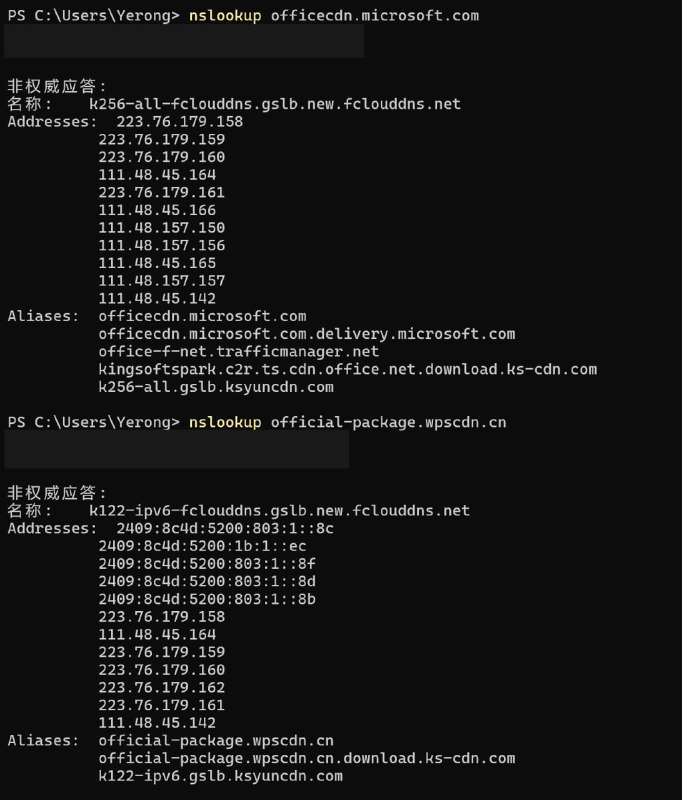
Office Tool Plus 📰 原来是换成了金山云啊() 金山集团旗下,说白了就是和 WPS 同集团,然后 WPS 也是用的金山云。
好消息是,他们终于换了,不再使用金山云 CDN。

但是,天翼云是个什么玩意儿?而且是两个随机分配?还是说正在切换?
  • 🤯 23
  • ❤ 1
Post #1316 3.33K
Office Tool Plus 📰 原来是换成了金山云啊() 金山集团旗下,说白了就是和 WPS 同集团,然后 WPS 也是用的金山云。
我有点好奇,MS 自己是不是知道这个问题?

现在是晚上,我检查 Office 更新,检查不出来,会提示已安装最新版,但是实际上能更新,且 Log 日志中显示微软服务器下发的版本号是空的。但我另一台设备在今天白天是可以检查到的。
  • 🤣 9
Post #1315 4K
Office Tool Plus 📰 由于微软服务器问题,在中国大陆地区下载 Office 可能会变得异常缓慢(尤其是晚上) 目前暂不清楚具体原因,所以我们建议大家都打开【下载后再部署】,避免由于下载速度太慢浪费时间或阻碍其它事情。 —————————— Is the download speed of Office normal?
原来是换成了金山云啊()

金山集团旗下,说白了就是和 WPS 同集团,然后 WPS 也是用的金山云。
  • 🤯 24
  • 😁 2
Post #1314 3.37K
由于微软服务器问题,在中国大陆地区下载 Office 可能会变得异常缓慢(尤其是晚上)

目前暂不清楚具体原因,所以我们建议大家都打开【下载后再部署】,避免由于下载速度太慢浪费时间或阻碍其它事情。

——————————

Is the download speed of Office normal?
Post #1313 4.4K
Office Tool Plus 📰 由于 荆楚理工学院镜像站 长期处于 502 Bad Gateway 的状态,我们决定从下载站列表中移除 荆楚理工学院镜像站。 感谢以上学院的支持,期待我们能够再次重逢。也欢迎别的院校联系我们,我们可以提供院校专属 ISO 镜像以及帮助文档。感兴趣的可以联系我们哦~
emmm,怎么还在三月的版本(不是同步成功了吗)
  • 😨 4
  • 🥱 1
Post #1312 3.88K
#Update

v11.3.12.0
———————————
English:
- Update Downloader to v5.2.0, fixed the issue of potential file corruption.
- Fixed an issue that `Office Tool Plus.Console` failed to verify signature.
- Fixed an issue where message notifications could cause keyboard focus to shift erratically.

Homepage

- The rendering quality of the icons has been improved.

Deploy

- To ensure system security, we will now enforce verification of the digital signature of Office installers.
- Added support for the `TenantId` property.
- Fixed an issue where `Property` elements in XML could not be read correctly.
- Fixed an issue where system disk permissions were not correctly detected in some cases.
- The Office Bitness identifier has been corrected to unify Office Bitness into x86 and x64, without distinguishing between ARM versions.

Toolbox

- When you remove Office, the registry key `HKEY_LOCAL_MACHINE\SOFTWARE\Policies\Microsoft\Cloud\Office` will now be deleted.
- When you remove Office, the registry key `HKEY_USERS\<UserID>\Software\Microsoft\Office` will now be deleted.

Settings

- Windows Server 2022 has been added as an optional Windows version for downloading Office.


中文:
- 更新了 Downloader v5.2.0,解决某些情况下 Office 安装文件可能会损坏的问题。
- 修复了 `Office Tool Plus.Console` 无法使用的问题。
- 修复了消息通知可能会导致键盘焦点乱跑的问题。

主页

- 提升了图标的渲染质量。

部署

- 为了确保系统的安全,现在我们将会强制校验 Office 安装程序的数字签名。
- 新增了对 `TenantId` 属性的支持。
- 修复了 XML 中 `Property` 元素不能正确读取的问题。
- 修复了某些情况下不能正确检测系统盘权限的问题。
- 修正了 Office Bitness 标识,将 Office Bitness 统一为 x86 和 x64,不区分 ARM 版本。

工具箱

- 移除 Office 时,现在会删除 `HKEY_LOCAL_MACHINE\SOFTWARE\Policies\Microsoft\Cloud\Office` 注册表。
- 移除 Office 时,现在会删除 `HKEY_USERS\<UserID>\Software\Microsoft\Office` 注册表。

设置

- 为下载 Office 添加了 Windows Server 2022 作为可选的 Windows 版本。
GitHub Release Office Tool Plus v11.3.12.0 · YerongAI/Office-Tool Change log Update Downloader to v5.2.0, fixed the issue of potential file corruption. Fixed an issue that Office Tool Plus.Console failed to verify signature. Fixed an issue where message notifica...
  • ❤ 9
  • 👍 1
  • 👏 1
Post #1311 3.77K
#Update

v11.2.19.0
——————————
English:
- Support to delete vNext licenses via /rmvlic and /rmvlics commands.
- Optimized Downloader's parameters and information display for faster Office installation file downloads.
- Optimized HttpClient-based download functionality for faster downloads.
- Replaced WixToolset.Dtf.Compression.Cab with Microsoft.Deployment.Compression.Cab.

Deploy

- Support to check whether the volume edition of Office is compatible with the update channel when modifying installation.
- Renamed AccessRuntimeRetail to Access Runtime 365.

Toolbox

- Added the ability to directly verify registry values for potential issues during system environment variable checks.
- Added a restart dialog to allow users to reboot the system immediately after resetting environment variables.
- Fixed an issue where Office Event Viewer failed to format certain JSON text correctly.

Settings

- Added more optional Windows versions for Office download.


中文:
- 支持通过 /rmvlic 和 /rmvlics 删除单个或全部 vNext 许可证。
- 优化了 Downloader 的下载参数和信息显示,可更快地下载 Office 安装文件。
- 优化了基于 HttpClient 实现的下载功能,可更快地下载大文件(包括程序更新和 Office 安装文件)。
- 使用 Microsoft.Deployment.Compression.Cab 替代 WixToolset.Dtf.Compression.Cab。

部署

- 支持在修改安装时检查批量版产品是否与更新通道匹配。
- 将 AccessRuntimeRetail 重命名为 Access Runtime 365。

工具箱

- 检查系统环境变量时,现在能够直接检查注册表的值是否存在问题。
- 添加重新启动的对话框,允许用户在重置系统变量后立即重启系统。
- 修复了 Office 事件查看器无法正确格式化某些 JSON 文本的问题。

设置

- 为下载 Office 添加了更多可选的 Windows 版本。
GitHub Release Office Tool Plus v11.2.19.0 · YerongAI/Office-Tool Change log Support to delete vNext licenses via /rmvlic and /rmvlics commands. For more information please visit the docs. Optimized Downloader's parameters and information display for faster ...
  • 👍 9
  • 🥰 2
Post #1310 3.55K
The problem was resolved, everything works well.

问题已被修复,一切恢复正常。
  • ❤ 4
  • 🤡 4
Post #1309 3.6K
We now have a better way to solve this problem.

Modify any deploy configs as needed, like a normal installation.

Finally, go to Deploy - Advanced settings - Install settings - Office version, select the latest version from the drop down list. Then Start deploy.
  • 🔥 5
  • ❤ 2
Post #1308 3.07K
Office Tool Plus 📰 #Issue Microsoft Server is unavailable ———————————————— This issue prevents users from updating, downloading, or installing Office. We are continuously monitoring the situation and investigating potential solutions. 微软服务出现问题 ———————————————— 此问题会导致用户无法更新、下载、安装…
We have provided two buttons on the homepage for deploying Microsoft 365 and Office LTSC 2024. Use it as needed. If you have any other questions, please contact us.

我们在主页提供了两个临时按钮用于部署 Microsoft 365 和 Office LTSC 2024,请大家按需使用。如有其它问题,请联系我们获取帮助。
  • 👍 7
  • 🥰 1
Older posts →

About this channel

How can I read @otp_channel without a Telegram account?
TGViewer shows the public web preview Telegram publishes for Office Tool Plus 📰: recent posts, photos, videos and the subscriber count, with no app, login or account.
How many subscribers does Office Tool Plus 📰 have?
Office Tool Plus 📰 (@otp_channel) has 7.16K subscribers on Telegram, refreshed roughly every 30 minutes.
Does Office Tool Plus 📰 know I viewed it here?
No. Public channel previews carry no viewer identity, and TGViewer has no accounts or tracking of what you look up.
Threads Profile ViewerView any public Threads profile without an account.Open ThreadLook →Writing with AI? Make it sound human.Metric37 rewrites AI drafts so they read naturally. Free AI detector, 1,500 words free.Try Metric37 →