TGViewer
Channel Public Channel
lbisPaintX.

lbisPaintX.

@lbispaintx

CP: @pupuu_robot.
@PenguSite @Littleetta.
Archive: @lbisPaintxAcv.

jangan unsubss! belum closedown 😐
Subscribers
1.59K
Photos
160
Videos
9
Links
23

Showing posts older than #893 · Back to latest

Older Posts 14 shown
Post #892 3.5K
notes: aku disini jelasin pakai video dan voice over yaa. biar lebih jelas dan aku kurang puas aja kalau kasih tutorial tuh pakai screenshot karena takutnya kalian susah pahamnya. enjoy!
Post #890 3.5K
⠀⠀
ㅤㅤ #TUTORIAL
ㅤㅤㅤ HOW TO MAKE BUBBLE
ON TEXT IN IBIS
. ★

⠀⠀⠀⠀Tutorial by Cece!
ㅤㅤㅤ⠀⠀
Post #878 3.11K
This is the final result. Before and After filter BLURSHARPEN
Post #877 2.9K
ㅤㅤㅤㅤㅤ
Step nine : kalo udah di satuin semua layer nya jadi satu layer, pencet ' filter ' pilih ' buram ' terus geser terus ke kanan sampai nemu ' tumpulkan mask ' terus atur rumus nya kaya aku itu tapi bisa juga sesuai kalian mau lebih keliatan efek sharpen nya atau malah di kurang in efek sharpen nya.
ㅤㅤㅤㅤㅤ
Post #875 2.5K
Ini Before and After buat filter blur nya aja tampa sharpen yaa.
Post #874 2.56K
ㅤㅤㅤㅤㅤ
Satuin semua layer jadi cuma satu layer ya.Kalo udah jadi seperti ini, berarti udah berhasil.

Next step buat jadi in filter nya ada efek sharpen.
ㅤㅤㅤㅤㅤ
Post #872 2.46K
ㅤㅤㅤㅤㅤ
Step seven : atur opacity layer 3 dan 4 kaya aku itu, kalo ga mau terlalu blur bisa turunin opacity layer ke 4 aja ya.

Step eight : terus layer ke 4 di ubah yang tadi nya normal jadi ' hard light '
ㅤㅤㅤㅤㅤ
Post #870 2.43K
ㅤㅤㅤㅤㅤ
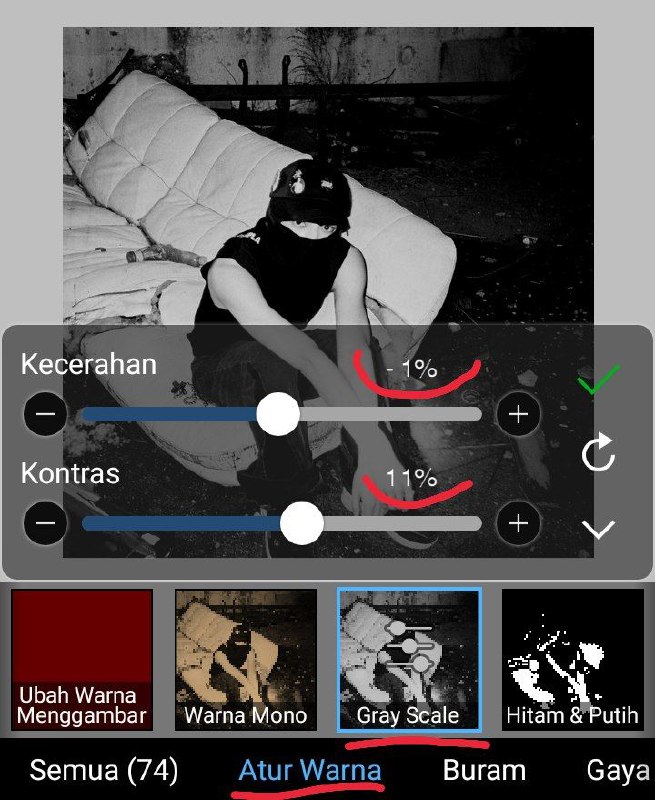
Step five : setelah layer ke 3 di klon, lalu pindah ke layer 4 abis itu pencet ' filter ' terus atur warna pilih ' gray scale ' rumus nya sesuai kaya aku itu ya. Tapi kalo kalian mau lebih pudar bisa atur kontras nya lebih kecil aja.

Step six : pindah ke filter ' buram ' pencet ' buram gaussian ' atur rumus nya kaya aku. Tapi bisa juga atur se suka kalian.

ㅤㅤㅤㅤㅤ
Post #868 2.52K
ㅤㅤㅤㅤㅤ
Step three : kalo udah di klon, add filter colour mono pakai warna ' C1D3A9 ' aku pilih warna hijau supaya keliatan kaya disposable tapi kalo kalian mau pakai warna selain hijau bisa bisa aja.

Step four : klon layer ke 3 yang udah ada filter mono nya.


Jadi sekarang ada 4 layer ya
Sama layer pertama yang di kosong in.
ㅤㅤㅤㅤㅤ
Post #864 2.95K
ㅤㅤㅤㅤㅤ
Step one : Add foto dulu yang kalian mau filterin kaya biasa.

Step two : habis itu klon layer yang ada foto nya tadi.

ㅤㅤㅤㅤㅤ
Post #863 3K
⠀⠀
ㅤㅤ #TUTORIAL
ㅤㅤㅤ HOW TO MAKE FILTER
BLURSHARPEN IN IBIS. ★


⠀⠀⠀⠀Tutorial by Bibim!
ㅤㅤㅤ⠀⠀
Post #856 2.98K
Heavenly beautiful sunday, Painters! Here's Checilia Audreey speaking to introduce herself. I'm delighted to greet you on this occasion after being chosen as one of three administrator here. I'll give you with stuff and resources that are cutesy and have a touch of a handsome design in this section. Thank you for taking the time to know me, and please keep supporting @lbisPaintX, Etta, Bibim, and myself in the next, okaay? ♡₍₍ ◝(・ω・)◟ ⁾⁾♡
ㅤㅤㅤㅤㅤㅤㅤㅤㅤㅤㅤㅤㅤㅤ
Older posts →
Threads Profile ViewerView any public Threads profile without an account.Open ThreadLook →Writing with AI? Make it sound human.Metric37 rewrites AI drafts so they read naturally. Free AI detector, 1,500 words free.Try Metric37 →