TGViewer
Channel Public Channel
Joomla News Italia

Joomla News Italia

@joomlanewsit

Ultime notizie dal mondo Joomla!
Subscribers
113
Photos
1.2K
Videos
0
Links
3.9K
Recent Posts 20 shown
Post #4138 2

Forwarded from Joomla News

📰 Zebchat - Live Chat For Websites
▶️ Live Support
✍️ Sohail Ahmed

Version: 1.1.2
Developer: Sohail Ahmed
License: GPLv2 or later
Type: Free download
Includes: Module
Compatibility: J5, J5 (b/c plugin), J6, J6 (b/c plugin)

⬇️ Download
🌐 Demo
❓ Support
📚 Documentation

ZebChat is live chat for your website. See who is browsing, answer from the web dashboard or the iOS and Android apps, and let an AI assistant handle the easy questions.

This extension adds the ZebChat widget to the public site. The administrator area is left alone. Installing the component also installs the system plugin that prints the widget.

Sign in with a ZebChat account or create one, choose this site, and turn the chat on or off at any time. Visitors see the chat button on every public page. There is no script to paste. Accounts with two-factor authentication finish the code on the same screen.

Inbox, appearance, team, and billing stay in the ZebChat dashboard. Works with Joomla 4 and 5 on PHP 7.4 or newer.

🔗 extensions.joomla.org

#LiveSupport #NewlyListedJoomlaExtensions #JoomlaLatestExtensions #JoomlaExtensions #JED #JoomlaOrg

📣 @joomlanews

Joomla! Extensions Directory™ Zebchat - Live Chat For Websites, by Sohail Ahmed - Joomla Extension Directory ZebChat is live chat for your website. See who is browsing, answer from the web dashboard or the iOS and Android apps, and let an AI assistant handle the easy questions.
Post #4137 2

Forwarded from Joomla News

📰 JoomION Dateien Upload (File Uploader)
▶️ Core Enhancements
✍️ JoomION

Version: 06.01.29
Developer: JoomION
License: GPLv2 or later
Type: Free download
Includes: Component, Module
Compatibility: J5, J6

⬇️ Download
🌐 Demo
❓ Support
📚 Documentation

JoomION Dateien Upload (File Upload) is a secure frontend upload for images, videos and documents. Logged-in users upload files through a module; administrators review and manage them in a backend component.

Features:
- Allowed types: images (jpg, png, gif, webp, bmp, tif), videos (mp4) and documents (pdf, txt, docx, xlsx, pptx)
- Every upload is stored in its own folder per day and user; the whole area is blocked for direct web access
- Backend access for Super Users and Administrators only: view, download (single or ZIP) and delete
- Upload attempts per hour and storage quota per user (both configurable)
- Optional notification e-mail, with the uploaded files attached up to a size limit
- Permissions via the Joomla ACL, optional frontend info text
- German and English language files

Built for Joomla 5 and 6. Free software (GPL v2+): no license key, updates via the native Joomla updater.

🔗 extensions.joomla.org

#CoreEnhancements #NewlyListedJoomlaExtensions #JoomlaLatestExtensions #JoomlaExtensions #JED #JoomlaOrg

📣 @joomlanews
Joomla! Extensions Directory™ JoomION Dateien Upload (File Uploader), by JoomION - Joomla Extension Directory JoomION Dateien Upload (File Upload) is a secure frontend upload for images, videos and documents. Logged-in users upload files through a module; administrators review and manage them in a backend component.
Post #4136 1

Forwarded from Joomla News

📰 JoomION FlipMe (Flip Book)
▶️ Multimedia
✍️ JoomION

Version: 02.01.36
Developer: JoomION
License: GPLv2 or later
Type: Free download
Includes: Component, Module
Compatibility: J5, J6

⬇️ Download
🌐 Demo
❓ Support
📚 Documentation

JoomION FlipMe shows image series and PDF documents on your website as a realistic page-turning book – with page-flip animation, keyboard control and fullscreen mode.

Features:
- Component: manage images in folders, PDF files and style sets (colour schemes) with live preview
- Drag & drop upload, thumbnails and lightbox in the backend
- Module: show an image folder or a PDF as a flipbook or as an embedded file view
- Hard covers, shadows, sizes and display options fully configurable
- Dashboard with live counters and quick access to all FlipMe modules
- Built-in bilingual help (German/English); all libraries bundled locally (no external CDN)

Built for Joomla 5 and 6. Free software (GPL v2+): no license key, updates via the native Joomla updater.

🔗 extensions.joomla.org

#Multimedia #NewlyListedJoomlaExtensions #JoomlaLatestExtensions #JoomlaExtensions #JED #JoomlaOrg

📣 @joomlanews
Joomla! Extensions Directory™ JoomION FlipMe (Flip Book), by JoomION - Joomla Extension Directory JoomION FlipMe shows image series and PDF documents on your website as a realistic page-turning book – with page-flip animation, keyboard control and fullscreen mode.
Post #4135 2

Forwarded from Joomla News

📰 JoomION Framework
▶️ Style & Design
✍️ JoomION

Version: 01.10.00
Developer: JoomION
License: GPLv2 or later
Type: Free download
Includes: Plugin
Compatibility: J5, J6

⬇️ Download
🌐 Demo
❓ Support
📚 Documentation

Template & Framework

JoomION Framework installs the JoomION template together with its framework builder plugin – a flexible, layout-driven template for Joomla 5 and 6.

Features:
- Visual framework builder in the frontend: arrange rows, columns and module positions by drag & drop
- Sidebars, sticky header and further layout options
- Scheme editor for colours, typography, menus, buttons and spacing – with live preview in the template settings
- Detailed font control (family, size, style, underline) for all areas
- Builder access restricted to selected users
- Assets loaded with cache busting; no external dependencies

The template is shipped inside this package (Joomla extension type "package"). Free software (GPL v2+): no license key, updates via the native Joomla updater.

🔗 extensions.joomla.org

#StyleDesign #NewlyListedJoomlaExtensions #JoomlaLatestExtensions #JoomlaExtensions #JED #JoomlaOrg

📣 @joomlanews
Joomla! Extensions Directory™ JoomION Framework, by JoomION - Joomla Extension Directory JoomION Framework installs the JoomION template together with its framework builder plugin – a flexible, layout-driven template for Joomla 5 and 6.
Post #4134 6

Forwarded from Joomla News

📰 Ideal Weather Lite
▶️ Weather
✍️ IdealPC

Version: 9.3.4
Developer: IdealPC
License: GPLv2 or later
Type: Free download
Includes: Module, Plugin
Compatibility: J4, J5, J6

⬇️ Download
🌐 Demo
❓ Support
📚 Documentation

Ideal Weather Lite is the free edition of Ideal Weather: it shows the current weather for your town on your Joomla site (temperature, description, humidity and wind) with clean line icons.

Data comes from OpenWeather (free API key) and is cached on your server, so your site stays fast and keeps showing the last known weather even when OpenWeather does not answer.

Features
- Joomla module "Ideal Weather" (card or flat style, centred or left-aligned, adjustable width)
- Current weather: temperature, town, description, humidity, wind
- Line icons for every weather condition, day and night
- One OpenWeather key for the whole site (system plugin), or one per module
- File cache, fallback data for up to 6 hours, one refresh at a time under load
- "Preview" mode with sample weather, to design the layout before your key is active
- Errors are only shown to administrators, never the API key
- Several modules on the same page
- Languages: English, French, German, Italian, Spanish; the description follows the language of each page on multilingual sites

Need more? Ideal Weather Pro adds a forecast for the next 1 to 5 days, 4 animated icon styles, the real moon phase, feels like, min/max, pressure, sunrise and sunset, custom colours and sizes, a horizontal layout and a YOOtheme Pro element. In the module, these settings are shown greyed out and marked (Pro). To upgrade, simply install Pro over Lite: your modules and settings are kept.

Requirements
Joomla 4.4, 5 or 6 - PHP 8.1 to 8.4 - a free OpenWeather API key (openweathermap.org).

Download and updates
Free download with a free customer account on idealpc.ch, no licence key. Updates are delivered through the Joomla Update System (System > Update > Extensions).

Licensed under the GNU General Public License version 2 or later.

🔗 extensions.joomla.org

#Weather #NewlyListedJoomlaExtensions #JoomlaLatestExtensions #JoomlaExtensions #JED #JoomlaOrg

📣 @joomlanews
Joomla! Extensions Directory™ Ideal Weather Lite, by IdealPC - Joomla Extension Directory Ideal Weather Lite is the free edition of Ideal Weather: it shows the current weather for your town on your Joomla site (temperature, description, humidity and wind) with clean line icons.
Post #4133 4

Forwarded from Joomla News

📰 Ideal Age Gate
▶️ Site Access
✍️ IdealPC

Version: 2.0.3
Developer: IdealPC
License: GPLv2 or later
Type: Free download
Includes: Module, Plugin
Compatibility: J4, J5, J6

⬇️ Download
🌐 Demo
❓ Support
📚 Documentation

Ideal Age Gate is a free age verification (age gate) for Joomla and YOOtheme Pro. Visitors confirm their age before entering the site: wine and spirits shops, breweries, tobacco and vape shops, CBD, adult content or gambling websites.

Features:
- Full-screen window over the page, which stays visible but blurred (or is hidden)
- Yes/No buttons or date of birth (exact age calculation, invalid dates refused)
- Ready-made texts for alcohol, tobacco, CBD, adult content and gambling in English, French, German and Italian; on multilingual sites the text follows the language of the page
- Minimum age of your choice (18, 21…)
- Refusal: message with "Back" and "Leave the site", or redirection to a URL or a menu item
- Answer remembered for the session, until midnight, for X hours or X days (one technical cookie, no personal data)
- Light, Dark, YOOtheme Pro (UIkit card and buttons) or custom colours, with image, logo and icon
- Accessible: dialog role, focus kept inside the window, full keyboard support
- Joomla module for any template, plus a YOOtheme Pro element with live preview in the builder
- Modules of the former "Age Gate 18+" (mod_agegate) are converted automatically with their settings
- Updates through the Joomla Update System, no licence key needed

Requirements: Joomla 4.4, 5 or 6, PHP 8.1+. YOOtheme Pro 4 or 5 for the element (optional).

🔗 extensions.joomla.org

#SiteAccess #NewlyListedJoomlaExtensions #JoomlaLatestExtensions #JoomlaExtensions #JED #JoomlaOrg

📣 @joomlanews
Joomla! Extensions Directory™ Ideal Age Gate, by IdealPC - Joomla Extension Directory Ideal Age Gate is a free age verification (age gate) for Joomla and YOOtheme Pro. Visitors confirm their age before entering the site: wine and spirits shops, breweries, tobacco and vape shops, CBD, adult content or gambling websites.
Post #4132 4

Forwarded from Joomla News

📰 Pennylane for HikaShop
▶️ e-Commerce Integrations
✍️ Hikari Software Team

Version: 1.0.0
Developer: Hikari Software Team
License: GPLv2 or later
Type: Paid download
Includes: Plugin
Compatibility: J4, J5, J6

⬇️ Download
🌐 Demo
❓ Support
📚 Documentation

Features
Sends the invoices and credit notes of HikaShop to Pennylane, the French accounting software and approved e-invoicing platform (PA), as Factur-X files.
The invoice sent is the Factur-X PDF of the PDF Invoice plugin: the same document, number and amounts as the invoice the customer gets.
Creates the customer in Pennylane on their first order, as a company (with its SIREN and VAT number) or as an individual.
The invoices of French business customers go over the e-invoicing network, as the French reform requires; the other sales stay in Pennylane for its e-reporting.
Lets Pennylane match the payment with the invoice on its own for Stripe and bank transfer orders, and marks the others as paid.
Credit notes of refunded orders sent and linked to their invoice.
Never sends an order twice; what failed is tried again by the HikaShop cron, and a "Send to Pennylane" button sends or retries an order from its page.
Can send the orders invoiced since a date, to start with Pennylane in the middle of the year.
Available in English and French.

Installation
1) Install the PDF Invoice plugin (5.2.1 or later), turn Factur-X on and fill your company's details and the legal mentions in it
2) In Pennylane, generate an API token (Settings, Connectivity, Developers) with read and write access to Customer invoices and Customers
3) Download the plugin from our website and install it via the Joomla Extension Manager
4) Enable the plugin and paste the token in its settings
5) In HikaShop, go to System > Order statuses and tick the statuses that send the invoice in the "Pennylane" column
6) Set up the HikaShop cron

Use
This plugin is compatible with all the editions of HikaShop
Requires the PDF Invoice plugin 5.2.1 or later
Requires the PHP cURL extension
Requires a Pennylane subscription with API access (Essentiel or above; not the Collaboratif plan an accountant offers, Starter or Basique)
Compatible with PHP 7.4 minimum
No time limit
Unlimited usage

🔗 extensions.joomla.org

#e-CommerceIntegrations #NewlyListedJoomlaExtensions #JoomlaLatestExtensions #JoomlaExtensions #JED #JoomlaOrg

📣 @joomlanews
Joomla! Extensions Directory™ Pennylane for HikaShop, by Hikari Software Team - Joomla Extension Directory Features Sends the invoices and credit notes of HikaShop to Pennylane, the French accounting software and approved e-invoicing platform (PA), as Factur-X files. The invoice sent is the Factur-X PDF of the PDF Invoice plugin: the same document, number and…
Post #4131 3

Forwarded from Joomla News

📰 CoinGate for HikaShop
▶️ Payment Gateway
✍️ Hikari Software Team

Version: 1.0.0
Developer: Hikari Software Team
License: GPLv2 or later
Type: Paid download
Includes: Plugin
Compatibility: J4, J5, J6

⬇️ Download
🌐 Demo
❓ Support
📚 Documentation

Features
Accept cryptocurrency payments through CoinGate, a MiCA licensed payment institution in the EU.
At the end of the checkout the customer is sent to the CoinGate invoice, pays with Bitcoin, Ethereum, Litecoin, stablecoins or the other coins CoinGate accepts, and comes back to your shop.
CoinGate converts each payment at once to euros, dollars or pounds and pays it to your bank account, so you carry no price risk; you can also keep the coins.
The invoice is priced in the currency of the order, among the 40 or so currencies CoinGate accepts.
The customer's name, country and email prefill the billing details CoinGate must collect under the EU Travel Rule, and a birth date custom field can be sent too.
The order is confirmed both when the customer comes back and when CoinGate sends its callback, and the order is always read back from CoinGate so it cannot be faked.
Refunds made in your CoinGate dashboard update the order: partial refunds in its history, full refunds to the refunded status.
A sandbox setting runs the whole flow on CoinGate's sandbox.

Installation
1) Download the plugin from our website
2) Install it via the Joomla Extension Manager
3) Enable the plugin
4) In HikaShop, go to System > Payment methods, click "New" and select the CoinGate plugin
5) In your CoinGate dashboard, create an API app, and paste its auth token in the payment method
6) Choose the settlement currency and save

Use
Requires a CoinGate merchant account (verified by CoinGate to be paid in euros, dollars or pounds)
Requires a website reachable from the internet so that CoinGate can send it its callbacks
Compatible with all the editions of HikaShop
Compatible with PHP 7.4 minimum
Compatible with all the versions of Joomla
No time limit
Unlimited usage

🔗 extensions.joomla.org

#PaymentGateway #NewlyListedJoomlaExtensions #JoomlaLatestExtensions #JoomlaExtensions #JED #JoomlaOrg

📣 @joomlanews
Joomla! Extensions Directory™ CoinGate for HikaShop, by Hikari Software Team - Joomla Extension Directory Features Accept cryptocurrency payments through CoinGate, a MiCA licensed payment institution in the EU. At the end of the checkout the customer is sent to the CoinGate invoice, pays with Bitcoin, Ethereum, Litecoin, stablecoins or the other coins CoinGate…
Post #4130 3

Forwarded from Joomla News

📰 VM Smart Filters
▶️ VirtueMart extensions
✍️ ToPowerYou.com

Version: 1.1.10
Developer: ToPowerYou.com
License: GPLv2 or later
Type: Paid download
Includes: Module, Plugin
Compatibility: J5, J6

⬇️ Download
🌐 Demo
❓ Support
📚 Documentation

VM Smart Filters is a module for Virtuemart 4 online shop and supports searchable String fields and Property filters for length, width, height and weight.

Ext. Specific Addon - Specific addon that requires VirtueMart ext. to operate

How the filters work

VM Smart Filters displays filters using the public custom fields assigned to your products.
Shoppers select a value or enter a measurement range, and the page reloads with matching products.

Product attributes
Searchable String fields appear as selection lists for attributes such as colour, material and size.

Measurement ranges
Property fields provide minimum and maximum filters for length, width, height and weight.

Combined selections
Products must match every selected filter. For example, Colour: Blue and Size: Large returns products matching both.

🔗 extensions.joomla.org

#VirtueMartextensions #NewlyListedJoomlaExtensions #JoomlaLatestExtensions #JoomlaExtensions #JED #JoomlaOrg

📣 @joomlanews
Joomla! Extensions Directory™ VM Smart Filters, by ToPowerYou.com - Joomla Extension Directory VM Smart Filters is a module for Virtuemart 4 online shop and supports searchable String fields and Property filters for length, width, height and weight.
Post #4129 2

Forwarded from Joomla News

Joomla layout.

When the edit link does not lead to the menu item with the profile, as with the edit button of YOOtheme, the profile of the Category List or Category Blog menu item of the article's category is used.

Tabs with columns (PRO)

Give every tab its own layout: one column, a main and a side column, a side and a main column, or two equal columns. Within a column a field can take the full width, three quarters, half or a quarter, so two dates fit next to each other. On a narrow screen the fields fall back to a width that stays usable.

Hidden fields (PRO)

Hide a field from the author and give it a value. New articles and copies get that value on the server, before Joomla checks the permissions of the category. Existing articles keep their own value.

A news form with the category hidden and set to News always creates news items, whatever the author does.

More in PRO


- Custom fields. Place the published custom fields of your articles in the form, in any tab and column.
- Own labels and help texts. Call the title "Headline" and the intro image "Photo", and tell the author what you expect below the field.
- Free texts. A block of text between the fields, with an optional CSS class: an instruction, a warning or a heading. Its HTML is cleaned when you save the profile and again when the form is shown.
- Default values for every field, not only for category, status, access, language and featured.
- Editor options. Hide the buttons under the editor, and the editor tabs of JCE.
- More buttons. Save as Copy and Move to Trash under the form.


Good to know


- The extension shapes the article form on the site. The article form in the administrator is not changed.
- A profile works on Category List, Category Blog and Create Article menu items of Joomla articles.
- Authors need the usual Joomla permissions to create or edit articles. A profile never gives a user more rights.
- A menu item has one profile. A profile can be used by any number of menu items.


Technical details


- Package with an administrator component, a system plugin and, in PRO, a plugin that adds the custom fields
- Joomla 5.4 or newer and Joomla 6, PHP 8.1 or higher
- One database table, for the form profiles; removed again on uninstall
- No core changes. The form is a plugin layout that a template can override
- Interface in English and Dutch
- Updates through the Joomla update system. An update request to the Joomill update server carries diagnostic headers with site and environment information; the extension installs the shared "Joomill - Update Logging" plugin for this


License

Article Form Builder comes in a FREE and a PRO edition, both licensed under the GNU GPL version 3 or later.

FREE has the builder with tabs, every core field, required fields, fields shown only when creating an article, default values for category, status, access, language and featured, the choice of the Save, Save & Close and Versions buttons, the menu assignment and the enforcement on the server.

PRO adds tabs with two columns, fields at three quarters, half or a quarter of the width, hidden fields with a value, custom fields, your own labels and help texts, free texts, default values for every field, the editor options and the Save as Copy and Move to Trash buttons. A PRO license includes updates and support, and installing PRO over FREE keeps your profiles.


- Documentation: https://www.joomill-extensions.com/documentation/article-form-builder
- Support: https://www.joomill-extensions.com/contact

🔗 extensions.joomla.org

#AuthoringContent #NewlyListedJoomlaExtensions #JoomlaLatestExtensions #JoomlaExtensions #JED #JoomlaOrg

📣 @joomlanews
Joomla Extensions by Joomill Article Form Builder Documentation for Joomill Frontend Editor: install the extension, build form profiles, hide fields with a fixed value and assign profiles to menu items.
Post #4128 2

Forwarded from Joomla News

📰 JoomION Admin URL
▶️ Site Security
✍️ JoomION

Version: 01.00.24
Developer: JoomION
License: GPLv2 or later
Type: Free download
Includes: Plugin
Compatibility: J5, J6

⬇️ Download
🌐 Demo
❓ Support
📚 Documentation

JoomION Admin URL hides your Joomla backend login behind a freely chosen path instead of the well-known /administrator.

Features:
- Choose an inconspicuous admin path (e.g. /office-k3x9qa7m) or generate a random one
- The new path is redirected internally to the administrator login
- Optionally block direct access to /administrator for visitors who did not come via your path
- Quick icon in the administrator dashboard for direct access to the settings
- Safe input validation to prevent locking yourself out
- Built-in bilingual guide (German/English)

An additional layer of protection that reduces automated login attacks – not a replacement for strong passwords or two-factor authentication.

Built for Joomla 5 and 6. Free software (GPL v2+): no license key, updates via the native Joomla updater.

🔗 extensions.joomla.org

#SiteSecurity #NewlyListedJoomlaExtensions #JoomlaLatestExtensions #JoomlaExtensions #JED #JoomlaOrg

📣 @joomlanews
Joomla! Extensions Directory™ JoomION Admin URL, by JoomION - Joomla Extension Directory JoomION Admin URL hides your Joomla backend login behind a freely chosen path instead of the well-known /administrator.
Post #4127 3

Forwarded from Joomla News

📰 JoomION Widerruf - Standalone
▶️ Contacts & Feedback
✍️ JoomION

Version: 01.00.29
Developer: JoomION
License: GPLv2 or later
Type: Free download
Includes: Plugin
Compatibility: J5, J6

⬇️ Download
🌐 Demo
❓ Support
📚 Documentation

JoomION Widerruf adds a withdrawal button ("Widerrufsbutton") to your Joomla site, as introduced for online consumer contracts by EU Directive 2023/2673 (applicable from 19 June 2026).

Features:
- System plugin: shows a prominent withdrawal button on every page and processes the submission
- Automatic confirmation of receipt to the consumer and a notification e-mail to the merchant
- Module: displays the complete withdrawal form with all texts on one page
- Configurable recipient address, texts, colours and button position
- German and English language files

Please check the legal requirements for your business yourself – the extension provides the technical function, not legal advice.

Built for Joomla 5 and 6. Free software (GPL v2+): no license key, updates via the native Joomla updater.

🔗 extensions.joomla.org

#ContactsFeedback #NewlyListedJoomlaExtensions #JoomlaLatestExtensions #JoomlaExtensions #JED #JoomlaOrg

📣 @joomlanews
Joomla! Extensions Directory™ JoomION Widerruf - Standalone, by JoomION - Joomla Extension Directory JoomION Widerruf adds a withdrawal button ("Widerrufsbutton") to your Joomla site, as introduced for online consumer contracts by EU Directive 2023/2673 (applicable from 19 June 2026).
Post #4126 3

Forwarded from Joomla News

📰 JoomION Bilder Upload
▶️ Photos & Images
✍️ JoomION

Version: 05.00.45
Developer: JoomION
License: GPLv2 or later
Type: Paid download
Includes: Component, Module
Compatibility: J5, J6

⬇️ Download
🌐 Demo
❓ Support
📚 Documentation

JoomION Bilder Upload (Image Upload) lets logged-in users upload images from the frontend – securely – while administrators manage everything in the backend. The package installs a frontend upload module and a backend component in one step.

Features:
- Upload form for logged-in users with configurable limits for number of files and file size
- Files are renamed to username_filename and stored in a folder that is locked against direct web access
- Upload rate limit per hour and storage quota per user
- Backend dashboard: view, download (single or as ZIP) and delete uploaded images
- Permissions via the Joomla ACL (who may upload, who may delete)
- Optional info text above or below the upload form
- German and English language files

Built for Joomla 5 and 6. Free software (GPL v2+): no license key, updates via the native Joomla updater.

🔗 extensions.joomla.org

#PhotosImages #NewlyListedJoomlaExtensions #JoomlaLatestExtensions #JoomlaExtensions #JED #JoomlaOrg

📣 @joomlanews
Joomla! Extensions Directory™ JoomION Bilder Upload, by JoomION - Joomla Extension Directory JoomION Bilder Upload (Image Upload) lets logged-in users upload images from the frontend – securely – while administrators manage everything in the backend. The package installs a frontend upload module and a backend component in one step.
Post #4125 2

Forwarded from Joomla News

📰 Administration Logs
▶️ Admin Reports
✍️ Chat-Loupe

Version: 1.2.0
Developer: Chat-Loupe
License: GPLv2 or later
Type: Free download
Includes: Module
Compatibility: J5, J6

⬇️ Download
🌐 Demo
❓ Support
📚 Documentation

Administration Logs gives Joomla administrators quick access to log files directly from the backend, with real-time monitoring, instant filtering and secure maintenance tools.


Administration Logs allows Joomla administrators to access and manage log files directly from the backend.
Log files are automatically detected and displayed with their size and last modification date. Administrators can open logs in a modal window, search their contents instantly and enable automatic refresh for real-time monitoring.
The module also provides maintenance tools to download individual logs, download several files as a ZIP archive, clear log contents or safely delete obsolete files.
Main features:
- Automatic detection of Joomla log files
- Direct log viewing in a modal window
- Instant search and filtering
- Manual refresh and live automatic refresh
- Download individual log files
- Download all available logs as a ZIP archive
- Clear log file contents
- Safely delete log files
- Configurable maximum read size for large log files
- Joomla ACL and CSRF protection
- English and French interface
- Compatible with Joomla 5 and Joomla 6
Administration Logs provides a simple and convenient way to monitor errors, events and technical activity without using FTP or a server file manager.

🔗 extensions.joomla.org

#AdminReports #NewlyListedJoomlaExtensions #JoomlaLatestExtensions #JoomlaExtensions #JED #JoomlaOrg

📣 @joomlanews
Joomla! Extensions Directory™ Administration Logs, by Chat-Loupe - Joomla Extension Directory Administration Logs gives Joomla administrators quick access to log files directly from the backend, with real-time monitoring, instant filtering and secure maintenance tools.
Post #4124 4

Forwarded from Joomla News

Typical Workflow

Administrator places the website in offline mode.
Administrator configures a secret access key.
Plugin generates a secure access URL.
Authorized user receives the URL.
User accesses the frontend through the secure link.
User reviews and tests the website.
User logs out when testing is complete.
Workflow Example: Secure Access URL → Login → Frontend Access → Testing & Review → Logout

This approach allows development and quality assurance work to continue without exposing the website to the public.

Administrator Controls
The Joomla Administrator area remains fully accessible regardless of whether the website is online or offline.

Administrators can:


- Enable or disable Joomla offline mode
- Update maintenance page content
- Change maintenance images
- Edit contact information
- Manage social media links
- Configure background settings
- Generate or update secret access keys
- Configure maintenance session duration
- Test frontend access permissions


Perfect For
JC Maintenance is ideal for:


- Joomla website administrators
- Joomla developers
- Web development agencies
- Website maintenance providers
- QA and testing teams
- Technical support teams
- Website owners
- Clients reviewing development work
- Staging and production environments


Real-World Use Cases

Website Redesign
Keep the public website offline while clients review the new design.

Joomla Updates
Safely test Joomla updates before reopening the website to visitors.

Extension Testing
Verify extension functionality without exposing unfinished work.

Client Review Sessions
Provide temporary access to clients for approval and feedback.

Quality Assurance
Allow QA teams to test functionality while visitors see the maintenance page.

Development Projects
Enable developers to continue frontend testing during maintenance windows.

Benefits
With JC Maintenance you can:


- Keep your website private during development
- Allow clients to review work securely
- Simplify testing and quality assurance
- Avoid repeatedly switching between online and offline modes
- Present a professional maintenance page to visitors
- Maintain complete control over frontend access
- Protect unfinished work from public visibility


What Makes JC Maintenance Different?
Most maintenance and under-construction extensions focus solely on displaying a maintenance page.

JC Maintenance goes further by combining:


- Dynamic maintenance page design
- Secret-key-based frontend access
- Secure access URLs
- Login and logout functionality
- Temporary access sessions
- Joomla offline mode integration
This makes it an ideal solution for agencies, developers, testers, and clients who need secure frontend access while the website remains unavailable to the public.


Summary
JC Maintenance is more than a simple maintenance page extension for Joomla.

It provides a professional maintenance experience for visitors while giving administrators complete control over who can access the frontend during maintenance periods.

With customizable maintenance content, secure access URLs, temporary frontend sessions, login and logout controls, and seamless Joomla offline mode integration, JC Maintenance delivers a practical and secure solution for website development, testing, updates, and client reviews.

Whether you are a Joomla developer, agency, administrator, tester, or website owner, JC Maintenance helps you maintain complete control over your website during maintenance without exposing unfinished work to the public.

🔗 extensions.joomla.org

#Offline #NewlyListedJoomlaExtensions #JoomlaLatestExtensions #JoomlaExtensions #JED #JoomlaOrg

📣 @joomlanews
Joomla! Extensions Directory™ JC Maintenance, by Abdulgani Tumbi - Joomla Extension Directory Joomla Maintenance Mode Page with a Secret Access Link When a Joomla website is undergoing maintenance, updates, redesign work, or development, it is often necessary to place the site in offline mode.
Post #4123 3

Forwarded from Joomla News

files, text and CSV files, MP3, M4A, OGG and WAV audio, and MP4, WebM and MOV video.


- The same rules apply as for images: inside the allowed folders only, and the file type must match its extension.
- You set a maximum file size. A larger file is skipped and reported in the log.
- A link to a mirrored file keeps pointing at the target site, also with Rewrite Relative Links on.


Dry run first

Switch on Dry Run and the task simulates a run without writing anything to the database or downloading any files. The task log shows which articles would be created, updated or deleted, and which images and files would be downloaded. The switch turns itself off after one run, so the next scheduled run is a real one.

Custom fields come along

Switch on Sync Custom Fields and the custom field values of every article are copied too.


- A field on the source is matched to the field with the same name on the target site. When the names differ, a field mapping connects them.
- Both fields must have the same type. A field without a counterpart is skipped and reported in the log.
- Supported types: text, textarea, editor, URL, integer, number, calendar, color, list, radio, checkboxes, media and media file.
- The image or file of a media field is mirrored along with it.


More control


- Removed articles. When an article no longer exists on the source, move the local copy to the trash, unpublish it or delete it permanently. Or leave it alone.
- Incremental sync. Only ask the source for articles changed since the last successful run. This saves many API requests on a large site.
- Force resync. Process every article again, once, regardless of its modification date.
- Rewrite relative links. Point relative links in the article back to the source site.
- Filter article HTML. Scripting is removed from the article HTML before it is stored. On by default.
- Schema.org data. Mirror the structured data of each article (needs Joomla 6.2 or newer on the source).
- Logging. Choose a log level and write every run to administrator/logs/contentsync.php, next to the task log of the scheduler.


Good to know


- The Web Services API must be reachable on the source site, with a user token that may read articles.
- The plugin goes on the target site only.
- Changes you make to a synced article on the target site are overwritten when the article changes on the source.
- Custom fields are not created for you. Create them on the target site first, with the same name and type as on the source.


Technical details


- Task plugin for the Joomla Task Scheduler, built on the namespaced Joomla plugin architecture with a service provider
- Joomla 5 and 6, PHP 8.1 or higher
- One database table that links source articles to local articles; removed again on uninstall
- No template overrides, no core changes


License

ContentSync comes in a FREE and a PRO edition, both licensed under the GNU GPL version 3 or later.

FREE creates and updates articles into one category on a schedule, with a filter on state and on one source category, image mirroring, the dry run, force resync and logging. Scripting is filtered out of the article HTML in both editions.

PRO adds filtering on several categories and on tag, language, featured and workflow stage, the mappings for categories, tags, authors and access levels, custom fields, documents, audio and video with several media folders, the handling of removed articles, incremental sync, Schema.org data and link rewriting. A PRO license includes updates and support, and installing PRO over FREE keeps your task settings.


- Documentation: https://www.joomill-extensions.com/documentation/contentsync
- Support: https://www.joomill-extensions.com/contact

🔗 extensions.joomla.org

#DataImportExport #NewlyListedJoomlaExtensions #JoomlaLatestExtensions #JoomlaExtensions #JED #JoomlaOrg

📣 @joomlanews
Post #4122 2

Forwarded from Joomla News

📰 DX YouTUBE Channel
▶️ Social Web
✍️ Trey Braid

Version: 1.3.0
Developer: Trey Braid
License: GPLv2 or later
Type: Paid download
Includes: Module
Compatibility: J5, J6

⬇️ Download
🌐 Demo
❓ Support
📚 Documentation

DX YOUTUBE CHANNEL
DX YouTube Channel is a flexible YouTube display module for Joomla 5 and Joomla 6, designed to showcase channel videos and playlists in clean, responsive layouts.

The module can be used with or without a YouTube Data API key, giving site owners the choice between simple keyless setup or expanded YouTube API functionality.

Display your videos in a responsive gridded layout, or feature a main video player with a grid of additional videos below. Built-in layout controls make it easy to customize the presentation for desktop, tablet, and mobile devices.

Key Features


- Joomla 5 and Joomla 6 compatible
- Use with or without a Google / YouTube API key
- Display YouTube channel videos
- Display YouTube playlists
- Responsive gridded video layouts
- Main player with video grid below
- Responsive layout controls
- Built-in video playback
- YouTube playlist support
- Flexible thumbnail and display options
- Mobile-friendly responsive design
- Easy Joomla module configuration


Keyless Mode provides a simple setup with no Google Cloud configuration required, while API Key Mode provides access to expanded YouTube Data API features such as larger video collections and playlist discovery.

DX YouTube Channel gives Joomla site owners a modern and flexible way to integrate

🔗 extensions.joomla.org

#SocialWeb #NewlyListedJoomlaExtensions #JoomlaLatestExtensions #JoomlaExtensions #JED #JoomlaOrg

📣 @joomlanews
Joomla! Extensions Directory™ DX YouTUBE Channel, by Trey Braid - Joomla Extension Directory DX YOUTUBE CHANNEL DX YouTube Channel is a flexible YouTube display module for Joomla 5 and Joomla 6, designed to showcase channel videos and playlists in clean, responsive layouts.
Post #4121 1

Forwarded from Joomla News

📰 Logo Grid DX Showcase
▶️ Photos & Images
✍️ Trey Braid

Version: 1.3.0
Developer: Trey Braid
License: GPLv2 or later
Type: Paid download
Includes: Module
Compatibility: J5, J6

⬇️ Download
🌐 Demo
❓ Support
📚 Documentation

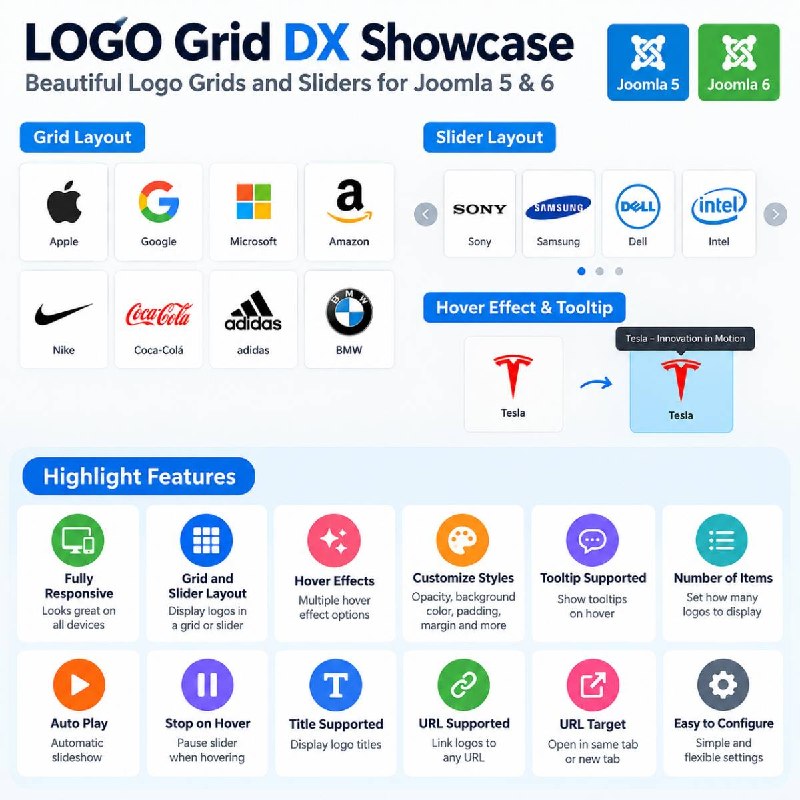
LOGO GRID DX SHOWCASE
LOGO Grid DX Showcase is a flexible and responsive Joomla module designed to showcase company logos, sponsors, partners, clients, brands, and affiliates in attractive grid or slider layouts.

Built for Joomla 5 and Joomla 6, LOGO Grid DX Showcase provides simple backend controls that allow you to create professional logo displays without custom coding. Customize the appearance, control the number of displayed items, add hover effects and tooltips, and link each logo to an external or internal website.

Whether you're creating a sponsor wall, partner showcase, client portfolio, or scrolling brand carousel, LOGO Grid DX Showcase provides a responsive solution that works across desktop, tablet, and mobile devices.

Highlight Features
Joomla 5 & Joomla 6 Compatible

Fully Responsive – Optimized for desktop, tablet, and mobile devices

Grid & Slider Layouts – Display logos in a traditional grid or responsive slider

Hover Effects – Add visual effects when visitors hover over logos

Custom Styling – Control opacity, background color, padding, margins, and other display options

Tooltip Support – Display additional information when hovering over a logo

Number of Items – Control how many logos are displayed

Auto Play – Automatically advance logos when using the slider layout

Pagination Support – Provide easy navigation through logo collections

Stop on Hover – Pause automatic slider movement when a visitor hovers over the showcase

Title Support – Display titles with individual logos

URL Support – Link each logo to an internal or external URL

URL Target Options – Choose whether links open in the same window or a new window

Flexible Image Support – Supports PNG, JPG, JPEG, and WEBP logo images

Easy Administration – Manage logos and showcase settings directly from the Joomla administrator

LOGO Grid DX Showcase makes it easy to build clean, modern, and responsive logo displays for sponsors, business partners, advertisers, clients, associations, and organizations throughout your Joomla website.

🔗 extensions.joomla.org

#PhotosImages #NewlyListedJoomlaExtensions #JoomlaLatestExtensions #JoomlaExtensions #JED #JoomlaOrg

📣 @joomlanews
Joomla! Extensions Directory™ Logo Grid DX Showcase, by Trey Braid - Joomla Extension Directory LOGO GRID DX SHOWCASE LOGO Grid DX Showcase is a flexible and responsive Joomla module designed to showcase company logos, sponsors, partners, clients, brands, and affiliates in attractive grid or slider layouts.
Post #4120 1

Forwarded from Joomla News

📰 GEO Schema Forge for Joomla
▶️ SEO & Metadata
✍️ BeraLabs

Version: 1.1
Developer: BeraLabs
License: GPLv2 or later
Type: Free download
Includes: Module, Plugin
Compatibility: J4, J5, J6

⬇️ Download
🌐 Demo
❓ Support
📚 Documentation

GEO Schema Forge is an advanced, high-performance system plugin designed specifically for Joomla 4 and Joomla 5. It empowers websites and local businesses to dominate both traditional search engines (Google, Bing) and next-generation Generative AI search systems (SearchGPT, Perplexity AI, Claude, Google Gemini) through deep semantic structuring.

Key Features:

Full Semantic Knowledge Graph (@graph): Seamlessly interconnects Organization, LocalBusiness, ProfessionalService, WebSite, WebPage, and Service nodes in a unified JSON-LD schema.
Precise Geo & Local SEO Targeting: Native support for GeoCoordinates (latitude/longitude), multi-day OpeningHoursSpecification, PostalAddress, telephone, price range, and service area coverage.
Native /llms.txt AI Endpoint: Generates a clean Markdown-based /llms.txt standard route that allows AI search crawlers to accurately parse and cite your business offerings.
Zero-Overhead & Modern Joomla Architecture: Built following native PSR-4 standards, Dependency Injection Container (services/provider.php) without any third-party framework overhead.
Multilingual Ready: Fully translated into English (en-GB) and Italian (it-IT) with Joomla standard INI language structures.
100% Schema.org & Google Rich Results Validated: Generates zero-error structured data compatible with Google Rich Results Test and Schema Validator.

Requirements & Compatibility:

Joomla! 4.4.0 or Joomla! 5.0+
PHP 8.1, 8.2, 8.3+
100% GPLv2+ Free & Open Source

🔗 extensions.joomla.org

#SEOMetadata #NewlyListedJoomlaExtensions #JoomlaLatestExtensions #JoomlaExtensions #JED #JoomlaOrg

📣 @joomlanews
Joomla! Extensions Directory™ GEO Schema Forge for Joomla, by BeraLabs - Joomla Extension Directory GEO Schema Forge is an advanced, high-performance system plugin designed specifically for Joomla 4 and Joomla 5.
Post #4119 1

Forwarded from Joomla News

📰 FG Backend LangSwitcher
▶️ Languages
✍️ ferino

Version: 1.3.1
Developer: ferino
License: GPLv2 or later
Type: Free download
Includes: Module, Plugin
Compatibility: J5, J6

⬇️ Download
🌐 Demo
❓ Support
📚 Documentation

Lets every administrator switch their own backend (admin panel) language in one click — without touching the site's global language settings and without needing another admin's permission to change it back.

By default the switch is temporary: it lasts until you log out, and never writes to your user profile. An optional setting makes it permanent instead, saving the choice to your profile's
admin_language parameter — exactly like Joomla's own "My Profile" screen would.

Features


- Temporary or permanent switching, your choice, per module instance.
- Dropdown or inline display style.
- Shows the native language name, the language code, or both.
- Customisable icon (any Joomla icon alias or Font Awesome class) — no code changes needed.
- Locale-independent alphabetical sorting of the language list (ICU Collator, with a strcoll() fallback if ext-intl isn't available).
- "Default (site setting)" option to reset back to the site's actual default admin language, correctly distinguished from your own persisted profile preference.
- Hidden automatically on the login screen (nothing to switch there).
- On first install, automatically creates a published module instance in the admin header's status area — nothing to configure by hand.
- Companion system plugin needed only for temporary-mode switching; it self-enables on first install.
- Errors (invalid token, plugin disabled, language not installed, profile save failure) are logged to a dedicated log file and always leave you with a clean URL, never a stuck/repeatable failed action.

🔗 extensions.joomla.org

#Languages #NewlyListedJoomlaExtensions #JoomlaLatestExtensions #JoomlaExtensions #JED #JoomlaOrg

📣 @joomlanews
Joomla! Extensions Directory™ FG Backend LangSwitcher, by ferino - Joomla Extension Directory Lets every administrator switch their own backend (admin panel) language in one click — without touching the site's global language settings and without needing another admin's permission to change it back.
Older posts →

About this channel

How can I read @joomlanewsit without a Telegram account?
TGViewer shows the public web preview Telegram publishes for Joomla News Italia: recent posts, photos, videos and the subscriber count, with no app, login or account.
How many subscribers does Joomla News Italia have?
Joomla News Italia (@joomlanewsit) has 113 subscribers on Telegram, refreshed roughly every 30 minutes.
Does Joomla News Italia know I viewed it here?
No. Public channel previews carry no viewer identity, and TGViewer has no accounts or tracking of what you look up.
Threads Profile ViewerView any public Threads profile without an account.Open ThreadLook →Writing with AI? Make it sound human.Metric37 rewrites AI drafts so they read naturally. Free AI detector, 1,500 words free.Try Metric37 →