![飞机手册 [金冠]](https://cdn1.telesco.pe/file/rimi8DKV0JiGI5_G2CGdC6zp2G3rSkmX-HO1QP4_qHhYnSNEctCjBZejrrX0iQhw51E12MYP2-l2bUqQKncJ5e1vR0BOAgk21PnngiX4KgsjO2_1xlvSIsViyiJyzc8_CfeKUpfwka9u9in9YyBKmskohgsNOtpi2OLu9xnd35imX3eS8WGK-hN5GwvwM5kNlcmA01nY51htYBpnYsk_Qm3-jRsAbjp7umX1Pbq2JNnNjhQtCkxSA51crWCZsfcN7x1j6WlIUKlr6jPfDj29TxoNMyXCyTOBDwr2lFURNbjEYZ_XGOB7lRR5bFcUmjliLhBN7ncml5gUAWYWINWrng.jpg)
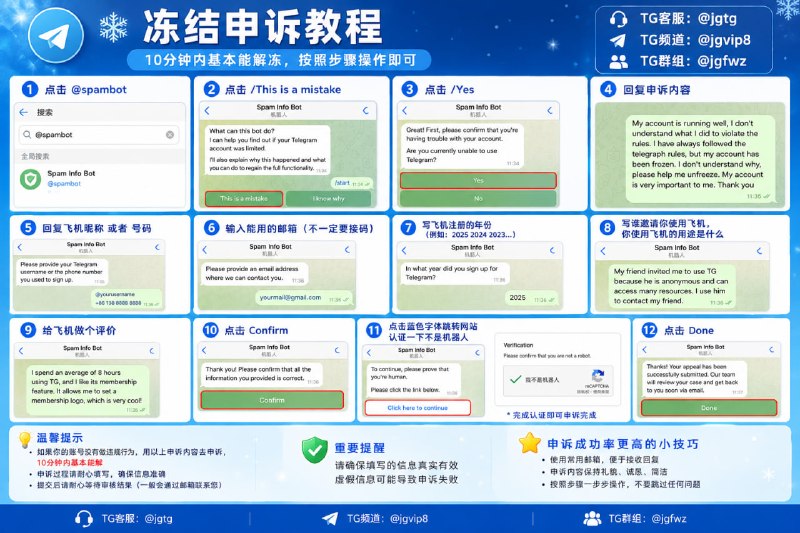
❄️ Telegram 冻结申诉教程
第一步:搜索并进入 @spambot
第二步:点击 This is a mistake
第三步:点击 /Yes
第四步:复制以下内容进行申诉:
Hello Telegram Support Team,
I believe my account was frozen by mistake. I have been using Telegram for normal personal communication and staying in touch with my friends and contacts.
I did not intentionally violate Telegram's Terms of Service or engage in spam, scams, or other harmful activities.
If any of my actions unintentionally triggered Telegram's security system, I sincerely apologize. I am willing to follow all Telegram rules and avoid any behavior that could cause misunderstandings in the future.
This account is very important to me, as it contains valuable contacts, conversations, and personal information.
I kindly request that your team manually review my account and reconsider the restriction.
Thank you for your time and understanding.
第五步:填写 账号昵称或手机号码
第六步:填写 abcs@gmail.com(邮箱可以随便填)
第七步:填写账号注册年份
例如:2025、2024、2023
只需要填写年份即可。
第八步:填写你是如何了解到 Telegram,以及主要用途。
回复以下内容:
I first learned about Telegram in 2022 through a friend who recommended it to me. I decided to join because Telegram is a convenient and secure messaging platform. I mainly use it to communicate with friends, stay in touch with contacts, and follow channels that interest me.
⚠️ 注意:将 2022 修改为你的 Telegram 账号实际注册年份。
第九步:填写你对 Telegram 的使用评价。
回复以下内容:
I use Telegram daily to communicate with friends and contacts, read messages, and follow channels for news and updates. I especially enjoy Telegram's fast messaging, group chats, privacy features, and the ability to share photos and files.
I mainly use Telegram for regular communication and staying connected with people. I value this platform very much and always try to follow its rules. I sincerely hope my account can be reviewed and restored.
第十步:点击 Confirm
第十一步:点击蓝色字体,跳转网页完成“我不是机器人”验证。
第十二步:验证完成后,点击 Done。
✅ 申诉完成,等待 Telegram 官方审核即可。
注意:
如果账号确实没有进行违规操作,可以如实填写申诉信息。审核时间因账号情况而异,并不能保证一定在10分钟内解封。
Post #56
2.87K
- ❤ 5
- 🥰 1