
New Pixel Camera update allows you to manually activate Astrophotography mode.
Since its introduction, the Astrophotography mode was automatic, and the prerequisite for its activation was that the device was stationary. To do this, you had to put the phone on a tripod or a stable surface. Otherwise, the mode was simply unavailable.
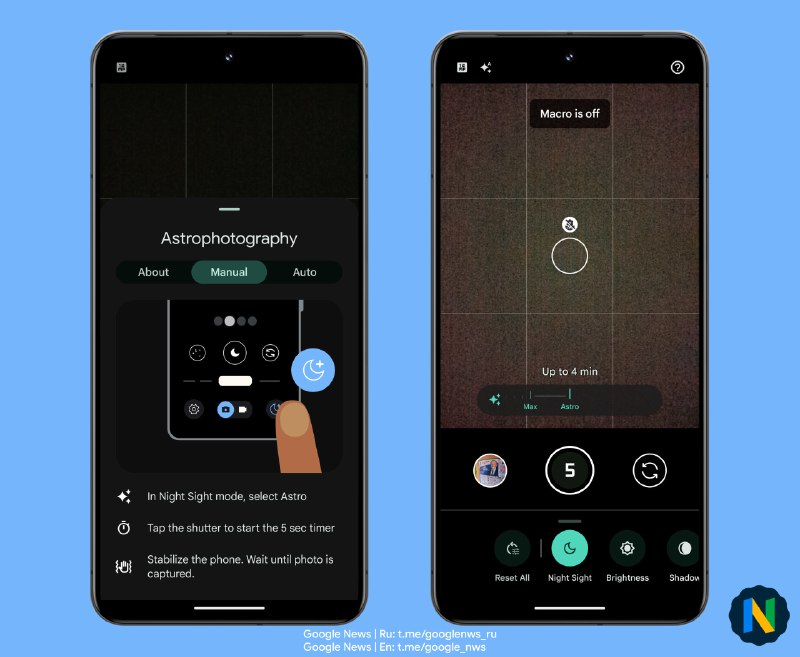
With the update of the 'Pixel Camera' app to version 9.5.118, users will finally have the option to activate Astro mode manually. To do this, there are two steps to take:
1) in the Night Sight mode quick settings, enable Astrophotography.
2) in the Night Sight duration slider select the new “Astro” option (rightmost position) .
This will automatically enable 5 seconds timer (which can be turned off) so that after the shutter is pressed, you have time to place the device on a stable surface and point it at the stars.
😎 Google News | En
Post #4208
23.4K
- ❤ 232
- 👍 88
- 🔥 12
- ⚡ 9
- 🌭 9
- 🍌 4
- ❤🔥 3
- 🎄 2