TGViewer
Channel Public Channel
Data science/ML/AI

Data science/ML/AI

@datascience_bds

Data science and machine learning hub

Python, SQL, stats, ML, deep learning, projects, PDFs, roadmaps and AI resources.

For beginners, data scientists and ML engineers
πŸ‘‰ https://rebrand.ly/bigdatachannels

DMCA: @disclosure_bds
Contact: @mldatascientist
Subscribers
14K
Photos
610
Videos
7
Links
341

Showing posts older than #1079 Β· Back to latest

Older Posts 20 shown
Post #1078 2.12K
10 Must-Know Data Analysis Concepts
  • πŸ‘ 3
  • ❀ 2
Post #1077 2.29K
Mastering SQL
  • ❀ 7
Post #1076 2.34K
Feature Leakage: When Your Model Quietly Cheats 🫠

Feature leakage is one of the most dangerous failures in machine learning because your model looks excellent on paper. Accuracy jumps, losses drop, cross-validation smiles at you… and yet the model is learning information it should never have access to.

Leakage hides in subtle places; columns updated after an event happens, IDs that encode outcome patterns, or features computed using future timestamps. Nothing looks suspicious, but the model is essentially borrowing tomorrow’s truth to predict today.

The only real defense is time awareness. Before allowing any feature into training, ask:

Would this value truly exist at the moment of prediction?


If the answer is no, the model isn’t learning. It’s cheating.
  • ❀ 3
Post #1075 2.2K
βœ… AI Ethics Basics You Should Know πŸ§ βš–οΈ

AI Ethics focuses on ensuring that artificial intelligence systems are developed and used in a responsible, fair, and transparent manner.

πŸ”Ή 1. What is AI Ethics? 
AI Ethics is the study of moral principles and practices that guide the development, deployment, and use of AI technologies.

πŸ”Ή 2. Why AI Ethics is Important: 
β€’ AI systems impact millions of people 
β€’ Prevents bias and discrimination 
β€’ Ensures trust and accountability 
β€’ Protects user privacy and rights 

πŸ”Ή 3. Key Principles of AI Ethics: 
β€’ Fairness: Avoid bias and discrimination 
β€’ Transparency: AI decisions should be explainable 
β€’ Accountability: Humans must be responsible for AI outcomes 
β€’ Privacy: Protect user data and personal information 
β€’ Safety: AI should not cause harm 

πŸ”Ή 4. Common Ethical Issues in AI: 
β€’ Biased algorithms 
β€’ Data privacy violations 
β€’ Surveillance misuse 
β€’ Job displacement due to automation 
β€’ Misinformation and deepfakes 

πŸ”Ή 5. Real World Use Cases: 
β€’ Fair hiring systems 
β€’ Ethical facial recognition 
β€’ Responsible healthcare AI 
β€’ Bias detection in financial systems 

πŸ”Ή 6. Examples of AI Bias: 
β€’ Gender bias in resume screening 
β€’ Racial bias in face recognition 
β€’ Language bias in NLP models 

πŸ”Ή 7. How to Build Ethical AI: 
β€’ Use diverse and representative datasets 
β€’ Regularly audit models for bias 
β€’ Maintain human oversight 
β€’ Clearly document AI decisions 

πŸ”Ή 8. AI Ethics vs AI Governance: 
β€’ AI Ethics focuses on moral values 
β€’ AI Governance focuses on rules and regulations 
β€’ Both work together for responsible AI 

πŸ”Ή 9. Who is Responsible for AI Ethics? 
β€’ Developers 
β€’ Companies 
β€’ Governments 
β€’ Researchers 
β€’ End users 

πŸ”Ή 10. Future of AI Ethics: 
β€’ Stronger regulations 
β€’ Ethical AI certifications 
β€’ More transparent AI systems 
β€’ Human centered AI development 

πŸ’‘ Learning AI Ethics is essential for building trustworthy and responsible AI systems.

πŸ’¬ Tap ❀️ for more!
  • ❀ 5
Post #1074 1.64K
Pandas vs SQL: Most Common Operations Comparison
  • ❀ 5
  • πŸ‘ 1
Post #1073 1.89K
βœ… Robotic Process Automation (RPA) Basics You Should Know πŸ€–βš™οΈ

Robotic Process Automation (RPA) is a technology that uses software robots to automate repetitive, rule based digital tasks normally performed by humans.

πŸ”Ή 1. What is RPA? 
RPA is a form of automation where software bots mimic human actions to perform structured and repetitive tasks across applications.

πŸ”Ή 2. How RPA Works: 
β†’ Bot logs into applications 
β†’ Reads and processes data 
β†’ Applies predefined rules 
β†’ Performs actions like clicking, typing, copying 
β†’ Completes tasks without human intervention 

πŸ”Ή 3. Common Use Cases: 
β€’ Invoice processing 
β€’ Data entry and migration 
β€’ Payroll and HR operations 
β€’ Customer support automation 
β€’ Report generation 

πŸ”Ή 4. Key Benefits of RPA: 
β€’ Reduces manual work 
β€’ Improves accuracy 
β€’ Increases productivity 
β€’ Works 24x7 
β€’ Faster business processes 

πŸ”Ή 5. Popular RPA Tools: 
β€’ UiPath 
β€’ Automation Anywhere 
β€’ Blue Prism 
β€’ Microsoft Power Automate 

πŸ”Ή 6. RPA vs Traditional Automation: 
β€’ RPA works at UI level 
β€’ No need to change existing systems 
β€’ Faster deployment 
β€’ Lower development cost 

πŸ”Ή 7. Industries Using RPA: 
β€’ Banking and finance 
β€’ Healthcare 
β€’ Insurance 
β€’ E commerce 
β€’ Telecom 

πŸ”Ή 8. Limitations of RPA: 
β€’ Not suitable for unstructured data 
β€’ Depends on application stability 
β€’ Limited decision making ability 
β€’ Breaks if UI changes 

πŸ”Ή 9. RPA + AI (Intelligent Automation): 
β€’ AI handles decision making 
β€’ RPA handles execution 
β€’ Enables automation of complex processes 

πŸ”Ή 10. Future of RPA: 
β€’ More intelligent bots 
β€’ Integration with AI and ML 
β€’ End to end process automation 
β€’ Higher enterprise adoption 

πŸ’‘ Learning RPA helps you understand how automation is transforming modern businesses.

πŸ’¬ Tap ❀️ for more!
  • ❀ 6
Post #1072 1.72K
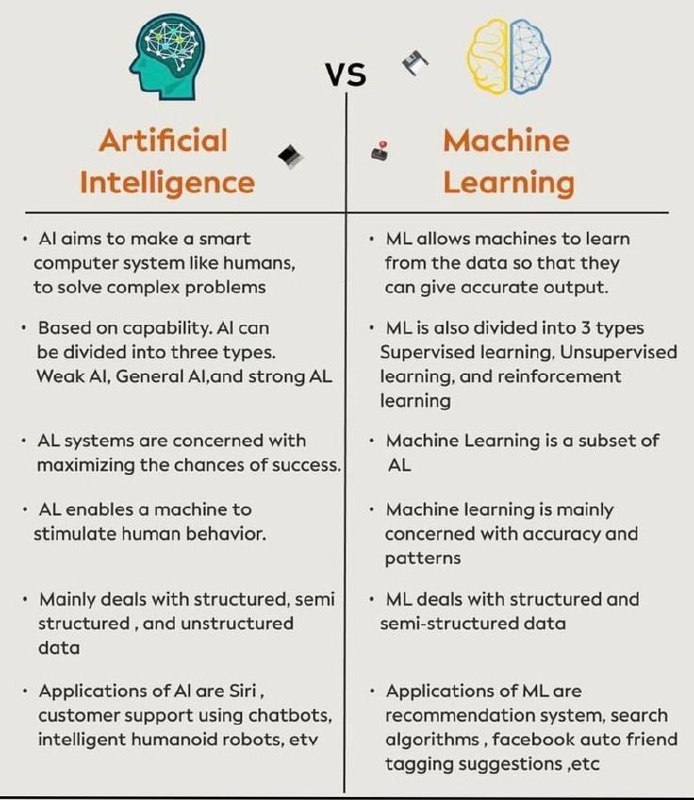
Artificial Intelligence vs Machine Learning
  • ❀ 5
Post #1070 1.96K
Vector Databases: Searching by Meaning, Not Keywords

Traditional databases retrieve exact matches.
Vector databases retrieve conceptual similarity.

They store high-dimensional embeddings(mathematical representations of meaning) and search by finding the closest vectors in that space. This is how modern systems power semantic search, personalized recommendations, and AI memory retrieval.

Instead of asking β€œDoes this word appear?”, you ask:
πŸ‘‰ β€œIs this idea close to what I’m looking for?”

It’s a shift from storing text to storing understanding.
And it’s becoming the backbone of LLM-powered applications.
  • ❀ 7
Post #1068 1.97K
SQL Joins Explained Visually
  • ❀ 4
Post #1067 1.69K
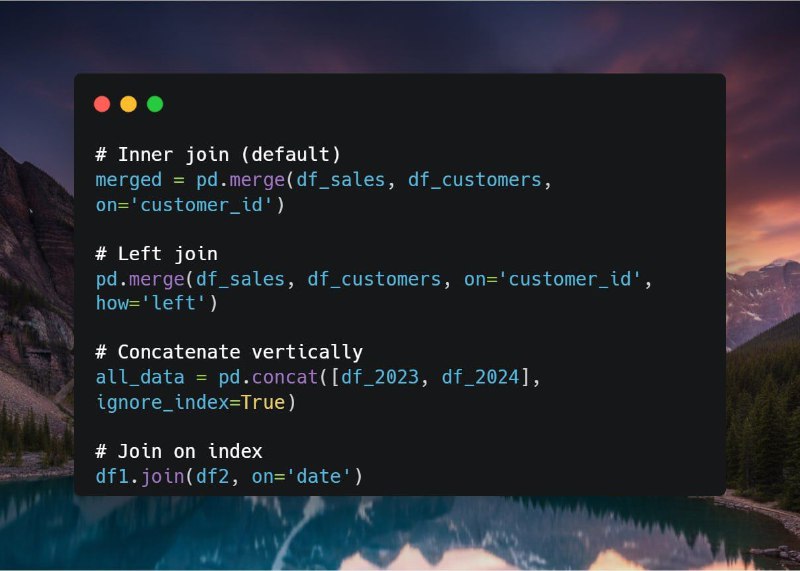
Merging and Joining Data

Working with multiple datasets? Combine them just like SQL:

# Inner join (default)
merged = pd.merge(df_sales, df_customers, on='customer_id')

# Left join
pd.merge(df_sales, df_customers, on='customer_id', how='left')

# Concatenate vertically
all_data = pd.concat([df_2023, df_2024], ignore_index=True)

# Join on index
df1.join(df2, on='date')


This wraps up our Data Manipulation Using Pandas Series.

Hit ❀️ if you liked this series. It will help us tailor more content based on what you like.

πŸ‘‰Join @datascience_bds for more
Part of the @bigdataspecialist family
  • ❀ 7
Post #1066 1.62K
OnSpace Mobile App builder: Build AI Apps in minutes

With OnSpace, you can build website or AI Mobile Apps by chatting with AI, and publish to PlayStore or AppStore.

πŸ”₯ What will you get:
β€’ πŸ€– Create app or website by chatting with AI;
β€’ 🧠 Integrate with Any top AI power just by giving order (like Sora2, Nanobanan Pro & Gemini 3 Pro);
β€’ πŸ“¦ Download APK,AAB file, publish to AppStore.
β€’ πŸ’³ Add payments and monetize like in-app-purchase and Stripe.
β€’ πŸ” Functional login & signup.
β€’ πŸ—„ Database + dashboard in minutes.
β€’ πŸŽ₯ Full tutorial on YouTube and within 1 day customer service

🌐 Visit website:
πŸ‘‰ https://www.onspace.ai/?via=tg_bigdata

πŸ“² Or Download app:
πŸ‘‰ https://onspace.onelink.me/za8S/h1jb6sb9?c=bigdata
  • ❀ 4
Post #1065 1.45K
Sorting and Ranking

Order matters! Sort your data to find top performers or trends:

# Sort by one column
df.sort_values('sales', ascending=False)

# Sort by multiple columns
df.sort_values(['region', 'sales'], ascending=[True, False])

# Reset index after sorting
df = df.sort_values('sales', ascending=False).reset_index(drop=True)

# Add rank
df['sales_rank'] = df['sales'].rank(ascending=False)


Next up πŸ‘‰ Merging and Joining Data
  • ❀ 3
Post #1063 1.59K
Using GroupBy

GroupBy is where Pandas shines brightest. It summarizes data by categories in one line.

# Total sales by region
df.groupby('region')['sales'].sum()

# Multiple aggregations
df.groupby('region').agg({
    'sales': 'sum',
    'customer_id': 'nunique',
    'order_date': 'max'
})

# Group by multiple columns
df.groupby(['region', 'product'])['sales'].mean()


Next up πŸ‘‰ Sorting and Ranking
  • ❀ 3
Post #1062 1.46K
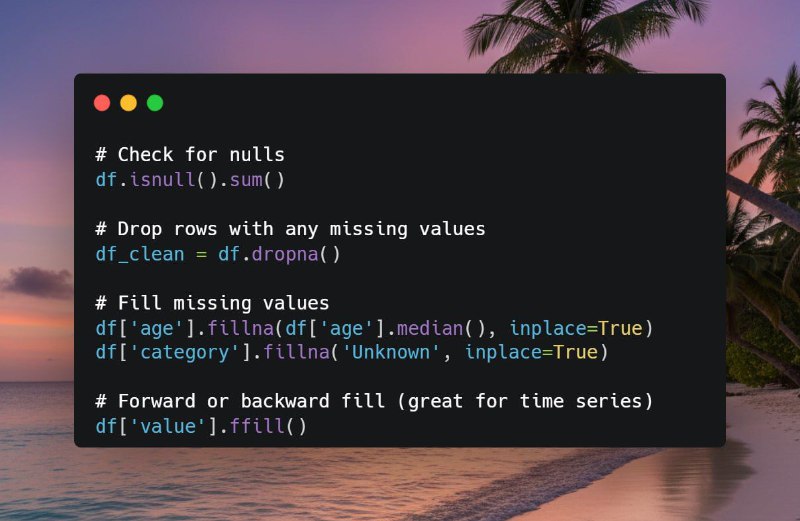
Dealing with Missing Values

Real-world data is messy, missing values are common.

Here's how to handle them cleanly:

# Check for nulls
df.isnull().sum()

# Drop rows with any missing values
df_clean = df.dropna()

# Fill missing values
df['age'].fillna(df['age'].median(), inplace=True)
df['category'].fillna('Unknown', inplace=True)

# Forward or backward fill (great for time series)
df['value'].ffill()


Next up πŸ‘‰ Using GroupBy
  • ❀ 8
Post #1061 1.51K
Adding and Removing Columns

DataFrames are flexible! Easily create new columns or remove unnecessary ones:

# Add new column
df['revenue'] = df['sales'] * df['price']

# From existing columns
df['full_name'] = df['first_name'] + ' ' + df['last_name']

# Drop columns
df.drop(columns=['temp_col'], inplace=True)

# Or create a new DF without modifying original
clean_df = df.drop(columns=['old_col1', 'old_col2'])


Next up πŸ‘‰ Dealing with Missing Values
  • ❀ 7
Post #1060 1.52K
Filtering and Querying

Want to zoom in on specific data?

Filtering in Pandas is incredibly powerful. Check the code below:

# Multiple conditions
high_sales = df[(df['sales'] > 1000) & (df['region'] == 'West')]

# Using .query() – cleaner syntax!
high_performers = df.query("sales > 1000 and region == 'West'")

# Find missing values
df[df['email'].isna()]

# Contains substring
df[df['product'].str.contains('Pro', case=False)]


Next up πŸ‘‰ Adding and Removing Columns
  • ❀ 5
Post #1059 1.47K
Selecting Columns & Rows

Need specific columns or rows? Pandas makes selection intuitive and fast:

# Single column (Series)
df['name']

# Multiple columns (DataFrame)
df[['name', 'age', 'sales']]

# Row selection with .loc (label-based)
df.loc[0:5]                    # Rows 0 to 5
df.loc[df['sales'] > 1000]     # Conditional

# .iloc (position-based)
df.iloc[0:5, 1:4]              # Rows 0-4, columns 1-3


Next up πŸ‘‰ Filtering and Querying
  • ❀ 7
Older posts β†’
Threads Profile ViewerView any public Threads profile without an account.Open ThreadLook β†’Writing with AI? Make it sound human.Metric37 rewrites AI drafts so they read naturally. Free AI detector, 1,500 words free.Try Metric37 β†’