TGViewer
Channel Public Channel
BodyWalkVR

BodyWalkVR

@bodywalkvr

Subscribers
11
Photos
0
Videos
5
Links
20
Recent Posts 20 shown
Post #44 5
Guided tour

FlatVR 1.71 is on the develop branch - built from your reviews

We read your reviews and the discussions on the Steam page, and this build is what came out of them. It is a big one, it is develop only, and we need your help testing it.

Getting started
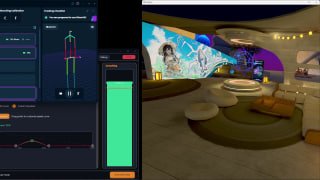
- Guided tour on a new install: the control lights up, an arrow and a short caption say what it does. Five tours - Basics, AI 3D Depth, ReShade, Screen, Video Player. TAKE THE TOUR on the Status tab brings them back.
- Menu in sections: Launch, then 3D, Screen and Extras. The Blur page is now Background & Glow.
- ReShade in one button: Install into Game... puts our addon next to the game, downloads ReShade from reshade.me and opens its installer on that game.
- "Active" box on the AI, ReShade and UEVR pages switches that depth source on right there.
- The whole interface in 16 languages, the player and UEVR pages included. Japanese, Chinese, Korean and Hindi switch with no restart.

Video player
- 360° and 180° video, mono and stereo, from your files.
- YouTube: Add Link..., or open a video in your browser and press Play from the browser. Quality and sound track as on YouTube.
- 360° AI 3D / 180° AI 3D: real depth for flat 360 video. Depth only where I look puts all the detail in front of you - the newest part, tell us how it looks.
- One button installs yt-dlp and FFmpeg (~100 MB), Check for Update keeps yt-dlp working with YouTube.

In the headset
- Keyboard in the headset, Virtual Desktop style, with your Windows languages (CJK through the IME).
- Right Click binding for the controller.
- Mouse and laser no longer fight: the cursor follows whichever moved last.
- Recenter / Toggle Overlay work on Insert, Delete and every other key.

Picture
- Brightness, Contrast, Gamma sliders for the headset and the SBS window.
- Correct Shadows (exact sRGB curve, on by default): dark scenes keep their darkest levels. If it looks worse to you, untick it and tell us.
- Custom Size for the SBS window.
- Black Netflix/Prime video: FlatVR now tells you why and what to do.

Please test - especially: the tour on a fresh install, Install into Game... on your games, YouTube and 360° in the player (360° AI 3D), the headset keyboard in your language, Correct Shadows. Crash report, a message here, or "it just works" - all of it helps.

How to switch: Steam library → right-click FlatVR → Properties → Betas → develop. Back: last_stable. Settings are kept.

🔗 Read more on site
Bodywalkvr BodyWalkVR | Your Body Knows the Way BodyWalkVR transforms your body into a VR controller. Walk, run, and jump physically in your favorite PCVR games using just a smartphone or SlimeVR tracker. Eliminates motion sickness.
Post #43 14
Phone compass and Turning

BodyWalkVR - v1.56 → v1.66

Walking and body tracking gain a phone compass that keeps your heading straight, plus several fixes. The built-in FlatVR tab also got a big update this cycle - see the FlatVR notes for the full list.

Phone compass, so your heading stops drifting

• A compass on the phone dial. When your phone is the tracker, the FlatVR/phone panel now shows a real compass: a fixed needle over a rotating N/E/S/W ring, with the azimuth and quadrant in the middle, exactly like the compass app on the phone. It reads the phone's own magnetic heading, filtered by the OS.

• Heading correction follows that compass. Turned on, it holds your in-game facing to magnetic north instead of letting it creep as you play. It corrects the way you actually point the phone, so it stays right whether the phone is lying flat or standing up.

• One switch, off by default. It only helps where the phone's magnetometer is trustworthy, so you choose when to use it; the magnetometer is turned on in the phone app.

Fixes

• Turning is fixed. Turning driven by your body could go the wrong way and wind past a half-turn (a "Turn +544" in the dial), and with Turn set to None the hips lagged backwards behind your head instead of following it. Turning now tracks you correctly. Quick Setup also stopped overwriting the axis you picked for a phone, nRF or SlimeVR source - it presets only the headset rows now.

• The DIY Magnetic Treadmill no longer fights the headset. Choosing Magnetic Treadmill on the Steps tab used to leave a headset walking source selected at the same time, so the two drove movement in parallel. Picking the treadmill is now exclusive, the way the other locomotion sources are.

• Meta Quest Pro: finger-touch on the controller works in OpenXR. On Quest Pro (and other Touch controllers), the capacitive touch sensors - your finger resting on the thumbrest, or on the A/B/X/Y buttons - were dead in OpenXR games: the layer declared the fields but never filled them, so a binding set to one of them did nothing. They reach the Mapping tab now. This needs the updated OpenXR plugin (2.0) - install it again from the Plugins tab.

• The app version is shown in the window title, so "which build do I have" reads at a glance, and the installer now removes older stray installs instead of leaving two side by side.

• Silent crashes can be caught. For the crashes that "just close" the app before a report can be written, the Debug tab now asks Windows to save a dump (and switches on Page Heap to catch memory corruption), then reports it with one Send.

The FlatVR tab

The flat-to-3D tab inside BodyWalkVR received its own large update this cycle:

• Cinema Mode plays films smoothly - no more freeze-then-jump.

• Sharper, faster depth - the AI presets were measured and two broken ones replaced, a new Balanced preset was added, and the model can now run in pieces for a steadier frame rate.

• Direct3D 12 games fixed - real depth from games like Cyberpunk 2077 no longer arrives blocky or resets the driver.

• Smoother output - dark gradients no longer band on SBS/XREAL, and glasses that switch their own 3D mode keep the picture on the right half of the screen.

• A round of crash fixes from your reports.

Full detail is in the FlatVR update notes.

Rolling back: Steam library → right-click BodyWalkVR → Properties → Betas → last_stable. Your settings are kept either way.

🔗 Read more on site
Bodywalkvr BodyWalkVR | Your Body Knows the Way BodyWalkVR transforms your body into a VR controller. Walk, run, and jump physically in your favorite PCVR games using just a smartphone or SlimeVR tracker. Eliminates motion sickness.
  • 🔥 1
Post #42 29
FlatVR AI Depth Models

BodyWalkVR v1.32 — Release Notes

We are pleased to announce BodyWalkVR v1.32, featuring FlatVR depth model updates, SteamVR controller mapping fixes, DirectML execution optimizations, and SuperDepth3D performance enhancements:

🧠 FlatVR AI Depth Models

• New Medium-Fast Depth Model: Added a new fast AI depth model to FlatVR, positioned between the Fast and Medium presets to deliver optimal depth detail with high performance.

• Heavy Model Moved to Custom Mode: The Heavy depth model has been removed from standard presets. It remains available as a standalone custom model that can be loaded via Custom mode if needed.

🎮 BodyWalkVR Input Mapping

• SteamVR Controller Stick Output Fix: Fixed output binding to the SteamVR controller thumbstick under the Mapping tab, ensuring accurate locomotion input pass-through.

🚀 DirectML & Depth Inference Optimization

• ORT DirectML Session Flags: Configured ONNX Runtime session options specifically for DirectML Execution Provider by disabling memory-pattern optimization and parallel execution as required by DML EP.

• Thread-Safe Timings: Implemented thread-safe atomic access for background inference timing counters.

⚡ SuperDepth3D Shader Performance

• Reduced Depth Sampling: Eliminated unnecessary per-pixel depth fetches for unused weapon convergence and parallax de-artifacting calculations.

• Dynamic Binary Search Iterations: Scaled binary search iteration depth dynamically based on march step counts.

• Coarse Screen-Global Sampling: Moved screen-wide average computations to state passes instead of per-pixel evaluation.

🛠️ UI Diagnostics & Debug Controls

• FlatVR Depth Diagnostics: Integrated granular per-stage depth timing breakdown into the UI stats panel under Debug Mode.

🔗 Read more on site
Bodywalkvr BodyWalkVR | Your Body Knows the Way BodyWalkVR transforms your body into a VR controller. Walk, run, and jump physically in your favorite PCVR games using just a smartphone or SlimeVR tracker. Eliminates motion sickness.
Post #41 21
Multi-language localization

BodyWalkVR v1.30 — Release Notes

We are excited to present BodyWalkVR v1.30, featuring comprehensive UI hover tooltips, multi-language localization updates, major OpenXR & OpenComposite stability fixes, START/STOP button indicator improvements, and FlatVR performance enhancements:

💡 Interactive UI Hover Tooltips

• Hover Hints System: Added interactive tooltips across all UI controls, tabs, and settings to provide inline guidance and explain parameter functions.

• Viewport Window Bounding: Bounded tooltips within the host application viewport to prevent creating separate OS windows/swapchains, eliminating VM and Windows Sandbox freeze issues when hovering over controls.

🌐 Global Localization Coverage

• 15 Languages Supported: Added full localization for German, French, Polish, Italian, Spanish (Castilian & Latin American), Portuguese (Brazilian), Turkish, Japanese, Korean, Simplified Chinese, Traditional Chinese, Hindi, Ukrainian, Russian, and English.

• Dynamic Script Font Selection: Optimized ImGui font atlas generation by dynamically loading font faces based on active language (Yu Gothic/Meiryo for Japanese, Nirmala UI for Hindi Devanagari, YaHei for Chinese, Malgun Gothic for Korean), drastically reducing memory overhead while avoiding empty box glyphs ("tofu").

• Localized Guidance & Quick Setup: Fully translated inline explanations, FlatVR sub-tabs, and Quick Setup locomotion preset cards across all supported languages.

🛠️ OpenXR & OpenComposite Grip Freeze Fixes

• Resolved Grip Freeze in Games: Fixed a critical thread deadlock and recursive mutex lock issue (std::system_error) in OpenXR and OpenComposite that caused controller grips to freeze or stop working in certain VR titles.

• Isolated Telemetry Channels: Separated OpenComposite telemetry (Local\BodyWalk_OpenComposite_State) from native OpenXR layer state (Local\VJoyOpenXR_State) to eliminate data mixing and state corruption.

• Gated Publishing & Mode Filtering: Gated plugin telemetry publishing to only activate when the plugin is explicitly selected, and enforced strict output mode filtering to prevent broadcasting locomotion signals across inactive output layers.

🎮 START / STOP Indicator & Hold Binding Fixes

• Hold Binding Fix: Resolved an issue where hold bindings could silently hijack the START button or remain stuck in a held state.

• Visual Status Indicator: Added a distinct visual press/release indicator on the START/STOP button for real-time feedback during movement activation.

🚀 FlatVR Performance & Stability Improvements

• Mouse Controller Input: Added the ability to control VR motion controller aiming and interaction directly using mouse input.

• ReShade SDK Integration: Implemented native FlatVR ReShade SDK integration for optimized 2D-to-VR game injection.

• Performance & Stability Enhancements: Expanded GUI modules, optimized rendering performance, and fixed process utility linkage issues to improve module restart stability.

🔗 Read more on site
Bodywalkvr BodyWalkVR | Your Body Knows the Way BodyWalkVR transforms your body into a VR controller. Walk, run, and jump physically in your favorite PCVR games using just a smartphone or SlimeVR tracker. Eliminates motion sickness.
Post #40 17
Manual Treadmill

BodyWalkVR v1.29 — Release Notes

We are happy to introduce BodyWalkVR v1.29 with major latency optimizations and input queue improvements:

⚡ Low Latency Input Processing

• Async UDP Input Listener: The SteamVR hook driver's UDP listener now runs in a dedicated thread with critical priority. Virtual joystick inputs and buttons are injected immediately on network package arrival rather than waiting for SteamVR's RunFrame rendering loop (removing up to 11ms of frame latency).

• High Priority Async Logic Queue: Internal logic for processing incoming trackers' data (NRF HID, owoTrack, OSC, SteamVR) is decoupled from receiver threads using an async queue structure. This prevents frame skips, lag spikes, and packet loss when the GUI thread or disk operations write changes.

🎛️ Customizable Locomotion Smoothing

• Locomotion Smoothing Slider: Added a slider to customize locomotion smoothing window from 0 ms (instant response, no smoothing) up to 500 ms inside the Direction tab.

• Instant Mode: Setting the slider to 0 ms bypasses the EMA filter entirely, providing instant tilt response which is highly recommended for VR NRF tracker setups.

🏃 Manual Treadmill Locomotion Mode

• Mouse Input Treadmill Support: Added a dedicated Manual Treadmill (Forward Only) locomotion mode that captures optical mouse movement for step tracking.

• Quick Setup Integration: Added a new preset card under Other Locomotion Types with custom treadmill guide graphics, a streamlined 3-step wizard flow, and live combined step signal visualizers.

🔗 Read more on site
Bodywalkvr BodyWalkVR | Your Body Knows the Way BodyWalkVR transforms your body into a VR controller. Walk, run, and jump physically in your favorite PCVR games using just a smartphone or SlimeVR tracker. Eliminates motion sickness.
Post #39 20
UI & Usability Improvements

BodyWalkVR v1.23 — Release Notes (v1.21 - v1.23 Cumulative)

🖥️ UI & Usability Improvements (v1.23)

• Quick Setup Presets: Added 2 tilt-based presets (Head/Body Tilt) and other modes to the Quick Setup tab.

• Direction Rename: Renamed the "Input" tab to "Direction" for clearer terminology.

• Separated Settings Popups: Technical configurations on the Main, Direction, and Steps tabs are now moved into dedicated "SETTINGS" popup windows to keep the main view clean and uncluttered.

• Main Tab Locomotion Badge: Added real-time display of the currently active locomotion template/preset badge.

• Inline Step Controls: When step locomotion is enabled, step settings sliders and a live step graph are displayed directly on the Main tab.

• Main Tab Layout Polish: Split visualizers vertically, adjusted heights dynamically, and auto-hide the Turn indicator when disabled.

⚙️ Joystick & Mapping Updates

• Input Joystick Mapping: Added input joystick support to the Mapping configuration for enhanced controller binding compatibility.

🕶️ FlatVR: ReShade Setup Wizard & Helpers (v1.21 - v1.22)

• Automated ReShade Installer: Select a game executable to automatically copy the FlatVR depth provider addon (FlatVR_DepthProvider.addon64) and launch the ReShade installer targeted directly to it.

• Addon Removal: Saves installed addon locations to installed_addons.json for one-click removal.

• Copyable Instructions: A help button ? opens multiline, copyable setup instructions from README_ReShade.txt.

🔗 Read more on site
Bodywalkvr BodyWalkVR | Your Body Knows the Way BodyWalkVR transforms your body into a VR controller. Walk, run, and jump physically in your favorite PCVR games using just a smartphone or SlimeVR tracker. Eliminates motion sickness.
Post #38 13
BodyWalkVR Test Room

BodyWalkVR v1.20 — Release Notes

🏃 1. BodyWalkVR Test Room

We are introducing the BodyWalkVR Test Room — a dedicated VR environment where you can test all BodyWalkVR locomotion methods in real conditions, just like in an actual game.

• Walk, tilt, step, and move around in a fully interactive VR space to verify your settings work correctly before jumping into a game.

• Supports all BodyWalkVR locomotion types: torso tilt, step-based, phone tracking, SlimeVR, and more.

• A great way to calibrate your setup and ensure everything feels right before playing.

• Available as a separate free download — install it alongside BodyWalkVR to start testing immediately.

⚙️ 2. Quick Setup Improvements

The Quick Setup wizard has been significantly expanded to make configuration faster and more intuitive:

Torso Tilt Calibration Step

• Added a dedicated calibration screen for all torso tilt locomotion profiles (Walk Types 1, 2, and 3).

• Deadzone / Max Tilt Cutoff range slider — set your dead zone and maximum lean angle with a single dual-handle control.

• Horizontal & Forward Sensitivity sliders — tune left/right and forward/backward sensitivity on the spot.

• Live Output Visualizer — see your tracker movement in real time as you lean.

• Reset Center Button — instantly recalibrate the torso center to your current stance.

START / STOP Controls in the Wizard

• The wizard now shows a START / STOP button and a program status message directly on the calibration and step settings screens.

• You can start or stop locomotion without leaving the setup to immediately feel the result.

OpenXR (In-Game) Source Available Everywhere

• "OpenXR (In-Game)" tracker source is now available in all Quick Setup tracker dropdowns — not just the HMD screen.

🔧 3. SteamVR Hook — Update to Version 1.9

[!IMPORTANT]
If you are using the SteamVR Hook output mode, please update your hook driver to version 1.9.

• The SteamVR Hook plugin is now also available to users on the free/Lite version — no PRO license required.

• Various stability and compatibility improvements.

To update: open the Plugins tab in BodyWalkVR → find SteamVR Hook → click Update.

🛠️ Additional Fixes

• Installer: Added the audio folder to the installer package so that start/stop sounds play correctly after installation.

🔗 Read more on site
Bodywalkvr BodyWalkVR | Your Body Knows the Way BodyWalkVR transforms your body into a VR controller. Walk, run, and jump physically in your favorite PCVR games using just a smartphone or SlimeVR tracker. Eliminates motion sickness.
Post #37 23
SteamVR Dashboard & FlatVR Optimized

BodyWalkVR & FlatVR v1.10 Release Notes

🕶️ SteamVR Dashboard & Controls

• SteamVR Dashboard Overlay: Added a dedicated SteamVR dashboard overlay to easily configure and manage BodyWalkVR directly from within the VR environment.

• Enhanced Pause Controls: Expanded locomotion pause functionality. In addition to the existing "Toggle" pause option, users can now pause locomotion via "Press" (hold to pause) and "Touch" (touch to pause) actions.

🛠️ OpenXR Input Bindings Fix

• Corrected Left/Right Mappings: Resolved a bug in the OpenXR API Layer plugin where side-string comparison was mismatching controller inputs (mapping them to the right controller regardless). Left and right thumbstick buttons and click overrides now map correctly to their respective sides.

• Normalized Controller Name Parsing: Implemented side name normalization so that both short ("L"/"R") and long ("Left"/"Right") controller sides are properly parsed by the OpenXR plugin.

🕶️ FlatVR In-Game Overlay Enhancements

• AI Model Quality Selection: Added an "AI Model Quality" selector ("Fast", "Normal", "Heavy") directly to the FlatVR in-game VR dashboard overlay settings. Changing the quality automatically scales the model resolution between 256px and 518px on-the-fly.

• Overlay Sliders Alignment: Aligned and adjusted FlatVR in-game overlay configuration sliders to match the parameters and layouts of the main desktop application.

🎛️ Optimized Default Presets

• SuperDepth3D Default Settings: Standardized default values for Separation (8.0%), ZPD (0.0080), Depth Map Adjust (15.2), and Offset X/Y (0.021, 1.0) to improve stereoscopic depth out-of-the-box.

• Ambilight Default Settings: Adjusted default values for Ambilight Extension Size (5.00), Edge Depth (0.020), Edge Blur (48 px), Resolution (1024 px), and Blur Passes (128) for an immersive ambient background by default.

🔗 Read more on site
Bodywalkvr BodyWalkVR | Your Body Knows the Way BodyWalkVR transforms your body into a VR controller. Walk, run, and jump physically in your favorite PCVR games using just a smartphone or SlimeVR tracker. Eliminates motion sickness.
Post #35 27
Quick Setup wizard

BodyWalkVR 0.988

• Feature: Added a Quick Setup wizard supporting different walk types (Head Tilt + Steps, Body Tilt, Body Tilt + Steps, and Body Tilt + Leg Steps) with integrated visual guide illustrations.

• Feature: Added support for Lite mode in Quick Setup, restricting walk type selection cards to only show "Body Tilt" when the "Hide PRO features" option is enabled.

• Feature: Integrated manual leg trackers assignment UI and real-time raw acceleration scrolling plots on Step 3 of the Quick Setup wizard.

• UI: Redesigned the Quick Setup layout to minimize bottom empty space and optimize spacing.

• Optim: Significantly optimized installer size (reduced from 274 MB to 110.8 MB) by packing only the assets required by the application.

🔗 Read more on site
Bodywalkvr BodyWalkVR | Your Body Knows the Way BodyWalkVR transforms your body into a VR controller. Walk, run, and jump physically in your favorite PCVR games using just a smartphone or SlimeVR tracker. Eliminates motion sickness.
Post #34 23
Big Update

🔥 BodyWalkVR - Major Update (v0.958 — v0.973)

🆓 Free LITE Version Now Available

• A completely free LITE version is now available for everyone! It includes all the essential core features you need to get started: leaning locomotion, input mapping, and the new FlatVR mode.

👓 FlatVR: Turn Anything into 3D VR!

Play any game and watch any movie in immersive 3D VR. The new FlatVR tab gives you two powerful ways to convert flat media into 3D:
• ReShade Native Depth: A high-quality, zero-latency 3D method that simply requires copying our addon into your game's folder.

• Neural Network Pseudo-3D (AI Depth): Uses a powerful AI model to convert literally anything into 3D! Watch YouTube videos, use your desktop, or play classic old games — all instantly transformed and available to you in VR.

🎮 Mapping Tab Overhaul

• Categories Added: The Mapping tab has been significantly improved and reorganized with clear, easy-to-use categories.

• Area of Effect (AoE) Attack: Added a brand new "Area of Effect" attack function to the gesture mappings, expanding your combat capabilities!

🔗 Read more on site
Bodywalkvr BodyWalkVR | Your Body Knows the Way BodyWalkVR transforms your body into a VR controller. Walk, run, and jump physically in your favorite PCVR games using just a smartphone or SlimeVR tracker. Eliminates motion sickness.
Post #32 36
AI Support Chat Update

BodyWalkVR v0.938

AI Support Chat Update

This release brings a major visual and functional overhaul to the in-app AI Support Chat!

• Modern Chat Bubbles: We have completely redesigned the chat interface. Messages are now displayed in dynamic rounded bubbles, making conversations much easier to read and visually distinct.

• Smart UI Resizing: The chat panel now dynamically expands when you resize the BodyWalkVR application window, taking up 35% of the total width for a comfortable reading experience on any screen.

• Copy Messages with Ease: You can now easily copy any response (or your own questions) to the clipboard. Simply right-click on any chat bubble and select "Copy text to clipboard".

• Refined Colors: Outgoing messages are painted in the BodyWalkVR theme Orange, and the bot replies in a sleek Dark Slate.

• Perfect Pixel Clarity: We fixed a global DPI scaling issue where the BodyWalkVR UI could appear blurry or smudged on high-resolution displays (e.g. 125% or 150% scaling in Windows). The interface, buttons, and text are now natively sharp and crystal clear on all displays.

• Mixed Typography: We restored the thick, stylized Fredoka font for the app's headers and buttons, while keeping the chat body text in crisp Segoe UI for the best readability.

🔗 Read more on site
Bodywalkvr BodyWalkVR | Your Body Knows the Way BodyWalkVR transforms your body into a VR controller. Walk, run, and jump physically in your favorite PCVR games using just a smartphone or SlimeVR tracker. Eliminates motion sickness.
Post #31 34
🔥 Step-in-Place Mechanics have arrived in BodyWalkVR!

Strap trackers to your legs (SlimeVR, SteamVR, or standard JoyCons) and just walk in your room. The app reads your stepping pace and converts it into in-game speed.
Post #22 50
A geometric equaliser has been added to provide a dynamic speed-versus-altitude relationship. Now, when you descend below the threshold value, your speed corresponds to the selected equaliser curve.
  • 👍 1
Post #21 42
Enhanced SlimeVR & Advanced Locomotion Precision

✨ Version 0.915: Enhanced SlimeVR & Advanced Locomotion Precision

This massive version delivers advanced locomotion tools, fixes tracking bottlenecks, and refines the UI based on continuous community feedback!

• Advanced Dual-Deadzone UI: Introduced a brand new hardware cutoff visualizer on the main page. This widget controls both the standard Deadzone and the completely new "Reverse Deadzone" (Maximum Tilt Cutoff) simultaneously on an interactive track with real-time positional indicator rendering.

• Unified Reverse Cutoff System: Upgraded the locomotion cutoff engine. Now, if either your pitch (forward/back) OR your roll (left/right) surpasses the allowed maximum physical boundary, ALL logical movement drops out smoothly to zero, solving the edge-stop tracking desyncs gracefully.

• Squat Detection "Equalizer" Curve: A major update to the crouch-to-walk slowdown system! We implemented a continuous cubic progression curve (geometric equalizer) to represent height-to-speed decay dynamically. As you lower your headset beneath the threshold, the movement speed now throttles down flawlessly alongside your real body, rather than triggering abruptly.

• SlimeVR Hardware Discovery Fixed: Corrected a critical issue where single physical trackers and native HMD/Controllers would fail to register in the Input selection menu. We implemented a manual data-packet traversal bypass to safely handle truncation bugs sent by the SlimeVR Java Server, ensuring 100% discovery rate regardless of your hardware loadout.

• Computed Tracker Spam Removed: Cleaned up the Locomotion Input selection list. Virtual "Computed" IK points (such as internal calculations for elbows and knees) are now completely hidden from the user interface, leaving only your actual physical trackable devices visible.

• UI Render Lag Banished: Fixed a major graphics stutter that would drop UI frames every 5 seconds while on the Main configuration tab. This was traced to blocking SteamVR Hook device polling logic interrupting the rendering loop. Hook polling is now lightning-fast and only executes incrementally or manually.

• Debug Console Scrubbed: Muted several highly verbose error and warning alerts related to FlatBuffers verifications and Empty Pings so your application log feed stays completely clean during standard gameplay.

🔗 Read more on site
Bodywalkvr BodyWalkVR | Step Into VR Reality BodyWalkVR transforms your body into a VR controller. Walk, run, and jump physically in your favorite PCVR games using just a smartphone or SlimeVR tracker. Eliminates motion sickness.
Post #17 39
Movement speed can now automatically decrease as you crouch, using a configurable power curve.
Post #14 27
Squat Slowdown Curve

🦆 Squat Slowdown Curve

Movement speed can now automatically decrease as you crouch, using a configurable power curve.

• Curve Visualization: A live graph in the settings shows exactly how speed scales with your crouch depth — from full speed while standing to near-zero at floor level.

• Adjustable Exponent: Tune the steepness of the deceleration curve. A higher exponent means a sharper, more aggressive slowdown as you descend.

• Extended Range: The exponent slider now supports a wider range for more extreme deceleration profiles.

• "None" Output Option: The squat output binding now includes a "None" option, letting you enable squat slowdown independently without triggering any button action.

🎮 VRChat OSC Movement Orientation Fix (Look Sync)

Fixes a VRChat bug where the character's movement direction "snaps" or drifts when releasing physical joysticks or using hand tracking.

• Local Vector Rotation: Instead of sending rotation commands to the game, BodyWalkVR now performs real-time Vector Rotation on your movement data. This ensures your in-game movement stays perfectly aligned with your physical body orientation, even if the game's internal "forward" direction changes.

• Configurable Source: Choose which tracker provides the orientation signal — SteamVR Tracker, SlimeVR (SolarXR), or Phone (owoTrack).

• Device Selection: Pick a specific device by name from a dropdown list for precise targeting.

• Independent Calibration: Look Sync uses its own separate yaw offset, decoupled from the locomotion calibration, so resetting one does not affect the other.

• Reset Yaw Button: A dedicated "Reset Yaw" button lets you re-zero the rotation baseline at any time without disturbing other locomotion settings.

• Live Axis Indicators: Real-time axis bars show the raw and relative rotation values for the selected device, making setup and debugging straightforward.

🔗 Read more on site
Bodywalkvr BodyWalkVR | Step Into VR Reality BodyWalkVR transforms your body into a VR controller. Walk, run, and jump physically in your favorite PCVR games using just a smartphone or SlimeVR tracker. Eliminates motion sickness.
Older posts →

About this channel

How can I read @bodywalkvr without a Telegram account?
TGViewer shows the public web preview Telegram publishes for BodyWalkVR: recent posts, photos, videos and the subscriber count, with no app, login or account.
How many subscribers does BodyWalkVR have?
BodyWalkVR (@bodywalkvr) has 11 subscribers on Telegram, refreshed roughly every 30 minutes.
Does BodyWalkVR know I viewed it here?
No. Public channel previews carry no viewer identity, and TGViewer has no accounts or tracking of what you look up.
Threads Profile ViewerView any public Threads profile without an account.Open ThreadLook →Writing with AI? Make it sound human.Metric37 rewrites AI drafts so they read naturally. Free AI detector, 1,500 words free.Try Metric37 →