
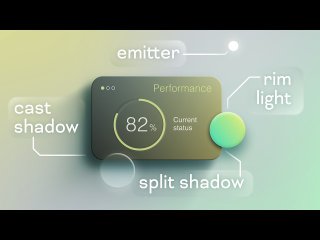
В этом уроке мы рассмотрим 5 различных методов создания динамических эффектов света и тени в After Effects, которые автоматически реагируют на положение источника света.
ROTATION - POINT LIGHT
var emitter = thisComp.layer("Emitter");
var myPos = thisLayer.toWorld(thisLayer.anchorPoint);
var emitterPos = emitter.toWorld(emitter.anchorPoint);
var delta = emitterPos - myPos;
radiansToDegrees(Math.atan2(delta[1], delta[0]))
ROTATION - DIRECTIONAL LIGHT
var emitter = thisComp.layer("Emitter");
var destination = thisComp.layer("Destination");
var delta = destination.position - emitter.position;
radiansToDegrees(Math.atan2(delta[1], delta[0]))
BEVEL & EMBOSS ANGLE - POINT LIGHT
var emitter = thisComp.layer("Emitter");
var myPos = thisLayer.toWorld(thisLayer.anchorPoint);
var emitterPos = emitter.toWorld(emitter.anchorPoint);
var delta = emitterPos - myPos;
radiansToDegrees(Math.atan2(-delta[1], delta[0]))
BEVEL & EMBOSS ANGLE - DIRECTIONAL LIGHT
var emitter = thisComp.layer("Emitter");
var destination = thisComp.layer("Destination");
var delta = emitter.position - destination.position;
radiansToDegrees(Math.atan2(-delta[1], delta[0]))
DROP SHADOW DIRECTION - POINT LIGHT
var emitter = thisComp.layer("Emitter");
var myPos = thisLayer.toWorld(thisLayer.anchorPoint);
var emitterPos = emitter.toWorld(emitter.anchorPoint);
var delta = myPos - emitterPos;
radiansToDegrees(Math.atan2(delta[1], delta[0])) + 90
DROP SHADOW DIRECTION - DIRECTIONAL LIGHT
var emitter = thisComp.layer("Emitter");
var destination = thisComp.layer("Destination");
var delta = destination.position - emitter.position;
radiansToDegrees(Math.atan2(delta[1], delta[0])) + 90
POSITION OFFSET - POINT LIGHT
var emitter = thisComp.layer("Emitter");
var shape = thisComp.layer("Shape A");
var distance = effect("Slider Control")("Slider");
var delta = shape.position - emitter.position;
var angle = Math.atan2(delta[1], delta[0]);
shape.position + [Math.cos(angle) * distance, Math.sin(angle) * distance]
POSITION OFFSET - DIRECTIONAL LIGHT
var emitter = thisComp.layer("Emitter");
var destination = thisComp.layer("Destination");
var shape = thisComp.layer("Shape A");
var distance = effect("Position Offset")("Slider");
var delta = destination.position - emitter.position;
var angle = Math.atan2(delta[1], delta[0]);
shape.position + [Math.cos(angle) * distance, Math.sin(angle) * distance]
RADIAL BLUR CENTER - DIRECTIONAL LIGHT
(Requires "Light Distance" slider to set emitter distance from layer, check out the tutorial file for this one)
var emitter = thisComp.layer("Emitter");
var destination = thisComp.layer("Destination");
var positionOffset = effect("Position Offset")("Slider");
var lightDistance = effect("Light Distance")("Slider");
var delta = destination.position - emitter.position;
var angle = Math.atan2(delta[1], delta[0]);
#tutorial | Project | By olly